Do you want to change a site URL?

The release of WebLearn version 2.8-ox5 has introduced a way to move a WebLearn site to a new URL and set up a redirection from the old site URL to the new location.

This is very useful in the following situations:

  1. A department changes its name
  2. A department moves to a new division
  3. A site was given a poor URL in error which needs correcting

The procedure for moving a single site is as follows:

  1. Go to the new location, use “Bring Site” to attach the site to be moved making sure to use the desired URL, (if you wish to move a parent site plus all its sub-sites then you must contact the WebLearn team who will do this for you). Make a note of the URL.
  2. Go to the old location and make a note of the site title and last component of URL of the site to be moved. For example, if you want to move the site …./physics/windscale/ to …./physics/sellafield/ then the last component is ‘windscale‘.
  3. Use “Arrange Site” then “Remove Site” to detach the offending site from the hierarchy. Make sure you don’t opt to delete the site as well. After successful completion, you will be placed in the parent site.
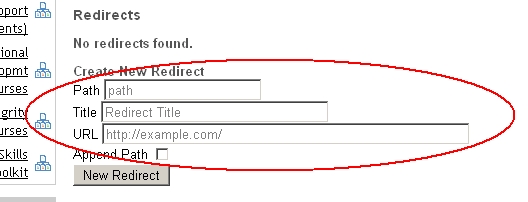
  4. Click on “Arrange Site”;  cast your eyes to the “Redirects” part of the page in order to set up the redirect.

    • Path – this is the last component of the URL of the now-removed site, in our example, this is ‘windscale‘.
    • Title – this is the title of the redirect that will appear in the sub-sites menu. In most cases this will be the name of the site that was just deleted.
    • URL – this is the new URL of the site, i.e., the place where the user will be taken when they click on the site title. You can use a full URL or a relative path, in our example, this will end with ‘sellafield
    • Select Append Path if the site that has moved had sub-sites, the sub-sites have  also been moved and you would like redirects to work for these sub-sites as well.

To test that the redirect has worked, try entering the old URL into your browser, WebLearn should redirect you to the new location of the site.

Try the same test with one or more URLs of sub-sites that have also moved.

Posted in Sakai, WebLearn | Tagged | 2 Comments

Student requests for recorded lectures to be made available in WebLearn

The WebLearn Student Experience (WLSE) project was run during Michaelmas term 2012. We collected and analysed student feedback to produce a number of generic recommendations for departments, colleges and the central WebLearn team. One of the recommendations emerged from the expressed student need for recorded lectures to be made available in WebLearn:

RECOMMENDATION 1.2: Lecturers are encouraged to make recorded lectures available in WebLearn.  This can be done using various tools and techniques such as WebEx, audio commentaries with Powerpoint slideshows, students making audio recordings of lectures (with permission), sourcing existing relevant podcasts etc. Contact the IT Services podcasting or WebLearn teams to find out more.

Here are some possible routes to follow and suggestions about how to achieve the end result:

Possible route

How to do it

Students record audio during lectures: this is probably the quickest and easiest way; students probably already do this, with or without permission Record and upload audio file into the Podcasts tool (WebLearn) – configure the tool permissions so that students are able to create and modfy their own audio files
Lecturers record audio commentaries: like point 1, audio commentary based on a slide show is of limited use without slides/slide timings Record and upload audio file into the Podcasts tool (WebLearn)
Source existing OER podcasts: there are many in the podcasts.ox.ac.uk collection, e.g. the series on the History of Medical Sciences (https://history.medsci.ox.ac.uk/seminars/), or other repositories like Jorum (http://www.jorum.ac.uk/).  Various open educational resources (OERs) are great for general interest/public engagement, but the students in the WLSE project were requesting recordings of their own lecturers’ teaching, focused on the local syllabus Use the Oxford Podcasts tool (WebLearn) –  it allows you to browse podcasts.ox.ac.uk and automatically import selected items with media player
Lecturers record audio with slideshow:In Med Sci there are a number of lecturers who simply record audio over their PowerPoint slideshows in their rooms just using a desktop microphone (i.e. not live) – this is built into PowerPoint and doesn’t need external audio programs like Audacity. It’s then relatively easy to convert to a video/Flash and upload it into WebLearn Record and upload media file into the Podcasts tool (WebLearn)
Medical Sciences records live audio and the VGA signal to the projector in a number of lecture situations; contact the Medical Sciences Learning Technologies Group This requires some special equipment (a £700 analogue to digital convertor) and host the videos on a streaming server (£700 for software); but they are accessed from a link in WebLearn
WebEx: In Medical Sciences, WebEx is increasingly used to:
– Run seminars/tutorials with students at a distance
– Broadcast, live, lecture courses so students not in Oxford can see them live. Some lecturers even allow ‘Chat’ questions during the lecture. If you’re doing this anyway, it’s just a question of pressing a button to record to server space provided by WebEx. The link can then be placed in WebLearn. This is Med Sci’s preferred long-term model for lecture recording
WebEx:http://www.oucs.ox.ac.uk/ webex/faq.xml
WebEx provides the space to store the files

Further suggestions:

  • Contact your local IT support officer: They may have a preferred option and be able to help you do it.
  • Technology tools: Visit Russell Stannard’s Teacher Training Videos website for more information and online tutorials about adding voice to your slideshows, and various voice recording, podcasting, screen capturing and webcam software tools.
Posted in Student Experience, WebLearn, WLSE | Leave a comment

Recommendations from WebLearn Student Experience Project

Adapted from the project report by Fawei Geng, Joanna Wild and Jill Fresen 

Following recommendations from the Student Digital Experience (DIGE) project, a small project was run in late 2012 to investigate how students currently use WebLearn in support of their learning, i.e. we focused on gathering information about student behaviour in finding, navigating and interacting with their current WebLearn areas.

Recommendations are listed in terms of those for the WebLearn staff user community, and those for the central WebLearn team to consider, depending on resources and priorities.

Recommendations for the WebLearn staff user community

REC 1.1 Where feasible and relevant, consider uploading lecture slides, notes and images into WebLearn regularly and consistently (preferably in advance of a lecture), for students to access at their convenience.

REC 1.2 Lecturers are encouraged to make recorded lectures available in WebLearn.  This can be done using various tools and techniques such as WebEx, audio commentaries on PowerPoint slideshows, students making audio recordings of lectures (with permission), sourcing existing relevant podcasts etc. Contact the IT Services podcasting or WebLearn teams to find out more.

REC 1.3a Consider using a discussion forum as a place to hold conversations with students or present FAQs about the subject matter, assignments and practicals.

REC 1.3b Inform students about the existence of the Forums tool and encourage them to use it in a self-directed way, even if there is no intention for it to be facilitated by the tutor or lecturer.  This can be done by creating a separate topic within a Forum, e.g. ‘Student café’, or ‘Student lounge’.

REC 1.4 Provide students with access to a shared folder in the resources area, with the required permission to ‘create new resources’ [see REC 6.3]. Alternatively, a student-driven discussion forum could be set up [see REC 1.3b], as it also provides an easy way of sharing learning resources in the form of attachments.

REC 1.5 Consider making consistent use of the WebLearn Schedule (Calendar) and tutorial Sign-up tools to support organisational aspects of student learning; advertise these tools to the students at the beginning of the term.

—oo0oo—

REC 2.1a Departmental induction sessions at the beginning of term should briefly inform students about the existence of the array of tools in WebLearn that might be of use to them and, subsequently direct students to a WebLearn follow-up session for more detailed information.

REC 2.1b Liaise with the central WebLearn team to offer support in developing a WebLearn follow-up session to be offered later in the term. Such a WebLearn follow-up session should be short (30-45 min) and tailored to the courses offered in the department or faculty.

REC 2.1c Use WebLearn follow-up sessions as an evaluation opportunity to collect any feedback, comments or issues raised by students with regards to course sites and tools, and to inform future design and redesign of course sites by staff members [see REC 6.4].

—oo0oo—

REC 3.1 Make use of the templates developed and provided by the central WebLearn team for various purposes, e.g. for tutorials, a lecture series, to provide content, or to focus on assessment.

REC 3.2 Subscribe students only to those ‘Active sites’ which are of direct relevance to them.

Recommendations for the WebLearn team

Welcome page

REC 4.1 Divide the Welcome page into two separate areas: one for staff and one for students.

REC 4.2a Make ‘Getting started’ the main part of the student Welcome page. The content should be tailor-made for students, e.g. finding my course material; communicating with others; sharing resources; FAQs for students, etc.

REC 4.2b Produce a series of 2-minute student help video demos, and feature a different one on a regular basis in a prominent place.

 REC 4.3a Make most important links and tools easily accessible (e.g. one click away) from the Welcome page.  These include: list of ‘Active sites’, past exam papers, ‘my resources folder’, profile and calendar.

REC 4.3b Improve navigation on the post-login WebLearn page, e.g. bookmarking favourite WebLearn pages, links or files, customising layout etc.

REC 4.4 Enable students to have more control over notifications from sites which are not directly relevant to them.

—oo0oo—

My Workspace

REC 5.1a Highlight useful tools that students can access from the ‘My Workspace’ area, e.g. uploading resources, setting up a profile, connecting with others, accessing aggregated announcements and schedules.
[Suggestion from WebLearn team: for new student accounts, prompt them to carry out ‘sensible’ set-up activities to get them started, with help on how to do it, e.g. Have you done these three things: 1. Upload your photo to your Profile; 2. Set your Preferences for receiving notifications; 3. Subscribe to your global My Workspace calendar.]

REC 5.1b Supply update prompts if an active student has not carried out the set-up activities, e.g. We notice you haven’t uploaded your photo into your profile. This would be really helpful so that your photo is displayed in forum posts and in the site members tool [this is how to do it…]

REC 5.2 Enable students to click on a name listed in the ‘Users present’ area to see a person’s profile or instigate a chat session with them.

—oo0oo—

Course sites

REC 6.1 Publicise existing templates for setting up course sites to departments and academic staff [see REC 3.1], in order to encourage consistency in site design and structure.

REC 6.2 Improve the usability of some WebLearn tools, in particular the Forums tool.

REC 6.3 Build more structure into all the templates, e.g. Forums tool, more folder structure in Resources [e.g. work done for the Blavatnik School of Government], student shared folder in Resources.

REC 6.4 Provide tools to enable easy feedback from students about their course sites, e.g. similar to the ‘Contact us’ link at the foot of every site.
Posted in e-learning, Sakai, Student Experience, WebLearn, WLSE | 1 Comment

WebLearn unavailable on 4 April 2013 7-9am

It is planned to upgrade WebLearn to version 2.8-ox5 on Thursday 4 April 2013 7-9am. There will be no service during this period.

Posted in Downtime, WebLearn | Tagged | Leave a comment

WebLearn unavailable on 12 March 2013 7-9am

It is planned to upgrade WebLearn to version 2.8-ox4.4 on Tuesday 12 March 2013 7-9am. There will be no service during this period.

This bugfix release will address problems with the SES tool.

Posted in Downtime, WebLearn | Tagged | Leave a comment

WebLearn User Group meeting 20 March 2pm

WebLearn User Group: Booking is required

Wednesday 20 March, 2:00 – 4:00 pm, followed by cream tea

Come and meet with fellow WebLearn users and members of the WebLearn team to give feedback and share ideas and practices. Ensure that your voice and ideas are heard and shared in order to inform the ongoing development and support of the system.

Agenda:

  • Jon Mason (Educational Technologist, Med Sci): LTI: Simple integration of external tools into WebLearn
  • Kyra Smith (Dept of Education): Use of WebLearn in the Dept of Education
  • WebLearn team: Findings from the WebLearn Student Experience project
  • Adam Marshall (WebLearn Service Manager): WebLearn system updates

Join the WebLearn User Group site: https://weblearn.ox.ac.uk/info/eas for regular updates and to access audio recordings of presentations at previous meetings.

Looking forward to seeing you on 20 March.

Jill Fresen

Posted in Sakai, WebLearn | Tagged | Leave a comment

WebLearn unavailable on Tuesday 5th March from 5am

We need to make some crucial changes to the WebLearn database on Tuesday 5 March 2013 starting at 5am, we think that the service will be back by 9am.

There will be no service during this period.

Many apologies for the short notice.

Posted in WebLearn | Tagged | Leave a comment

SES / OXCAP: When is a course ‘upcoming’?

As part of the OXCAP project we have had to devise an algorithm to decide when a course should be shown as ‘upcoming’ and when it should be marked as ‘previous’ in WebLearn’s SES tool. I thought it may be useful to outline that algorithm here in case training providers need to reference it.

The process is complex because specifying the start and end date of a course in not mandatory, nor is it mandatory to say when booking opens and closes.

In the following ‘dtf  attribute’ is  the date and time of a course specified in ISO 8601 format. The <start> and <end> XCRI-CAP elements represent the course start and end date respectively. (For training providers supplying data in XLSX (Excel) format these correspond to columns 10 (J) and 29 (AC) of the spread sheet.)

The <applyUntil> and <applyFrom> XCRI-CAP elements correspond to the booking closes and opens  date. None of these XCRI-CAP elements are mandatory.

  1.      if <end> dtf attribute is in future, course as ‘upcoming’, if it is in the past mark course as ‘Previous’
  2.     if <end> dtf is missing look at dtf attribute of <start>
  3.     if <start> dtf attribute is in future, course as ‘upcoming’
  4.     if <start> dtf is missing look at dtf attribute of <applyUntil>
  5.     if <applyUntil> dtf attribute is in future, course as ‘upcoming’, if it is in the past mark course as ‘Previous’
  6.     if <applyUntil> dtf is missing look at dtf attribute of <applyFrom>
  7.     if <applyFrom> dtf attribute is in future, course as ‘upcoming’
  8.     otherwise for the course to be legal it must have text between the <start> tags so must be ‘upcoming’

The upshot of this is that it is important to supply course end dates otherwise, assuming a start date has been specified, a course will be earmarked as ‘previous’ as soon as it has begun.

Posted in OxCAP, WebLearn | Tagged | Leave a comment

Teaching With Sakai Innovation Award (TWISA) Now Open for Entries

Call for Entries: 2013 Teaching with Sakai Innovation Award (TWSIA)

The Sakai Teaching and Learning community is seeking submissions for the annual Teaching With Sakai Innovation Award (TWSIA) competition. The award recognizes innovation and excellence in technology-supported teaching, academic collaboration, and student engagement. (See last year’s winners.)

Award categories include:

  • Higher Education: Face-to-face
  • Higher Education: Fully Online or Hybrid Course
  • Primary and Secondary Education (K-12)
  • Project Sites & Other Uses of Sakai
  • Portfolios

We look forward to entries from those using the Sakai CLE and those pioneering the Sakai OAE (Open Academic Environment).

This year, the selection process will consist of two phases:

Phase 1: Preliminary abstract submission (recommended but not required)
Opening Date:  Feb 11, 2013      Closing Deadline: March 1, 2013

Each applicant should submit a brief description of the innovative teaching method, practice or strategy to be considered for the final award. Instructions and an example of a well-written abstract are included in the submission form.

Applicants will receive feedback on abstracts by March 8, 2013.

Submitting an abstract is not required. However, the three questions on the abstract submission form will be required for all applicants as a part of the full application process. Those who submit a preliminary abstract may edit their responses prior to submitting the final application, in order to incorporate feedback from the judges.

The responses to these three items also will be used as part of the session description at the annual conference.

Phase 2:  Final submission (required of all applicants)
Opening Date: March 1, 2013     Closing Deadline: April 5, 2013

Each applicant will submit an in-depth description of the innovative teaching method, practice or strategy submitted and how it addresses the award criteria.

Resources for applicants

Winners will be announced no later than April 19, 2013 and recognized at the Apereo (previously Jasig-Sakai) Conference in San Diego, California, June 3 -6, 2013.
Registration and travel expenses may be available for award winners.
Contact: Salwa Khansk16@txstate.edu  Texas State University, TWSIA Committee Chair

Posted in e-learning, Sakai, WebLearn | Tagged , | Leave a comment

WebLearn unavailable on 12 February 2013 7-9am

It is planned to upgrade WebLearn to version 2.8-ox4.2 on Tuesday 12 February 2013 7-9am. There will be no service during this period. Sorry for the short notice.

This bugfix release will address problems with the SES tool.

Posted in Sakai, WebLearn | Tagged | Leave a comment