FAQs from Site Management/Resources session

Thanks to the participants in the WebLearn Bytes: Site Managment and Resources session on Tuesday 11 February 2014 for the following interesting questions:

Q: What is the difference between the Chat and Forums (Discussions) tools?

A: Conversations conducted using the Chat tool are intended to take place in real time (i.e. synchronously). If your site participants are located in different parts of the world, you would need to pre-arrange a convenient time for the chat to take place, depending on their various time zones. Forums is an asynchronous tool where participants post their messages  and responses at any time that is convenient for them (similar to Email). Even though Chat is intended to be used in real time, a log is kept, so that participants not able to attend the live session can refer later to the text-based log of the conversation. The Chat tool offers more than one chat room, so that chat sessions can be set up for different purposes, at different times. A good example of using Chat synchronously, is the Politics tutor who conducts a live chat session with his students as the results of elections are reported.

Q: If you provide the ‘Access’ or ‘Smart’ view of Resources for your site participants, can they upload any files?

A: No… the ‘Access’ view (like the ‘shop window’ into your Resources area), is for browsing and viewing only. If you want your site participants to be able to upload files, you need to provide the full Resources functionality AND grant them the permission to ‘create new’ resources (alongside the applicable folder, select ‘Edit Folder Permissions’).

[Reminder: to create an ‘Access’ view into any folder in Resources, use the Actions dropdown menu and select ‘Make Web Content Link’.]

Posted in WebLearn Bytes | Leave a comment

WebLearn and TurnItIn report Oct 2013 -Jan 2014

Turnitin

iParadigms suffered a couple of outages of their TurnItIn Academic service during December which provoked outcry amongst  the UK user community. iParadigms have been very apologetic and have promised not to let this happen again; the Turnitin CEO will attend the UK User Group meeting in Birmingham in February. TurnItIn Admissions was not affected.

On a brighter note, it is now possible to obtain originality reports for PowerPoint presentations (both via submit.ac.uk and via WebLearn) and iParadigms have released a very swish iPad app which even allows ‘off-line’ marking – all marks are automatically synchronised once the device comes within range of a wireless network.

Further good news for Turnitin users is that the Originality Report download is now in colour – an enhancement that has been requested amongst the Turnitin community for a long time. There have been other minor enhancements to the submit.ac.uk user interface.

WebLearn

Have you got a suggestion to improve WebLearn? If so you may like to contribute to the WebLearn User Voice feedback service which is also available from the WebLearn Welcome page: “Suggest an Improvement”

There have been two upgrades to WebLearn since the last report (2.8-ox8 and 2.8-ox9). The move to ‘ox8 was a bumper edition with a huge amount of improvements in many areas, however, ‘ox9 was a more modest affair. The highlights are a deployments of new versions of the Sign-up and Tests tools.

Improvements and New Features in WebLearn 2.8-ox8

  • Brand new version of Sign-up Tool
    • notifications setting have been overhauled with the ability to choose which coordinators receive messages
    • ‘Announce Availability’ is now not ticked by default
    • ‘Default Email Notification’ setting on ‘Create Meeting’ page is now not ticked by default
    • there is now a ‘category’ filter on sign-up tool home page
  • Updates to Graduate Training (SES) Tool
    • there is now a Vitae Research Developer Framework view of courses
  • Resources
    • allow a file or folder to be made available to ‘All Oxford Users’
    • there is now a link to the Recycle Bin at the top of the tool (in grey bar)
    • one can no longer zip the root folder
    • a warning is issued if the file submitted to ‘upload new version’ has a different name to the file it is replacing
    • file browser (‘Browse server’) now works on Internet Explorer 10
  • Assignments
    • there is no longer a default Turnitin repository set
    • web pages are rewritten so that non-secure blocked content can be seen
  • Forums
    • web pages are rewritten so that non-secure blocked content can be seen
  • Site Management
    • site redirects can now be hidden from users
  • Home Tool
    • ‘Options’ page is now the correct size so that the WYSIWYG editor is not truncated (and the Save button is visible)
  • ‘My Active Sites’ List
    • ‘mouse-over text’ will display the target URL to allow disambiguation
  • Create / Duplicate Site
    • one is no longer asked to supply the site title for a second time when creating a site from a template
    • permissions within hidden folders are now copied when duplicating a site
    • reading lists are no longer copied when a site is duplicated
  • iPad
    • HTML WYSIWYG editor is now available
    • wiki pages can now be edited
  • Schedule (Calendar)
    • the bug which prevented one from subscribing to Google calendars has now been fixed

Improvements and New Features in WebLearn 2.8-ox9

  • A brand new version of the Tests (Mneme) Tool has been released and offers the following improvements over the previous version:
    • Question pools are now copied during site duplication
    • Inform user about duplicate or faulty questions which make an assessment invalid
    • Many improvements to the UI (user interface)
    • Add ability to “shuffle choices” via test settings
    • Highlight or show in red when an assessment has 0 points
    • Add ability to move one or more questions (in bulk) from one part to another
  • Improvement to Sign-up Tool
    • ICAL (ics) attachments which are sent out when a student signs up for a meeting can now be used with OWA (MS Outlook web access) and Gmail (via web browser)
    • Better performance on sites with a large number of events
  • General Improvements
    • IMS Basic LTI has been extended to work with anonymous logins
    • Graduate Training Tool:
      • Module administrators can now confirm individual module components separately
      • The tree of departments now has less levels  of nesting when a department does not contain sub-subunits
    • HTML pages in Resources can be forced to contain an HTML 4 <!DOCTYPE> declaration so that browsers are obliged to render the page in ‘standards mode’ (as opposed to ‘quirks mode‘). Please note that in the next major release (at Easter 2014) we hope to add this declaration to all HTML pages if it is not already present

Training and Guidance

This term’s programme of training has been announced: http://wp.me/p1K8WQ-Qx

Projects / Plans

Work on the Student Enrolment System (SES) III project has now completed. This project is led by the academic divisions and is funded by SSPB and has made improvements to the Graduate Training (SES) tool within WebLearn.

The much delayed Groups Store project looks like it is just about to start. This project is being carried out by the Identity and Access Management (IAM) team and is due to complete phase 1 by July 2014. WebLearn integration will be forthcoming and at this stage we hope to offer basic integration by Jan 2015.

We plan to move the underlying WebLearn from version 2.8 of Sakai to version 10 of Sakai in time for the next academic year. This will bring many enhancements including:

  • a student dashboard – this will consolidate notifications, due dates, messages and the like into a single place
  • Enhanced ‘Chat’ tool: click on a person’s name and instigate a chat session
  • New IMS LTI 2 tool: “incorporates more sophisticated outcomes reporting and a rich extensions architecture”.
  • ‘Neo-portal’ – a completely redesigned UI within which Sakai pages / tools are displayed. This makes navigation far easier and offers great improvements for students. This would address one of the main complaints raised in the DIGE and WLSE projects. Neo-portal will have to be enhanced to embrace Oxford’s hierarchy / devolved administration work will have to be updated to work with Neo-portal. This represents a significant piece of work
  • Lessons tool: allows a week by week scheduling of activities, see: http:www.youtube.com/watch?v=a5H7Oa2YlNc for a demo. Usage includes:
    • offer structured material by unit or week – Lessons links to quizzes and assignments, and handles common types of content.
    • define sequences of material – this is something that has been missing since the days of Bodington.
    • require certain items to be completed and limit access until pre-requisites are satisfied.
    • OER import from other systems that support IMS Common Cartridge.
  • Improved reading lists with ability to reorder
  • Comprehensive Entity Broker access to virtually all tools providing excellent opportunity for the writing of custom JavaScript pages and mobile apps

We also plan to work with IT Services’ Infrastructure and Hosting team to improve the resilience of WebLearn. When the work is complete this should offer greater service stability and quicker recovery times in the event of an outage.
Posted in Sakai, Turnitin, WebLearn | 2 Comments

WebLearn unavailable on Tuesday 28 January 2014 from 7-9am

It is planned to upgrade IT Services’ AFS servers on Tuesday 28 January 2014 7-9am. Unfortunately, this will mean that there will be no WebLearn service during this period.

We apologise for any inconvenience that this essential work may cause.

Posted in Downtime, WebLearn | Tagged | Leave a comment

WebLearn and TurnItIn Courses in Hilary Term 2014

WebLearn and Plagiarism Awareness Courses      Hilary Term 2014

A variety of taught courses are offered by IT Services to support the use of WebLearn and the plagiarism awareness software Turnitin.

Course books for the formal courses (3-hour sessions) can be downloaded for self study.

Places are limited and bookings are required.

Click on the links provided to book a place, or for further information. Bookings open 30 days in advance, but you can express an interest in a course and receive a reminder to book when booking opens.

WebLearn courses:

Plagiarism awareness courses (Turnitin):

Byte-sized lunch time sessions:

These focus on particular tools with plenty of time for questions and discussion

User Group meetings:

Express an interest!

The following course can be arranged if there is sufficient demand for them. Visit the link to express your interest:

  • WebLearn: Assessment and feedback There are several ways to assess student work in WebLearn. This course looks at the e-assessment options available to lecturers and tutors: how to configure the tools, use them to mark student’s work and deliver feedback.
Posted in Sakai, WebLearn, WebLearn courses | Tagged | Leave a comment

How to display Researcher Training on your website

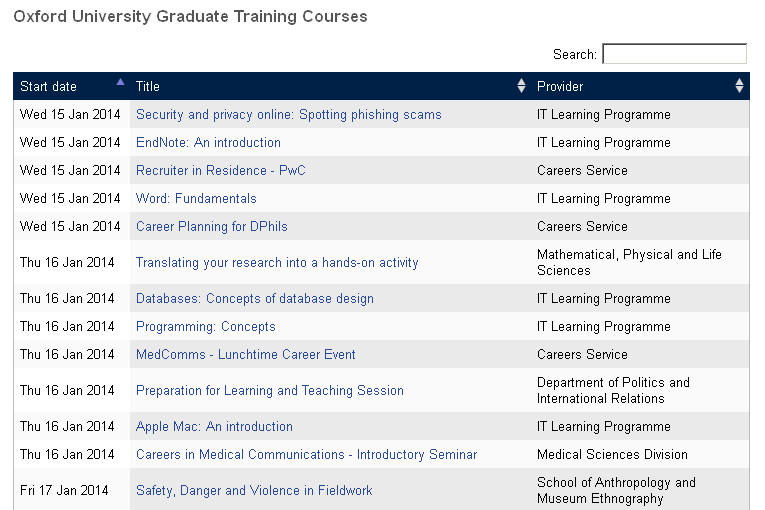
As part of the JISC-funded OXCAP project, IT Services developed a portable JavaScript ‘widget’ that can be placed on any website and be made to display upcoming publicly visible Researcher Training opportunities – the list of courses can be filtered by department, date or by skill.

There is an example of the widget in use on the WebLearn welcome page. In this case, all upcoming courses are displayed; the search box can be used to focus on courses of interest.

js-widget

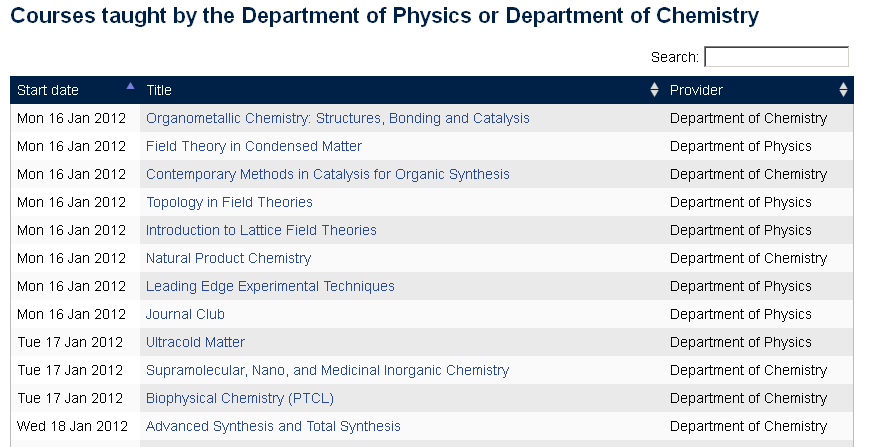
The widget can also be configured to display training from one or more departments, here is an example of training offered by the departments of Physics and Chemistry.

js-widget-phys-chem

It is also possible to specify which columns are made available.

How to add the widget to a website

It is very easy to add the widget to a web site. All that is required is the referencing of two JavaScript libraries in the page header and the placements of a specially crafted <div> block at the point on the page where the courses are to be displayed.

Full documentation and further examples are available on the Courses Widget Documentation site

Posted in OxCAP, WebLearn | Tagged | Leave a comment

WebLearn unavailable on *MONDAY* 13 Jan 2014 from 7-9am

It is planned to upgrade WebLearn to version 2.8-ox9 on Monday 13 Jan 2014 7-9am. There will be no service during this period.

We apologize for any inconvenience that this essential work may cause.

Posted in Downtime, Sakai, WebLearn | Tagged | Leave a comment

How to display WebLearn within a Power Point slide

People often like to browse WebLearn from within a PowerPoint presentation.

Generally this is done by adding a hyperlink or maybe by just breaking out of the presentation and switching to a web browser, however, it is actually really easy to embed a web browser (and hence WebLearn) within a slide.

Here’s the recipe for PowerPoint 2010.

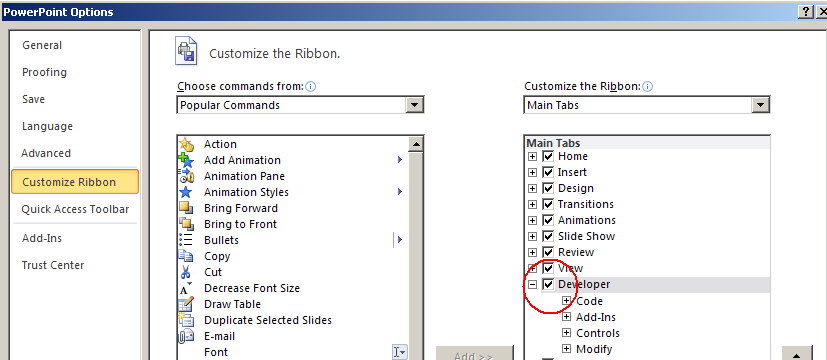
Step 1: Enable Developer Ribbon (in File > Options > Customize Ribbon)

enable-dev-toolbar

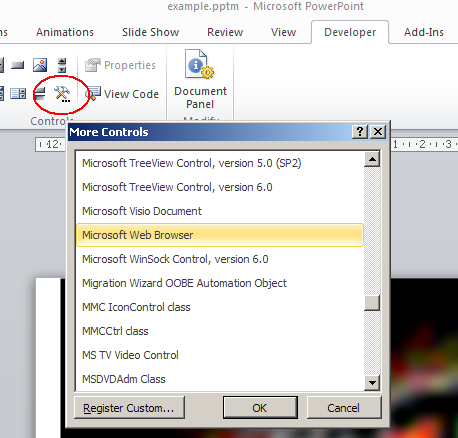
Step 2: Add Microsoft Web Browser to a slide (Developer > More Controls > Microsoft Web Browser)

more-controls

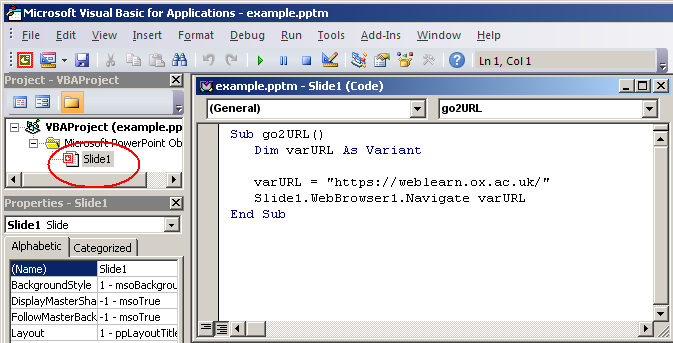
Step 3: Add a macro (Developer > Visual Basic), then click on the given slide

vb1

Step 4: Paste the following into the edit window (assuming it is Slide1 that being developed)

Sub go2URL ()
   Dim varURL as Variant
   varURL = "https://weblearn.ox.ac.uk"
   Slide1.WebBrowser1.Navigate varURL
End Sub

vb

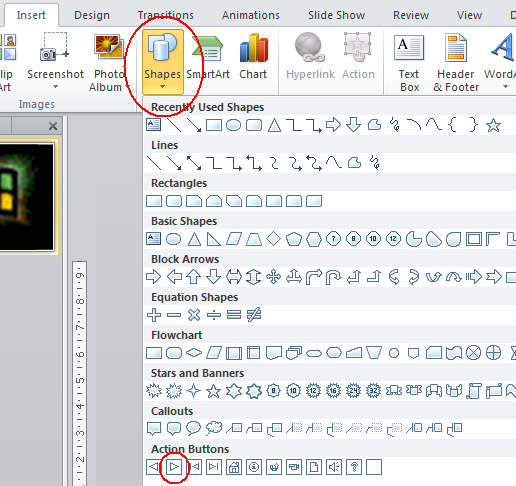
Step 5: Add an Action Button (Insert > Shapes > Action Button) &

ab

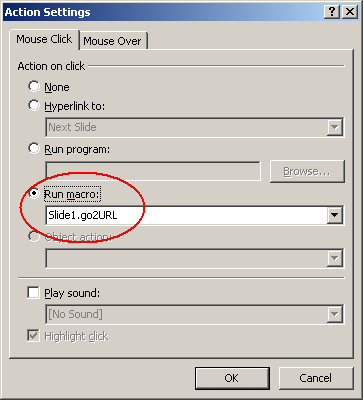
Step 6: Opt to run the go2URL macro upon mouse click

as

Step 7:  Save as .PPTM file (macro-enabled PowerPoint file)

pptm

During the slide show, the presenter must click on the Action Button to bring WebLearn onto the slide.

Posted in Sakai, WebLearn | Tagged , | Leave a comment

Tests tool – WebLearn Bytes session

These points were noted at the WebLearn Bytes: Tests and quizzes held on 26 November 2013, and may be helpful to other WebLearn users:

The Tests tool offers 6 types of questions: Multiple choice, True/False, Fill-in-the-blank, Matching, Essay and Task. Spend some time planning and formulating your envisaged test questions according to the best fit into one of the available question types.

All questions in a question pool must have the same points value (i.e. score). It is advisable to put all matching-type questions into one pool, with a reasonable points value (e.g. 5 per question, if they contain five matches). Similarly you might want to put all essay/task questions into one pool with zero points – you will manually assign scores to these questions when you mark the test.

There is also a Lickert scale question type, and most of the other questions can be turned into survey questions (i.e. there is no right/wrong answer and the score is zero). If you do use any survey-type questions, it is advisable to put them all into one question pool. It is preferable to use the specialised Surveys tool to design and conduct full surveys.

Essay and Task questions are not classified as so-called ‘objective questions’ (that means they cannot be marked automatically by the system) – you can go into ‘Marking’ and manually assign a score and a comment for these questions.

The Tests tool is designed for tests to be administered to named site participants in a WebLearn site. If you wish to open the test to broader groups of Oxford users, please contact the WebLearn team (weblearn@it.ox.ac.uk), since a special parameter needs to be set.

Question pools, assessments and parts all have titles, so it’s helpful to use meaningful titles that describe what the item is, e.g. “Pool of Matching-type questions”; “Test for Michaelmas Term 2013”; “Section A” respectively.

You can export the list of names and total scores to Excel for further manipulation of the data and generation of your own summary reports. Within the Tests tool, you can generate ‘Summary data’ — this shows the usage statistics per question, which can help to refine and improve your questions for future use.

Useful links:

Posted in WebLearn Bytes | Leave a comment