OXCAP – Oxford’s use of Share Point

Thanks to Alex Dutton for the helping with this post.

The OXCAP project is about collecting and distributing information about graduate training opportunities at The University of Oxford. This information is stored in the University’s Open Data Service (ODS) and is then used to drive a ‘course booking portal’ and to publicise the excellent training that is on offer at Oxford. (There is an earlier blog post describing how graduate training data moves around the university to make this possible.)  Share Point plays a key role in this project.

Share Point is used in two distinct ways:

  • as a data entry system: we have an Info Path document which is used to capture all the relevant details about a course.
  • as a document repository:  there is a shared document library that houses XLSX (Excel) files describing courses offered by different training providers.

The Data Entry System

We have an Info Path document library for courses which cannot be ‘automatically’ exported in an electronic format. The form is split into two: provider details and presentation details.

We ask for basic details of the unit providing the training, this includes a University-wide ‘unit identifier’ which is used as a unique key to identify the host department.
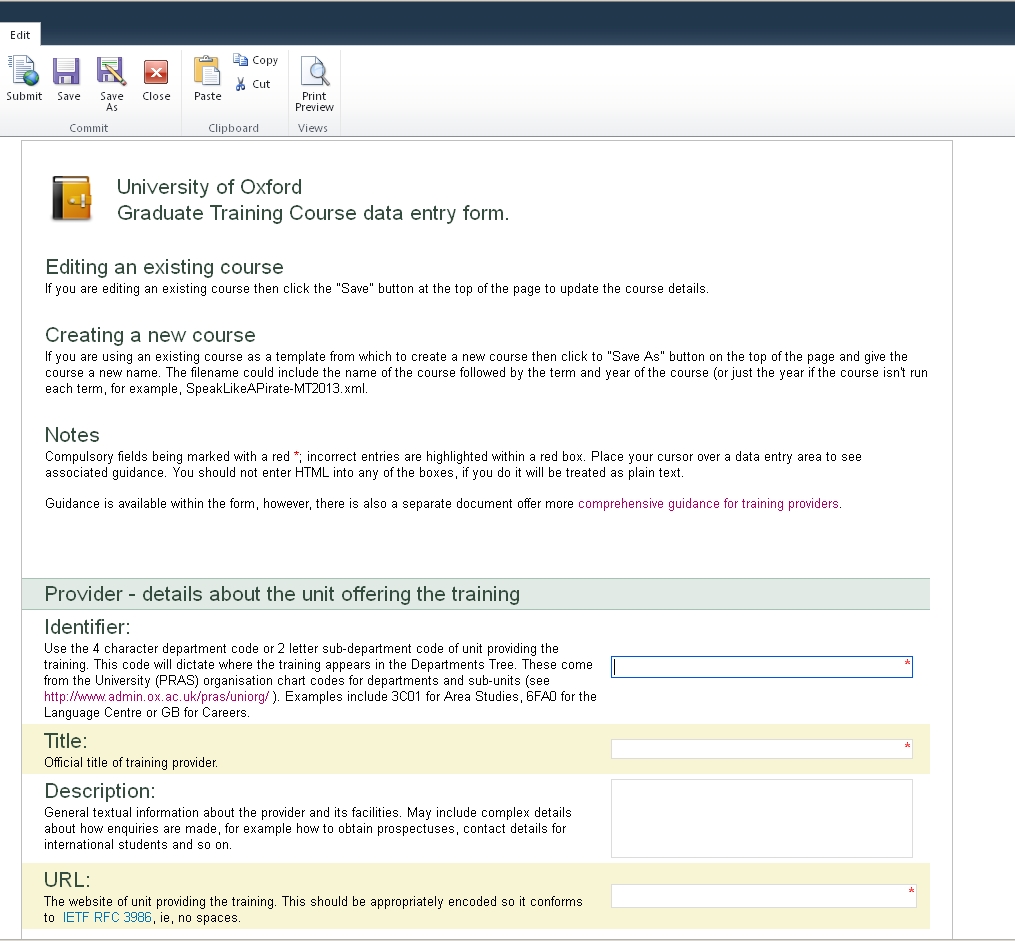
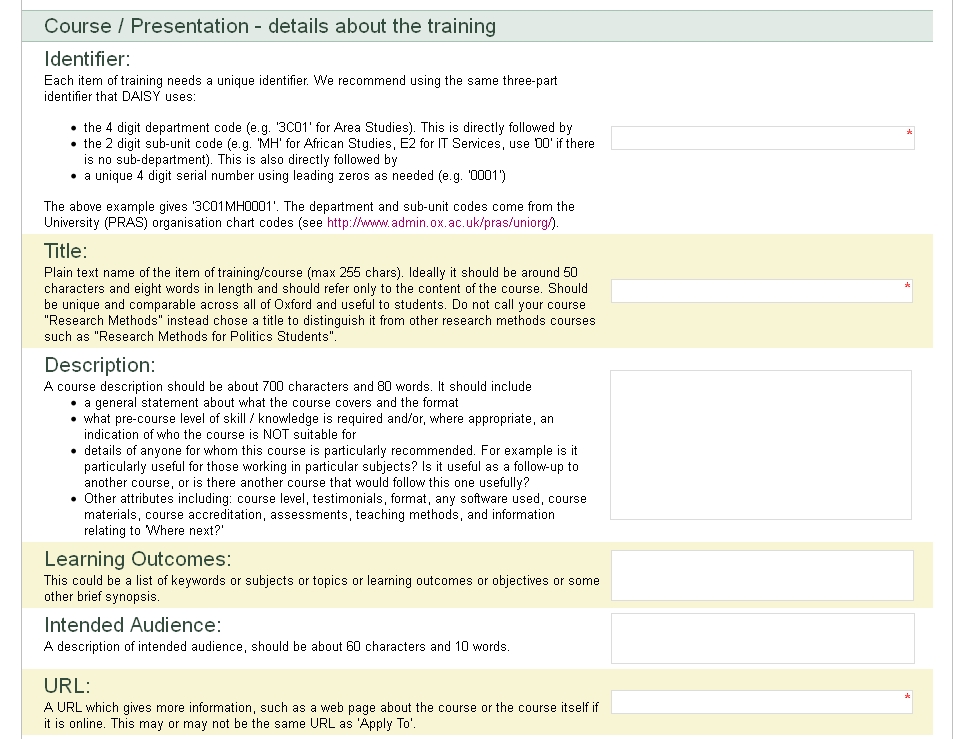
The second part of the form collects information about a single instance of the course – this may be a single presentation or a series of individual sessions.

We start with asking for basic information such as Title,  Description (HTML) and a URL.
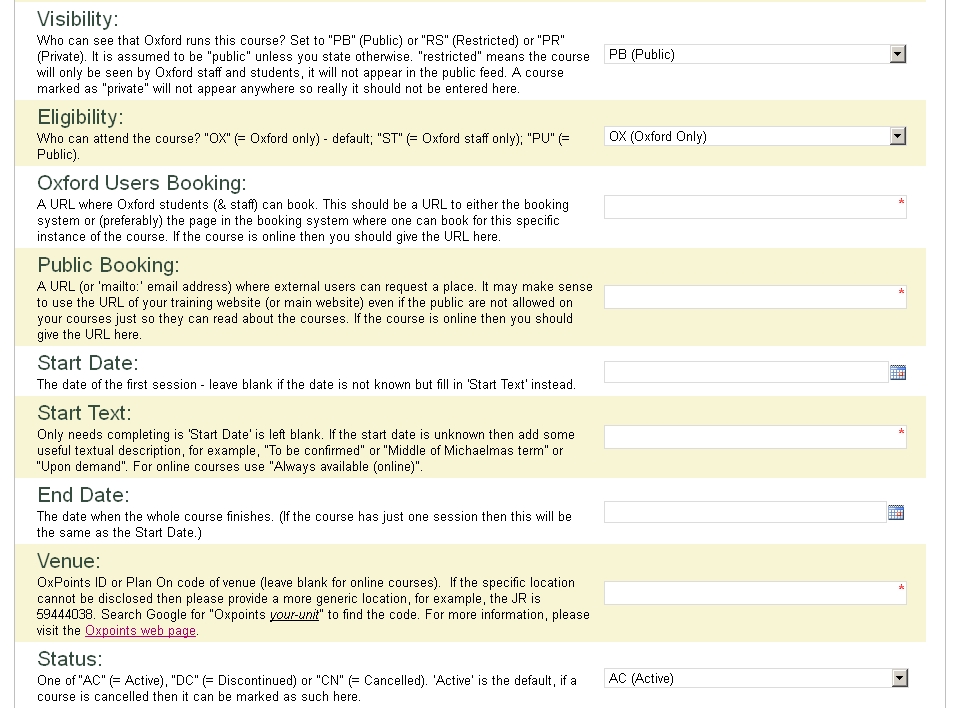
We then ask who can see and book on the course and collect booking URLs,  dates and a venue.
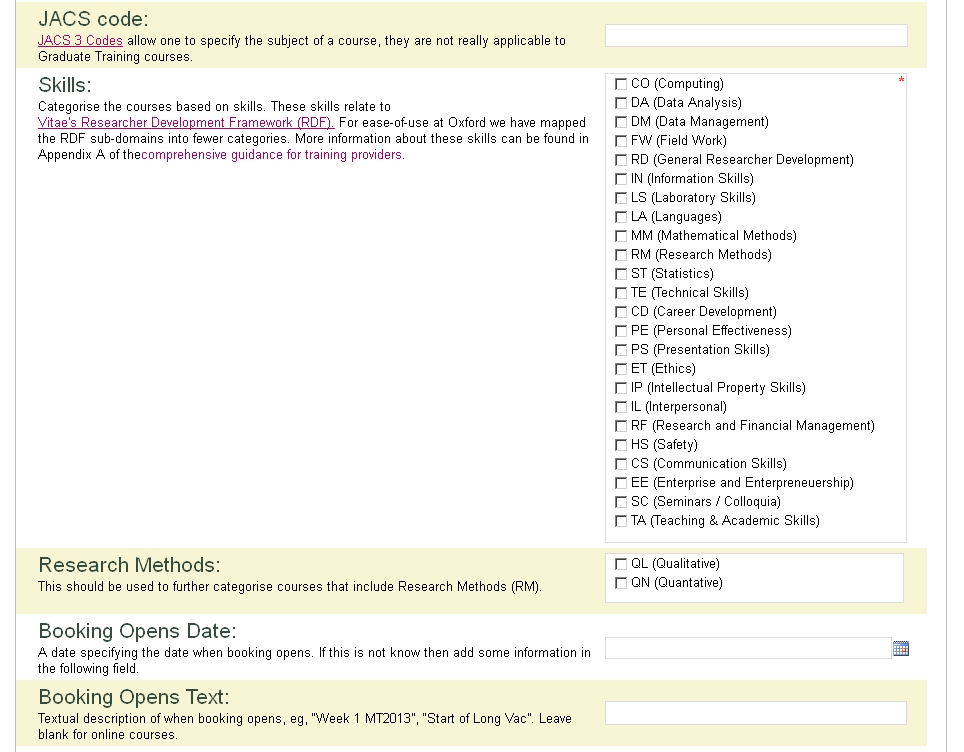
We then ask for some sort of categorisation. JACS codes are not really applicable for graduate training so we have developed our own set of skills which are based on Vitae’s Researcher Development Framework. We have cut down on the number of categories to make the tagging process more manageable.
Finally we ask for booking details and information about the timings of individual session.
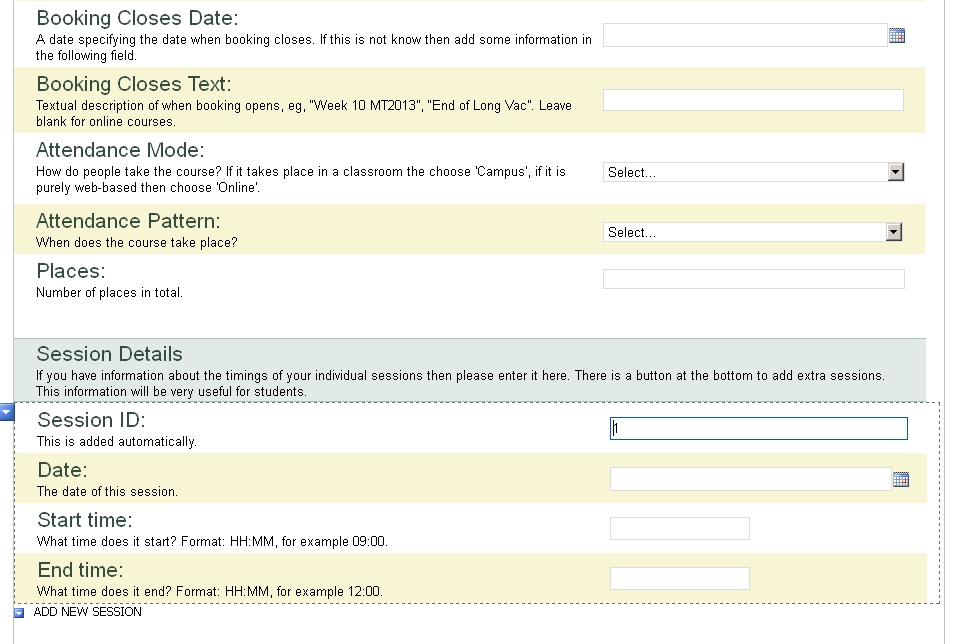
We encourage training providers to base a new presentation on existing information, that is, open an existing form, just change the bits that are different and use the ‘Save As’ functionality.

Once data has been entered we are able to use the Share Point lists web service to enumerate the XML files that represent the courses, and use XSLT to turn these in XCRI-CAP which is then stored as RDF within ODS.

The Document Repository

Data about other courses are provided to us as Excel (XLSX) spreadsheets, which can be emailed (as attachments) to a Shared Document Library within Share Point. The format of the XLSX files is outlined in a document that gives comprehensive guidance for training providers.

The XLSX files (one per training provider) are retrieved from Share Point, transformed into the Resource Description Framework  by an XSLT file and then stored within ODS. (See: https://github.com/ox-it/tei-spreadsheet). (For other projects we’re investigating using Share Point lists directly, and have written a Python library and command-line tool for extracting data from Share Point, see: https://github.com/ox-it/python-sharepoint).

Once the data is stored within ODS, it can be transformed into XCRI-CAP using the same XSLT as for all other course data.

We feel that Share Point — as part of our existing infrastructure — provides a good way to maintain our data where it’s not in already-existing systems.

Links
Posted in OxCAP, Sakai, WebLearn | Tagged , | Leave a comment

Data Flow in the OXCAP Project

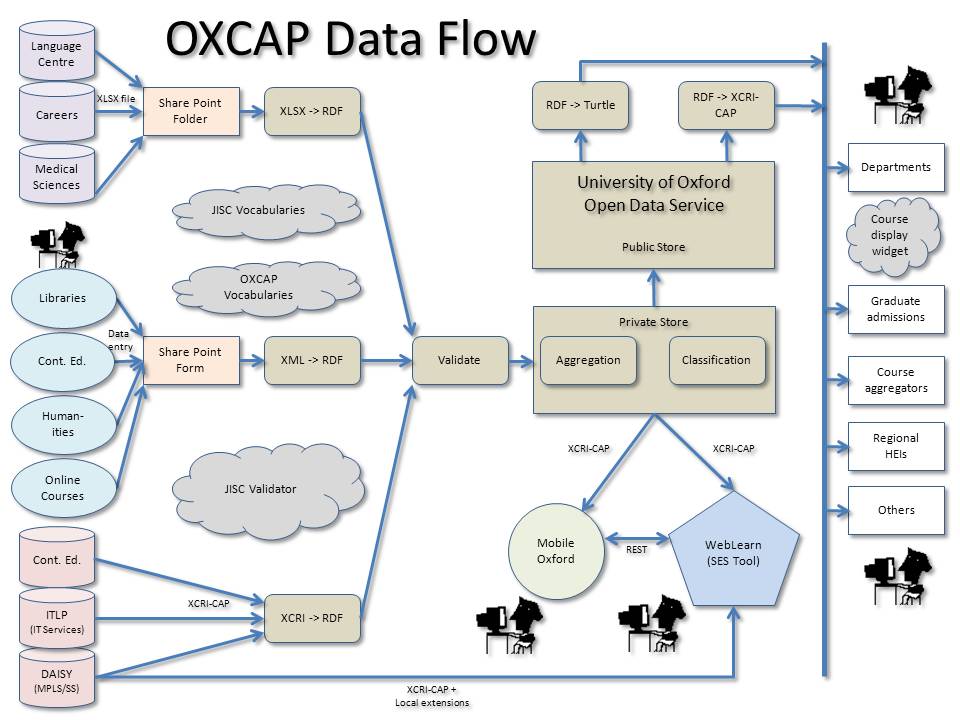
We thought it may be useful to explain how data about graduate training makes its way from training providers into the SES tool in WebLearn. To do this we produced the diagram below. This shows the 3 different methods of data collection: spreadsheet (XLSX) files , XCRI-CAP v1.2 feeds and via a custom data entry form hosted in Share Point.

In all cases the source format is transformed from XML into RDF (Resource Description Framework). The RDF data is then validated and stored in the University of Oxford’s Open Data Service (ODS). ODS is a giant RDF database and stores numerous other ‘open datasets’ such as OxPoints location data.

ODS has two distinct storage areas: a ‘public’ store and a password-protected ‘private’ store, in both cases the RDF is converted into XCRI-CAP v1.2 (and other formats if so desired) and made available as an XML feed.

The public store supplies XCRI-CAP feeds for external use such as course aggregators or for display on (departmental or college) websites; to facilitate this we have produced a small JavaScript widget which allows a searchable subset of courses to be displayed on a web page.

The private store supplies a slightly richer feed to internal applications such as WebLearn and Mobile Oxford.

WebLearn exposes the course information within its SES tool and Mobile Oxford will ultimately present a course search ‘app’ which will allow students to locate courses and initiate booking via their mobile phones.

Links

Posted in OxCAP, Sakai, WebLearn | Tagged , , | 2 Comments

WebLearn on Twitter

WebLearn has a twitter account: @oxfordweblearn.

You will find out all the latest news about your favourite VLE by following us!

Posted in Sakai, WebLearn | Tagged | Leave a comment

Byte sized Assignments tool

Questions and Answers that emerged from the WebLearn Bytes – Assignments session on 12 November 2012:

Q: How do I make Marks and comments visible to students?

A: In Assignments you must return the assignment to the student in order for him or her to see it.

Q: What is the connection between Assignments and the Markbook tool?

A: Maintainers have two options to record and post assignment marks in WebLearn.

  • Add to Markbook lets you mark each student’s work only from the Assignment tool.
  • Associate with existing Markbook entry lets you enter marks using either the Assignment or Markbook tool

Q: One of my students has ‘submitted’ an assignment but forgot to attach their paper. How do I allow them to resend it?

A: When marking an individual student’s assignment, there is a check box to allow resubmission.

Posted in WebLearn, WebLearn Bytes | Leave a comment

Byte-sized Surveys tool

Questions and Answers that emerged from the WebLearn Bytes – Surveys session on 8 November 2012:

  1. Q: Can WebLearn Surveys handle branching, e.g. skip to a certain part of a survey based on a participant’s response?
    A: No. A possible solution is to put the branching instructions in the question wording.
  2. Q: What is the difference between a ‘Multiple Choice Question’ and a ‘Multiple Answer Question’?
    A: For a ‘Multiple Choice Question’, a survey participant can select only one option whereas a ‘Multiple Answer Question’ (Multiple Response question) allows more than one option to be selected. The convention is that a multiple choice question uses radio buttons to indicate the options, whereas a multiple response question uses check boxes.
  3. Q: Can a WebLearn Survey allow a time restriction in which to answer the questions?
    A: No.
  4. Q: Is there a limit to the number of respondents for any survey?
    A: No, a survey can be taken by as many respondents as you wish.
  5. Q: Does the exported output provide a unique identifier for each respondent?
    A: By default, the surveys are anonymous.  However, you can ask participants to type in either their name or a unique ID for the first question in your survey.
  6. Q: Can respondents edit their responses and, if so, up to what point?
    A: If you set up a survey which has to be taken by logging into WebLearn, you can configure the survey to allow respondents to edit their responses before the survey is closed.
Posted in WebLearn, WebLearn Bytes | Tagged , | Leave a comment

Byte-sized Resources tool

Hints and tips that emerged from the WebLearn Bytes – Resources session on 5 November 2012:

  1. Top-level permissions ‘cascade down’ to all folders and files in Resources (set ‘top-level’ permissions using the blue link at the top of the Resources tool>
  2. Use Resources > Actions > Edit Details (Properties) to make a folder/file publicly viewable, or to restrict a folder/file to an internal sub-group
  3. Use Resources > Actions > Edit Details (Properties) to add a description of a folder or file – this description is helpful in the Access View (see no. 7 below)
  4. You must first create at least one internal sub-group (Site Info > Manage Subgroups) before you can restrict a folder or file to a sub-group
    — You must first add participants to the site (Site Info > Add Participants) before you can assign them to an internal sub-group
  5. Use Resources > Add Reading List to create a reading list by linking to the Solo catalogue and/or Google Scholar (> Import into WebLearn)
  6. Use Resources > Create HTML Page to build any HTML page; design an HTML page to organise content and enhance layout and navigation for your site users
  7. Create an ‘Access View’ (‘Smart View’) for your users to browse Resources (Actions > Make Web Content Link); then hide the Resources tool itself (Site Info > Page Order)
Posted in WebLearn, WebLearn Bytes | Tagged , | Leave a comment

Chart of logins around the start of term

I thought it may interest people to see how many separate logins are made per day around the start of term. Note that these are separate logins not unique users.

The graph shows a peak of 17044 on the first day of term (Monday 8 October 2012).

Posted in e-learning, Sakai, WebLearn | Tagged , | Leave a comment

EuroSakai in Paris 28th-30th Jan 2013

From Ian Dolphin:

I am pleased to announce the 2013 EuroSakai Conference, in association with ESUP and Jasig. The event will be hosted by University P.M. Curie (UPMC-Sorbonne Universités) at its Jussieu Campus in Paris between January 28th and 30th.

An ESUP Days event will follow on January 31st, at University Paris-Descartes, only 900m from the EuroSakai event.

An early web site is available at

http://www.congres.upmc.fr/sakai2013

Watch out for more details in coming weeks!

Posted in e-learning, Sakai, WebLearn | Tagged | Leave a comment

WebLearn unavailable on 16 October 2012 7-9am

It is planned to upgrade WebLearn to version 2.8-ox3.3 on Tuesday 16 October 2012 7-9am. There will be no service during this period.

This bugfix release will address problems with the SES tool.

Posted in WebLearn | Tagged | Leave a comment

Alleged cheating at Harvard – opportunity for Oxford to be proactive

Melissa Highton, co-director of Academic IT Services, has posted a thought-provoking piece on her blog highlighting the case of alleged cheating at Harvard and posing questions about plagiarism detection policies and processes at Oxford University.

You can read it at: http://blogs.it.ox.ac.uk/melissa/2012/10/06/scandal/

Posted in WebLearn | Leave a comment