WebLearn upgraded to version 2.6-ox9 on 27 September 2011

New WebLearn was upgraded on 27th September 2011 to version 2.6-ox9. For more detailed information please looked at the detailed release notes.

We had intended to move to 2.8-ox1 but unfortunately have had to delay this until the January 2012 release.

Improvements

  • Printed wiki page no longer has text about ‘jsmath’ at the top of the page
  • Instructions about webDAV on an iPad have been added
  • Reading Lists availability information is now appearing again.

Surveys

  • Added date range selector to my surveys page
  • MS Word control characters from “survey instructions” are now removed from the PDF report
  • Members count is now correct when assigning a survey
Posted in Sakai, WebLearn | Tagged , , | Leave a comment

Euro Sakai 2011 – Amsterdam

Doug Johnson at Euro Sakai 2011 image Ian Dolphin11 people from UK HE attended the European Sakai conference (#EuroSakai). Delegates from the UK represented the following bodies: the Universities of Oxford, Cambridge, Bath, Newcastle, Hull and Leeds and JISC/CETIS.

The highlight of the conference was almost certainly the extended Sakai OAE demonstration.

The OAE is based upon the Sakai Learning Capability Design Lenses: https://confluence.sakaiproject.org/display/PED/Sakai+Learning+Capabilities+v+1.0. OAE is not yet complete but a combination of it and the Sakai CLE running as a Sakai Hybrid do just about cover every aspect. (Sakai CLE tools or sites can easily be displayed within the OAE.)

The scenario that was demonstrated was the construction of a collaborative research projects (with industrial contact). This demonstrates:

  • openness – layers of content opened up at appropriate levels: “unlocking your content”
  • reuse of material
  • collaboration: authoring, review publishing

The demo showed how a student or researcher could go about putting together a research proposal by collecting material from within Sakai OAE and from material located on the web. Then people with similar interests can be found and invited to help collaborative author a proposal. The proosal can then be opened up for evaluation of for public consumption. Collaborators can be from within the University or from external companies / institutions.

Other aspects of OAE were covered during other sessions: NYU spoke about their impressive pilot (http://www.youtube.com/user/nyuatlas) and the project team outlined the two-year road map. The emphasis will be on  integration with Sakai CLE, annotating documents, content collections, lists of people and a widget SDK to allow individuals and institutions to easily develop their own ‘tools’.

The OAE is currently in a very usable state. It has just had it’s first release and is ready for institutions to download and deploy as a pilot

There were many other interesting sessions including presentations about Mobile interfaces (and the Mobile Sakai project, see photo), Open Courseware, the benefits of open source software, new tools, the upcoming ‘Neo’ portal and integration with Internet2 Grouper.

The social side of the conference is also very important and it was nice to hear more about the Sakai initiatives at Leeds, Newcastle and Bath Universities. It is great to see that the word is spreading in the UK.

There have also been many opportunities for UK institutions to engage in collaborative projects with European and American partners. The Sakai Mobile Project is a good example of this.

In summary, it was great to see so many delegates from the UK and also to see that Sakai OAE is now ready for use ‘in anger’.

Posted in Apereo OAE (formerly Sakai OAE / 3), Sakai | Tagged | Leave a comment

Old WebLearn (Bodington) is now read-only

As of Tuesday 27th September 2011 it is no longer possible  for regular users to create new material within Old WebLearn.

‘Floor Managers’ still retain create permissions but all other users have had such privileges removed.

Old WebLearn will be decommissioned in September 2012. If anybody needs assistance moving their material to New WebLearn then please contact the WebLearn team or visit the WebLearn: Migrating Your Content site.

Posted in Migration, Old WebLearn, WebLearn | Tagged , | Leave a comment

WebLearn upgrade on Tuesday 27th September

The WebLearn service will be unavailable sometime between 7am and 9am on Tuesday the 27th of September for an upgrade to version 2.6-ox9. (It was hoped that we would move to version 2.8-ox1 on this date but this has not been possible and will now happen in January 2012.)

It is advisable to avoid using the WebLearn service between these hours to avoid interruptions. Sorry for any inconvenience.

Posted in Sakai, WebLearn | Tagged | Leave a comment

Student Enrolment System

What is it?

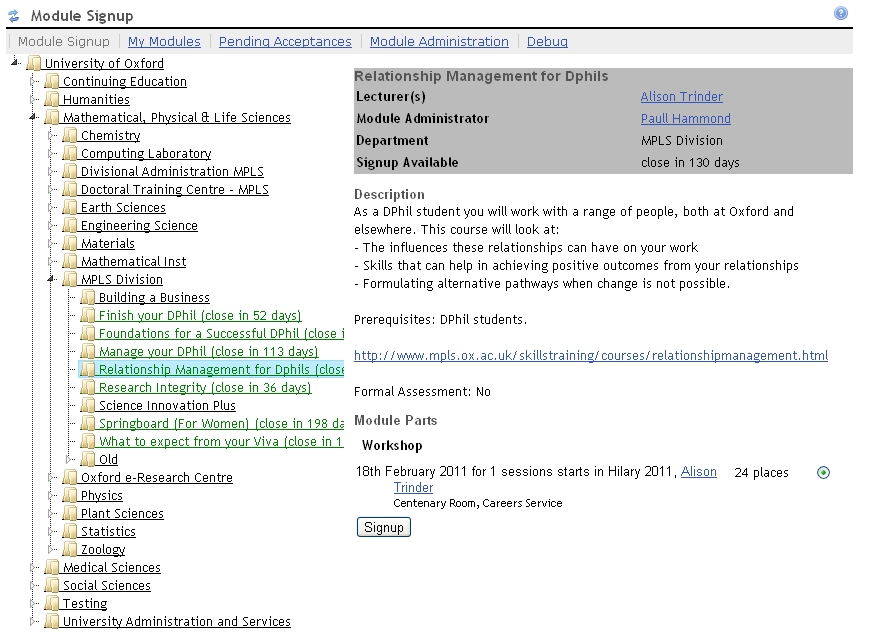
The Student Enrolment System (SES) is a web-based tool that presents information about graduate training opportunities available across the departments in Social Science and MPLS to graduate students, supervisors and administrators and allows students to request places on training. SES consists of a ‘courses database’ DAISY  as the source of information about teaching/training provision and an interface in WebLearn for students and others (https://weblearn.ox.ac.uk/portal/hierarchy/socsci/ses and https://weblearn.ox.ac.uk/portal/hierarchy/mpls/gap).

What’s it for?

SES enables students and supervisors to view in one place information about graduate training opportunities from the departments and divisional office and to search for courses, and allows students to enrol for places.

Context

Social Sciences ESRC Doctoral Training Centre and MPLS Graduate Academic Programme both aim to promote student access to training and greater sharing of training opportunities across departments and disciplines.

In the recent OUSU PGT review report, a key finding was the need to provide students with better access to information about training opportunities across departments and other parts of the University.

Benefits

For students: SES will provide easier access to information about training opportunities, in one place, and the facility to request a place online. The training information in SES is searchable.

For Supervisors: SES will provide information about training opportunities across departments, and help them to oversee the training of each of their supervisees.

For Departmental administrative staff: SES will help with providing information and handling student sign up for options, as well as course administration including registers for attendance, and charging.

Approval

SES has the facility to allow up to three approval points before a requested place is confirmed. Departments can decide which they want to use, and switch off others:

  • Module/course administrator
  • Supervisor
  • Student’s home department approver (overview of all training, and budget)

The module/course administrator can accept or decline requests for places, subject to the specifications of the course such as eligibility criteria.

Supervisors can:

  • Approve (or not) students’ requests for training places
  • View the training records in SES of each of his/her students

Student’s home department approver

A department can choose to use this level of approval and nominate a person to oversee all training requests by its students, with a view to monitoring levels of requests, particularly where there may be a charge.

Information requirements

DAISY must be given a description for each module or course, including information such as the content, level, eligibility, any pre-requisites, the type and subject of the training, etc. Web links to a reading list and other course material can be included.

Other functionality

By Michaelmas Term 2011, the SES will have a waiting list facility that a department can choose to use. Also by MT, the system can send automated reminder emails to students, if required.

The SES provides a list of enrolled students. If departments collect attendance information, this can be entered in the system and reports on attendance by session can be retrieved for use for academic, administrative or financial purposes.

Reporting

The system can provide reports by module/course showing all the students enrolled and completed and their department, and reports on individual students. If attendance information is collected, reports on attendance by session can be provided.


Posted in WebLearn | Tagged | Leave a comment

Interesting report by UC Berkley about Mobile Access to Sakai

I just came across this comprehensive and very interesting report by UC Berkley detailing what students would find useful if a mobile interface into Sakai were developed. The top two wishes were viewing Announcements and checking details of Assignments.

Mobile Oxford currently provides access to Announcements (as well as Polls and the Tutorial Sign-up tool); we plan to look into adding the Assignments tool next year.

Links

Posted in Sakai, WebLearn | Tagged , | Leave a comment

WebLearn Upgraded to Version 2.6-ox8.1 on 22 August 2011

New WebLearn was upgraded on 22nd August 2011 to version 2.6-ox8.. For more detailed information please looked at the detailed release notes.

Improvements

  • Sign-up tool: a site may now have up to 1000 members and the tool will still present drop-down list for site owners to use to allocate atendees
  • All reading lists have been translated to use new Aleph reference identifiers
  • Improvements in replacing references to the old site during site copy. (When sites are copied, a simple search and replace changes references to the old site with references to the new site. In the past links to documents in the new site would point to documents stored within the old site.)

Bug Fixes

  • Surveys: 2pt, 3pt & 4pt grouped rating scale question headings now line up

New Bugs

Real-time availability information is currently not avaiable for books – this has arisen is becasue of the libraries switch to Aleph and will be fixed in due course.

Posted in Sakai, WebLearn | Tagged | Leave a comment

Useful advice and free teaching and learning resources

Jill Fresen has drawn my attention to this useful resource:

The Staff area of Association for Learning Development in HE website contains lots of resources in various formats (including a fridge magnet about academic writing(!).

It has good layout within topics, including ‘Resources for tutors’, ‘Top 3 pick up and go classroom activities’, ‘Activities for students to use independently’, ‘Theoretical underpinning’ and ‘Supporting information’.

Under Mobile Learning, there is an item ‘Top tips for developing a mobile resource from an existing one’…

The website is produced by the LearnHigher Centre for Excellence in Teaching and Learning (CETL).

Link

Posted in e-learning, Web | Tagged , | Leave a comment

Xerte content authoring tool

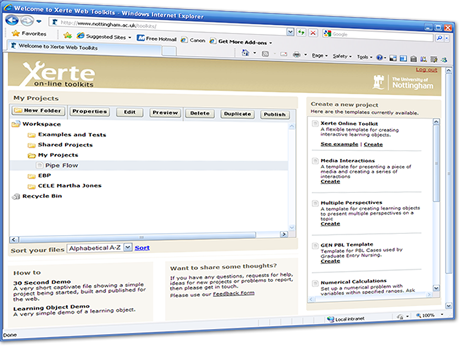
The University of Nottingham’s Xerte Project provides a full suite of open source tools for elearning developers and content authors producing interactive learning materials.

Pat Lockley, worked in the Xerte team (who won the 2009 ALT Learning Technologists Team of the Year) before he moved to OUCS, very kindly gave a demonstration of the on-line version of the tool to selected members of LTG.

Xerte, which is open source and recently won a prestigious IMS Platinum award, comes in three flavours:

  • Xerte desktop V2 (for MS Windows only)
  • Xerte online toolkit – allows for shared authoring
  • Xerte desktop v3 Alpha  (for Mac, Linux and Windows)

Xerte Learning Objects are based on one of a small number of templates. Pages may contain text, audio / video etc, charts (generated from tabular data), interactive activities, open content and so on. All objects are highly accessible; one can change contrast, text size, font and others.

Links to example objects can be found at the end of the post.

Within a page containing images, one may zoom in and out, have slide-shows, morphed pictures, an image gallery (thumbnails), hotspot mark-up, hotspot quizzes, and others. Other pages may contain quizzes, web 2 objects such as Google Maps, YouTube videos, Flickr slideshows, delicious bookmarks plus many more plus regular textual content.

All content can be exported as a ZIP file or a SCORM object for use in a VLE.

Pat recommended that a good way to get started is to download the desktop version (v2) or possibly to use the free TechDis-hosted on-line sandpit – this has a slightly simpler user interface but is initialised at the start of every month (one must export and then import and content in order to continue to development).

Xerte is highly recommended for professional-looking student generate content.

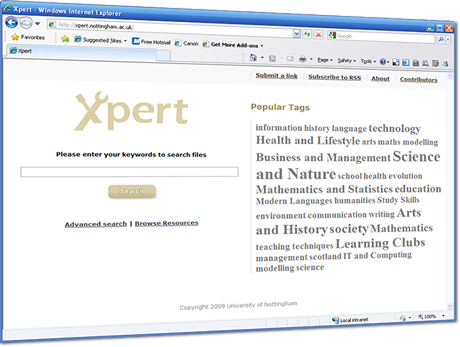
Xpert is a companion tool to Xerte and can be described as a searchable Open Educational Resource (OER) aggregator which, at the time of writing, had over 232,000 nuggets of learning. Xperte is open to anybody to use to find free teaching material (including of course all Oxford University podcasts).

Links

Posted in e-learning, Web | Tagged , , , , | Leave a comment

GLOMaker content authoring tool

London Metropolitan University’s GLOMaker tool is a free open source tool which allows elearning developers and content authors to produce highly structured and media rich interactive learning materials.

In May, Professor Tom Boyle from the Reusable Learning Objects CETL gave a presentation in OUCS a part of the ITLP Make series of lunchtime seminars.

One of the key drivers behind GLOMaker is that the design of learning objects should be reusable – the tool has a number of in-built design patterns (or ‘learning designs’) which are rooted in good pedagogic principles.

GLOMaker spports most of the most commonly desirable features: quizzes (multiple choice / word assembly) with feedback, photo display with zoom facility, slide-show viewer, video and audio players and a step-through sequence player.

One of the best aspects is that the tool comes into its own with its extensible design pattern interface. The tool is shipped with 4 common patterns but it is easy to tailor your own via the intuitive drag-and-drop ‘block editor’. Pedagogical guidance is offered for each block and there exists a number of different page layouts. The authoring process is very similar to that of Power Point which implies that it is fairly easy to get started with the software.

Links

Posted in e-learning, Web, WebLearn | Tagged , , , , | Leave a comment