It is planned to upgrade WebLearn to version 2.8-ox10 on Tuesday 15 April 2014 7-9am. There will be no service during this period.
We apologise for any inconvenience that this essential work may cause.
It is planned to upgrade WebLearn to version 2.8-ox10 on Tuesday 15 April 2014 7-9am. There will be no service during this period.
We apologise for any inconvenience that this essential work may cause.
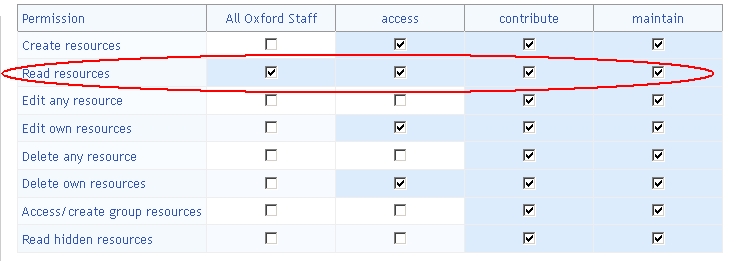
In our Easter upgrade, we propose to put measures in place to stop site managers from removing the ‘Read resources’ permission within the Resources Tool.
The reason for this is that over the last couple of years we have had a number of complaints from users which have been as a direct result of the removal of this permission – it is a little known fact that all attachments associated with a site (including Assignments tool submissions) are effectively stored in a hidden ‘attachments’ folder in Resources.
Removing the ‘Read resources’ permission has a number of undesirable side-effects including:
If you think that this action will cause problems on one or more of your sites then please contact us: weblearn@it.ox.ac.uk.
In our Easter upgrade, we propose to change the default behaviour of WebLearn and deliver all HTML pages which have been authored within WebLearn and are stored in Resources in ‘standards mode’ rather than ‘quirks mode’ as they currently are. (By currently using ‘quirks mode’, we are effectively serving non-standards compliant web pages which . See http://en.wikipedia.org/wiki/Quirks_mode for more explanation).
Key comments:
If you think you may have relied on ‘quirks mode’ or simply want to check that your pages will look correct in ‘standards mode’ then you can do so by following this procedure. You may like to do this in more than one browser, for example, Chrome, Firefox and Internet Explorer.

If you think that this action will cause problems then please contact us: weblearn@it.ox.ac.uk.

We are pleased to announce a special seminar about the Apereo Open Academic Environment (OAE) presented by our friends from CARET (Centre for Applied Research in Educational Technologies) at Cambridge University. The talk will take place in ISIS room, IT Services, Banbury Rd at 12.30 on Thursday April 3rd. Please visit the following URL to reserve a space: https://courses.it.ox.ac.uk/detail/OUOU
Apereo OAE, which has been developed by CARET along with Georgia Tech, Research Research and others, is a brand new platform that aims to support academic collaboration and academic networking. It is being developed by the same organisation that oversees the Sakai CLE project which of course is the software which underpins WebLearn.
 The easiest way to explain OAE is by analogy: Universities have always had classrooms. But recently, many have invested heavily in new buildings with a mix of informal break-out areas designed to draw people together – faculty, students and administrators. This is the idea behind the OAE. It’s an informal collaborative online space that sits alongside the highly structured Learning Management Systems such as Sakai CLE designed to deliver courses to students.
OAE supports many types of collaborations, including research projects, ad-hoc student groups, committees, collaborative projects, etc. It’s a network of people, content and groups, where files, links and collaborative documents can easily be created and shared with other people and groups, whilst being able to provide feedback and participate in discussions.
OAE is a multi-tenant system, which means that it can support multiple universities on the same physical installation. Each university has its own tenancy with its own branding, skinning and users and a sort of permeable membrane around it. It’s easy to keep things private to your own institution or research group, or to mix things up with the rest of the world. It has a modern architecture that will scale to millions of users and a simple, intuitive interface that does not force users to behave in a particular way.
We will be very interested to hear what Oxford University staff members think about Apereo OAE.
It is planned to restart the WebLearn AFS servers on Tuesday 11 March 2014 7-9am. Unfortunately, this will mean that there will be no WebLearn service during this period.
We apologise for any inconvenience that this essential work may cause.
Have you experienced the problem that students submit their assignments in WebLearn, but red alert messages appear and the originality reports are never returned in WebLearn?
WebLearn is integrated with the external Turnitin service (http://submit.ac.uk). Classes and assignments are created behind the scenes in Turnitin, and student papers are submitted there via the WebLearn Assignments tool. There are three places where a problem may occur with the WebLearn-Turnitin integration, plus other issues to check (see point 4 below):
Please see this flowchart for more details about what to do in the above situations:
Turnitin Originality Reports not being generated_flowchart
Contact the WebLearn team at weblearn@it.ox.ac.uk if you have any questions about your particular WebLearn assignment.
The March meeting of the WebLearn User Group is all about creating web pages to enhance navigation and the presentation of materials in your WebLearn site.
Date: Monday 17 March 2014
Time: 2:00 – 4:00 pm, followed by cream tea
Venue: IT Services, 13 Banbury Rd
Booking is required for catering purposes – book now to secure your place: https://courses.it.ox.ac.uk/detail/TOVD
Come and meet with fellow WebLearn users and members of the WebLearn team to give feedback and share ideas and practices. Ensure that your voice and ideas are heard and shared in order to inform the ongoing development and support of the system.
Agenda:
Join the WebLearn User Group site: https://weblearn.ox.ac.uk/info/wlug for regular updates and access to audio recordings of previous presentations.
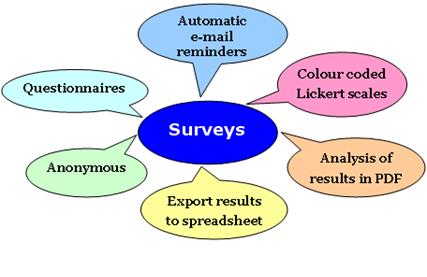 Thanks to the participants in the WebLearn Bytes: Surveys session on Tuesday 18 February 2014 for the following interesting questions.
Question: Is it possible to merge survey results based on the same template?
Answer: The WebLearn Surveys tool cannot pull together results from different surveys (based on the same template). However you can export the results from each survey to Excel, and then manually combine the results into one spreadsheet. On a related note, if you assign a survey to multiple WebLearn sites, when exporting the results you can either select a single site, or if you select multiple sites, it will merge the results.
Question: Is there any scope for editing questions offline and importing into WebLearn?
Answer: The WebLearn Surveys tool does not offer a question import function. However you can author questions offline and then copy and paste them into a survey template.
Question: Does the WebLearn Surveys tool have a branching function, e.g. if you answered ‘No’ to question 3, you will be directed to question 18?
Answer: The current version of WebLearn Surveys tool does not have a branching feature. The workaround is that you can include such text in the question wording, e.g. if your answer to this question is ‘No’, please go straight to Question 18.
Question: Where is the WebLearn Survey data stored as I have colleagues who are worried that a commercial tool like SurveyMonkey can potentially cause the data to be compromised?
Answer: The WebLearn Evaluations (Surveys) tool is a Sakai tool and is not under the control of any third party. The survey data is stored locally and managed by IT Services.
Question: Is it possible to spread questions over multiple pages?
Answer: All questions are on the same page by default.
Question: Does closing and re-opening a survey cause any issues for participants (e.g. losing any information already input, not being able to export older and newer information together, sending a ‘this survey has closed’ notification to people who haven’t completed it yet…)?
Answer: In itself, closing and re-opening a survey will not cause any loss of data. Closing the survey will not send a ‘survey closed’ notification to anyone. Whenever the results are exported, the data is exported from the opening time to the exporting time. However, you should exercise caution in what you do if you close a survey while it is still active ̶ just as for a paper-based survey, you would not want to compromise the data collection process in any way. Note that it is possible to ‘View Results’ while the survey is still active.
Question: Are templates coupled to the surveys they spawn or is creating a survey a one-off exercise? Once a survey is running, does it matter how the base template is modified?
Answer: Once a survey has been created, editing questions in the corresponding template will not affect the survey.
Question: Can I browse individual responses by person so that I can check what they have and haven’t answered?
Answer: By default survey responses are anonymous. This is a common survey practice for various reasons. If you need to identify survey participants, e.g. requirements gathering, you can insert a free text question to ask them to enter their names. When you export the survey results as an Excel or csv file, the data is arranged by participant, with a row for each participant’s responses.
Question:In the exported results, what is the significance of the “mean” (average)?
Answer: The “mean” is calculated as a weighted average, with the first scale option worth 1 point, the second scale option worth 2 points and so on. We agree that the value calculated by the system does not always make sense. For example, in a 5-point rating scale question, the first scale option is allocated 1 point regardless of whether it represents ‘strongly agree’ or ‘strongly disagree’. We have reported the issue to the Sakai community with a view to improvement.
Tips of conducting a WebLearn survey:
WebLearn was upgraded on 18th February 2014 to version 2.8-ox9.2. This release is a small bug-fix deployment. For more detailed information and other minor changes, please look at the detailed release notes.
If you would like to suggest improvements then please do some by contributing to the WebLearn User Voice feedback service.
The following issues have been addressed.
It is planned to upgrade WebLearn to version 2.8-ox9.2 on Tuesday 18 February 2014 7-9am. Unfortunately, this will mean that there will be no service during this period.
We apologise for any inconvenience that this essential work may cause.
 WebLearn User Group talks Technology-enhanced learning and teaching Turnitin at Oxford Sakai in UK HE LTG Case Studies LTG Likes OxTALENT