WebLearn upgraded to 2.6-ox8

Release Notes – WebLearn – Version 2.6-ox8 – 12 July 2011

New WebLearn was upgraded on 12th July 2011 to version 2.6-ox8. For more detailed information please looked at the detailed release notes.

General Improvements

  • When sites are copied, a simple search and replace of references to the old site are replaced with references to the new site. In the past links to documents in the new site would point to documents stored within the old site. Note that we have discovered a handful of cases where the reference is not replaced – these will be fixed with release of 2.6-ox8.1.
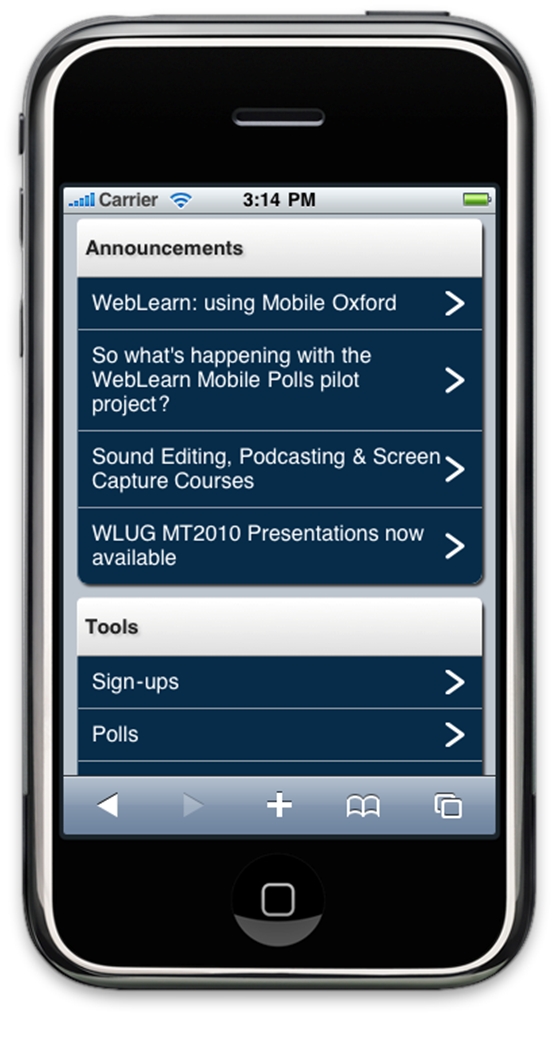
  • Announcements viewed in Mobile Oxford now include links to attachments
  • The Sign-Up tool has been translated into English – Americanisms have been removed

Surveys Beta

  • There is now a link to ‘My Scales’ – this allows one to create (and consequently reuse) one’s own rating scales
  • Results can now be downloaded when using Internet Explorer
  • Users can now choose whether to send an initial email notification of a survey
  • When adding multiple choice question or multiple answer questions the “rating scale text” from the previous user of the system is no longer displayed
  • The link within an email message to view the results of a survey now works correctly
  • The ‘mouse-over hover text’ for rating scales is now correct
  • A note has been placed at the top of the survey to indicate whether answers may be changed after submission

Reading Lists

  • More books now display availability info – a bug was discovered and fixed
  • The ‘Notes’ field is now shown in the default view since this information is considered to be important.
  • The ‘Edition’ of a book is now shown in the default view since this information is considered to be important.
  • ‘Search Library Catalogue’ now works when using Internet Explorer

SES (Module Sign-up) Tool

  • Module search now works in Internet Explorer 8
  • Course details now have the potential to be displayed to the general public. (This facility is not yet active as departments have to vet their courses first.)
  • Module sign-up from search now works in Internet Explorer 9
Posted in Sakai, WebLearn | Tagged , , , , , , , , | Leave a comment

Book Release: “Sakai CLE Courseware Management”

The Sakai Foundation and PACKT publishers are proud to announce the Sakai CLE Courseware Management book. This is the official guide to the Sakai CLE.

This book is the officially endorsed Sakai guide and is an update to the previous book, Sakai Courseware Management: The Official Guide. From setting up and running Sakai for the first time to creatively using its tools and features, this book delivers everything you need to know.

Written by Alan Berg, a Sakai fellow and former Quality Assurance Director of the Sakai Foundation, and Ian Dolphin, the Executive Director of the Sakai Foundation, with significant contributions from the Sakai community, Sakai CLE Courseware Management: The Official Guide is a comprehensive study of how Sakai CLE should be used, managed, and maintained, with real world examples and practical explanations.

Posted in e-learning, Sakai, WebLearn | Tagged , | Leave a comment

WebLearn User Group TT2011 presentations available

From Jill Fresen:

Thanks to Fawei Geng, the recordings and presentations from the WLUG meeting of Trinity Term 2011 are now available from the Home Page in the WebLearn User Group site.

Trinity Term: Thursday 7 July 2011 2:00-4:00 pm

Presentations

Jill Fresen, WebLearn Team
Introduction and Site templates

Rachel Woodruff and Victoria Brown , Department of the History of Art.
History of Art: a multiple site model (narrated demo) (17 mins)

Daniel Wilkes, Web Designer, Social Sciences
Lessons learned from the Politics WebLearn migration Audio commentary

Denise McDonough, OUCS Help Desk
Help Desk Resources – all in one place in WebLearn
Audio commentary

Adam Marshall, WebLearn Team
WebLearn Update

Fawei Geng: WebLearn Team
Pilot projects (Mobile Polls & Reading lists)

Posted in e-learning, Sakai, WebLearn | Tagged | Leave a comment

When do new students get access to WebLearn?

There has been a bit of interest in using WebLearn as a resource to help new students before their arrival in Oxford; I made a blog post about this entitled:
Supporting students before they arrive with WebLearn. I thought it may be helpful to forward a communiqué from the OUCS Registration team.

The process for creating SSO credentials and email addresses for new students is slightly different this year in that details will be emailed, via an automatic job, to the student, as soon as their signed University contract has been processed, they have been Final C’d and their University card record has been created.

This means there wont be a batch creation but students will be issued with usernames and passwords as their paper work is completed. Approx 400, students have been issued with accounts since the Card office began Final C’ing students on 1st July. They will appear in https://register.oucs.ox.ac.uk/itss/unitinfo with a University Card start date of 1-oct-2011.

We are currently putting in a 48 hour delay between creating the account and actually notifying the student, to enable the data to get into all the right places.

For details of the process see: http://www.oucs.ox.ac.uk/registration/itss/sso_for_new_students_2011.xml

Posted in Web, WebLearn | Tagged , | Leave a comment

WebLearn Announcements now available via Mobile Oxford

The Mobile Oxford team have now added the Announcements tool to their WebLearn area.

Clicking on the Announcements link in Mobile Oxford will collate all announcements from all sites where the user is a participant and display them in a list. Public announcements will also be shown.

The first time you log in via Mobile Oxford you will be asked for your Oxford SSO username and password and will be asked to authorise the Mobile Oxford service to act a go-between between WebLearn and your phone. (This is done using a technology called ‘oAuth’.)

Your phone communicates with Mobile Oxford which then accesses WebLearn on your behalf, reformats or builds special pages and then sends them back to your phone.

If you lose your phone or want to stop Mobile Oxford acting on your behalf then use WebLearn’s regular interface and navigate to your ‘My Workspace‘, click on the ‘Trusted Applications‘ link on the left-hand side and remove Mobile Oxford from your list of trusted applications.

Links

  1. Mobile Oxford
  2. oAuth

Apology

Due to circumstances beyond our control, the Announcements facility with Mobile Oxford will not work until 9am on Tuesday 12 July 2011.

Posted in e-learning, Sakai, Web, WebLearn | Tagged , , , , | Leave a comment

Transferring very large files

In the past we have been asked about using WebLearn to transfer very large files to other users in a secure fashion.  We generally say that WebLearn not the most suitable vessel for this, however, there is now some good news as OUCS has just begun to offer ‘Oxfile’ a brand new service created for exactly this purpose.

Links

Posted in Web, WebLearn | Tagged | Leave a comment

EuroSakai 2011: Focusing on European Adoption, 26-28 Sept

From Frank Benneker

EuroSakai 2011

Sakai is returning to Amsterdam for 2011 edition of EuroSakai. It will be held on the same beautiful waterfront as the 2007 Sakai conference, the dates are: 26 – 28 September 2011.

The main theme of EuroSakai 2011 is “Focusing on European Adoption”. Over the past years, Sakai has seen increased adoption by institutions and the community has grown steadily. However, the adoption of Sakai in Europe lags behind, particularly in comparison to Northern America. At the same time, higher and tertiary education in Europe are also confronted with budget constraints, and the end of many existing product licenses. A number of European institutions that had previously not considered open source software are now starting to give it serious consideration. Awareness of the benefits and flexibility of open source, and the possibility of collaborating between renowned institutions needs to be fostered in Europe. Meanwhile, policy makers such as the European Commission Digital Agenda are encouraging use of open standards and open source software. All summed up, the conference takes place at a time of great opportunities for Sakai.

Conference Themes

We encourage the presentations to fit within one of the following themes. However, other suggestions are also welcomed.

  • Adopting Sakai, best practices in implementation, support and teaching
  • Expanding in Europe, new audiences
  • Quality Assurance in Code and Practice
  • Internationalisation and localisation
  • Innovation in Education and Technology

The registration fee is 100 EUR for Foundation Members and € 125 for Non-Members.

More Information and a link to the registration are available on sakaiproject.org website: http://sakaiproject.org/news/eurosakai-2011-amsterdam-netherlands

If you are planning to attend this conference please visit the web site and register as soon as possible. We send also an special invitation to all the (South-) African & Middle East Sakai members to join the conference.

About PRESENTATION & WORKSHOP PROPOSALS

Please we need all your collaboration for the conference presentations. If you think you have any good experience to talk about, a new tool to show or any good practice you want to share, please think about doing a presentation in the conference.

Presentation proposals can be sent to the conference e-email address : proposals@eurosakai.nl

Additional information, registration, programme and forms for call for proposals on the conference website (under construction):

http://communities.uva.nl/portal/site/6f062541-29d2-40a0-a9dc-80d1b4a13b1a

More Information

Please contact us at: info@eurosakai.nl

On behalf of organizing committee,

See you in Amsterdam

Frank Benneker (UvA)

Jaeques Koeman (Edia)
Posted in Apereo OAE (formerly Sakai OAE / 3), e-learning, Sakai, WebLearn | Tagged | Leave a comment

Learn about WebLearn reading lists

There will be a workshop entitled “Weblearn Reading lists and SOLO” which will be run by the Weblearn team on 13 July.  The new Weblearn – SOLO integration makes it much easier to create simple reading lists from SOLO, and this is a great opportunity to find out about it.

There is no need to book a place – please just turn up on the day.

This session will cover recent enhancements to WebLearn and SOLO.

It is now possible to invoke SOLO, the Bodleian Library’s search interface, from within WebLearn and, at the click of a button, import selected citations into a reading list to be displayed within WebLearn. Besides SOLO, the creator of the reading list may also search Google Scholar, type up a reading list from scratch, or import an existing reading list from citation management software such as EndNote. When viewed by a student, the reading list displays all the imported citations, with up-to-date availability information and links to full text versions of journal articles, where these are available.

The session will include a 20-minute demo of the new facilities, followed by a 20 minute hands-on exercise with the opportunity to ask questions and supply feedback.

Posted in e-learning, WebLearn | Tagged , | Leave a comment

‘History of Sakai’ book by Dr Chuck

The indomitable Dr Chuck has done it again!

Sakai: Free as in Freedom, written by Charles Severance (the first Executive Director of the Sakai Foundation) is a personal view of the history of Sakai. The book is a thorough description of how the project and its software evolved. This is not a book about software configuration; it is a book that describes how a community emerged from the actions of individuals.

Alan Berg, author of the first Sakai book (Sakai Courseware Management: The official Guide) has written a review.

If you want to get an insight into Dr Chuck then check out

Posted in Sakai | Leave a comment

IMS Basic LTI Outline

Thanks to Matthew Buckett for this post. Updated 26th Oct 2012 – the username is now passed via ext_sakai_provider_displayid

IMS Basic LTI

Basic LTI allows external tools to be integrated into an existing application such as a VLE. These application can be hosted outside of the VLE and once Basic LTI integration has been done any application that supports Basic LTI can integrate with them.

From a technical point of view Basic LTI can be thought of as an automatic account provisioning and login mechanism. The process of sending this single request is called a Basic LTI launch.

For WebLearn an application integrated with basic LTI appears as a tool in a site. When the user clicks on this tool they sent to the external application. To integrate an external application it needs to support Basic LTI, an implementers guide is available at http://www.imsglobal.org/lti/blti/bltiv1p0/ltiBLTIimgv1p0.html which details how to implement basic LTI. There is also a Sakai guide at: https://source.sakaiproject.org/svn/basiclti/trunk/basiclti-docs/resources/docs/sakai_basiclti_api.doc

To cut a long story short, WebLearn builds a page with a <FORM> in it and that submits it to the launch URL of the external tool’s. Data about the current user and context are encoded as hidden fields in the form.

<form action="http://dr-chuck.com/ims/php-simple/tool.php"
      name="ltiLaunchForm" id="ltiLaunchForm" method="post"
      encType="application/x-www-form-urlencoded">
 <input type="hidden" name="oauth_version" value="1.0"/>
 <input type="hidden" name="oauth_nonce" value="c8350c0e47782d16d2fa48b2090c1d8f"/>
 <input type="hidden" name="oauth_timestamp" value="1251600739"/>
 <input type="hidden" name="oauth_consumer_key" value="12345"/>
 <input type="hidden" name="resource_link_id" value="120988f929-274612"/>
 <input type="hidden" name="user_id" value="292832126"/>
 <input type="hidden" name="roles" value="Instructor"/>
 <input type="hidden" name="lis_person_name_full" value="Jane Q. Public"/>
 <input type="hidden" name="lis_person_contact_email_primary" value="user@school.edu"/>
 <input type="hidden" name="lis_person_sourced_id" value="school.edu:user"/>
 <input type="hidden" name="context_id" value="456434513"/>
 <input type="hidden" name="context_title" value="Design of Personal Environments"/>
 <input type="hidden" name="context_label" value="SI182"/>
 <input type="hidden" name="lti_version" value="LTI-1p0"/>
 <input type="hidden" name="lti_message_type" value="basic-lti-launch-request"/>
 <input type="hidden" name="tool_consumer_instance_guid" value="lmsng.school.edu"/>
 <input type="hidden" name="tool_consumer_instance_description" value="University of School (LMSng)"/>
 <input type="submit" name="basiclti_submit" value="Launch Endpoint with BasicLTI Data"/>
 <input type="hidden" name="oauth_signature_method" value="HMAC-SHA1"/>
 <input type="hidden" name="oauth_callback" value="about:blank"/>
 <input type="hidden" name="oauth_signature" value="TPFPK4u3NwmtLt0nDMP1G1zG30U="/>
 <input type="hidden" name="ext_sakai_provider_displayid" value="oucs0000"/>
</form>

The receiving tool (in this case, at drchuck.com/…) then has to process this request, check the signature, create any local user account, set up the session, log the user in and return the first page of the application.

Note that the username is now available via ext_sakai_provider_displayid

Security

There is one issue to note: Basic LTI tool allows details of users to be sent to a 3rd party site, this could be a publisher or social networking site. Since personal details  (such as name and email) of everyone who uses the tool may be forwarded, this means that it is imperative that the 3rd party is trustworthy and has undertaken not to use these details in an unacceptable way.

Posted in Sakai, Web, WebLearn | Tagged , , | Leave a comment