A message from the new Sakai Executive Director

I’d like to introduce myself. I’m Ian Dolphin, the new Executive Director of the Sakai Foundation. Many of you know me from my time on the Board of the Sakai Project, during the period of Mellon grant funding and early years of the Foundation. For those who don’t know me, I’ll tell you a little about my background. I began my career as a teacher, but have worked in educational and administrative software for the last twenty years, first facilitating content creation with groups of teachers, and latterly as Head of eStrategy at the University of Hull. During that time I managed a considerable range of grant-funded projects, from either UK or European Union funding sources. For the last three years I’ve been seconded from that post to the Joint Information Systems Committee (JISC), a part of the UK education funding council structure which provides a series of ICT related services for UK Higher and Further Education. At the JISC my roles included a period as a Programme Director, and, for the last two years, International Director of an initiative involving the JISC and several agencies in New Zealand and Australia. In addition to my time on the Sakai Board, I have also served on the Board of JASIG, the parent organisation for uPortal, and the Curriki content initiative.

Returning to the Sakai Community after two years, it’s difficult to miss the changes. The Sakai Collaboration and Learning Environment is both a more mature, and more widely adopted platform than ever before.
We all owe a debt of gratitude to those — software developers and others — who have improved the environment so much, and who have helped broaden the adoption base. The growth of the teaching and learning community around Sakai is tremendous. Listening to the Teaching and Learning Award winners at the recent Denver conference was a powerful reminder of why this community does what it does; innovate for the benefit of learners and educators.

It’s also very noticeable, whether one attends Sakai Conferences, or participates on mailing lists and other community endeavours, how much of a global community Sakai has become. I was pleased to participate in the Sakai 3 Project meetings in Denver. Around the table were participants from the US, UK, Australia and South Africa. Sakai 3 is international from the outset.

My priorities in my first weeks and months with the Foundation are to understand and review the processes which ensure the health and sustainability of Sakai. I’ll be working closely with Alan Marks, the newly appointed Director of the Sakai 3 Project, to ensure that project gets off to flying start. More critically still, I’ll be finding ways to reach out to the institutions and individuals which make up the Sakai Community, and understand your strategic priorities and goals, so that the Foundation can serve you better. Those conversations are an essential — if not the essential — component of renewing and refreshing Foundation strategy.

It would be wrong to let the opportunity pass to thank the individuals who have occupied this position before me. Chuck Severance, the first Executive Director of the Foundation, who faced the difficult task of transitioning from funded project to community. Michael Korcuska, who shepherded the Foundation through its early years, and Lois Brooks, a Sakai Founder who stepped at short notice in the period following Michael’s departure. I owe a particular debt to Lois for her help in transitioning to my tenure. It is an honour to succeed them.

My intention as Executive Director is to be as transparent and open as possible. I’m iandolphin@sakaifoundation.org — please feel free to drop me a line. Over the next few months I’ll be visiting as many Sakai schools as I can — and some which aren’t users of our software, I hope. You can follow my progress on Twitter (I’m iandolphin24), or my soon-to-be-established blog. I look forward to working with you all.

Ian Dolphin
Executive Director, Sakai Foundation
iandolphin@sakaifoundation.org
Posted in Apereo OAE (formerly Sakai OAE / 3), Sakai | Leave a comment

Proposed new user interface for the Reading List tool

The Sir Louie project will integrate the Bodleian Libraries’ SOLO search interface with the Reading List tool; this tool is part of the Resources tool.

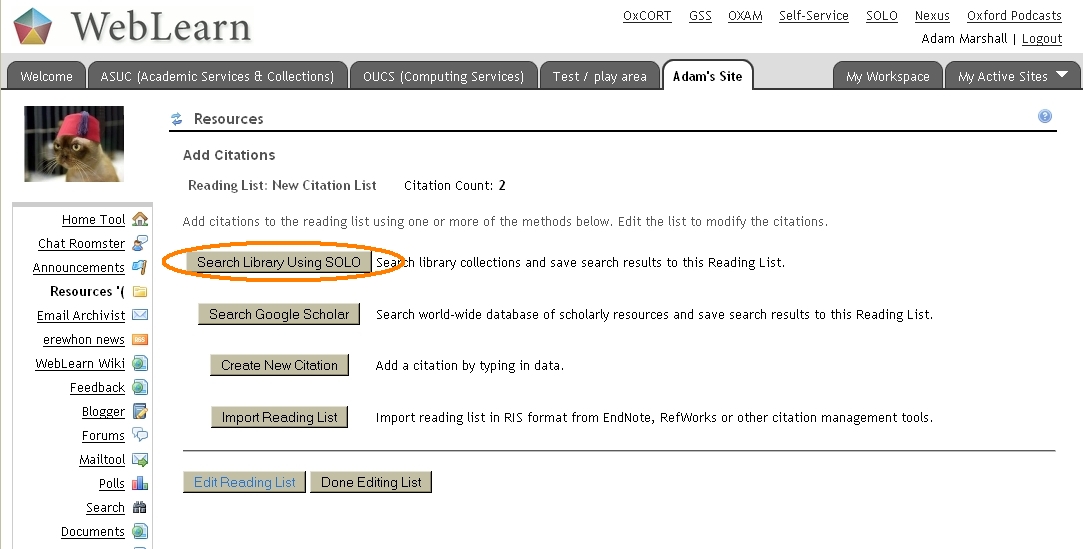
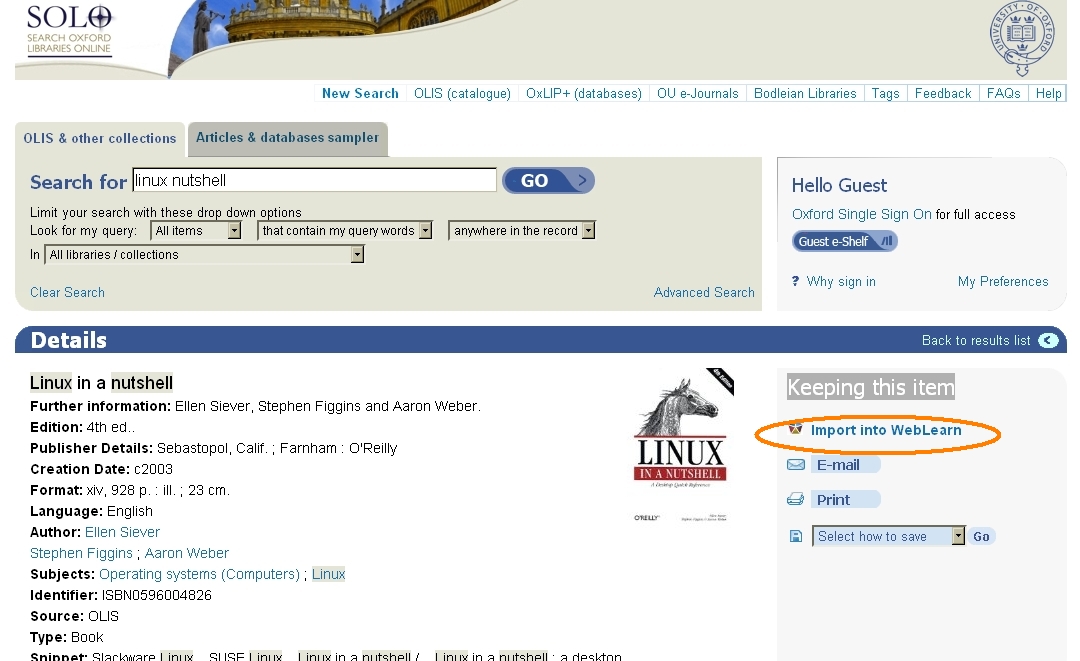
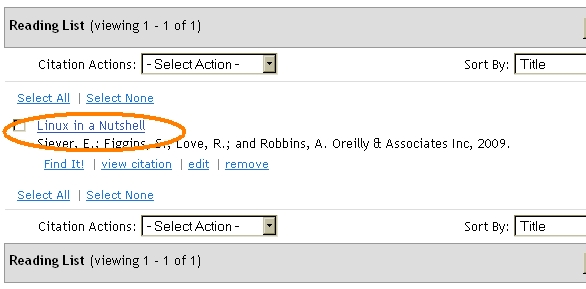
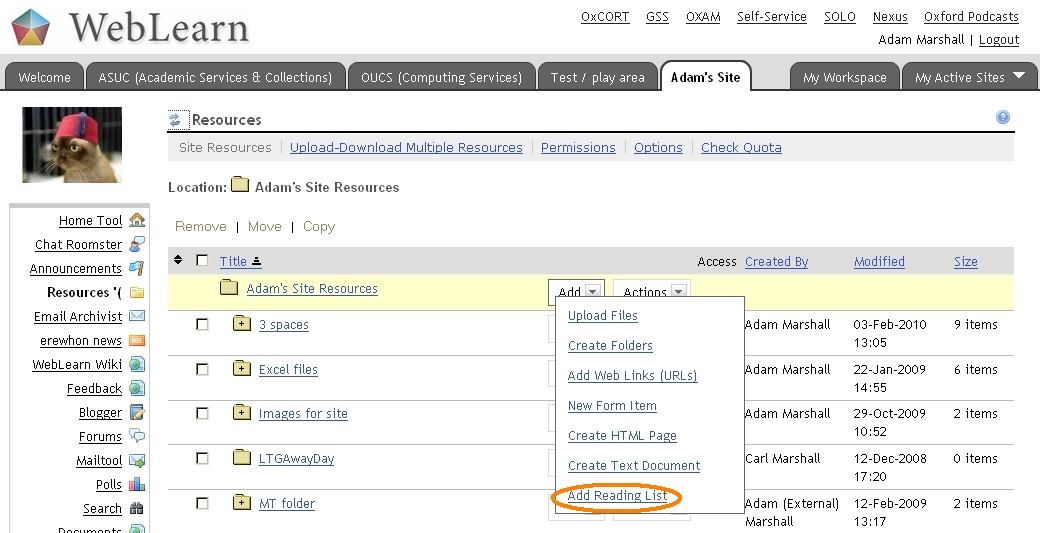
We have made mock-ups of how we think the integration will look.

1 Create the reading list within the Resources tool

wl-create-rl

2 Initiate a search of SOLO

wl-search-solo

3 Search for “Linux in a Nutshell” and import into WebLearn

solo-import-into-weblearn-1

or

solo-import-into-weblearn-2

4 The item will now appear in a reading list

wl-nutshell-in-rl

Links

  1. Sir Louie website
Posted in e-learning, Sakai, WebLearn | Tagged , , , , , | Leave a comment

New Version of WebLearn Released (v2.6-ox4.0)

Apologies for the delay in this announcement!

New WebLearn was upgraded on 20th July 2010,  to 2.6-ox4.0

New Facilities – The Highlights

    1. Users can now become members of ‘Joinable’ sites by simply visiting the site – previously one had to join via the ‘Memberships’ tool in ‘My Workspace’
    2. ‘Tasks, Tests and Surveys’ has been renamed as ‘Tests’
    3. New ‘Survey Beta’ tool added – this tool was previously called ‘Evaluations’ – please note that there are still a few issues with this tool hence its Beta status
    4. oAuth‘ authentication now available for files stored in ‘Resources’
    5. IMS Content Packages of less than 60MB can now be uploaded into Resources via ‘Site Info’ > ‘Import From File’, please note that this is now the preferred export route from Old WebLearn
    6. The ‘fairuse’ copyright link has been changed to point at the JISC Legal website
    7. A number of bug related to the Survey Beta (Evaluations) have been fixed. The release notes contain a more detailed list of Survey Beta bug fixes.

      Deprecated Tools

      Two tools, ‘Blogger’ and ‘Presentations’ will soon not be supported by the Sakai community therefore we have taken the decision to remove them from the tools list.

      More Information

      There is a separate document containing a more detailed list of changes.

      Posted in Sakai, WebLearn | Tagged , , , , , , | Leave a comment

      Reading lists are set to improve

      Sir Louie Logo

      The Sir Louie Project

      Sir LouieSystem for Integrating Reading Lists within the Oxford University Information Environment.

      This project will enhance two academic and administrative systems, the WebLearn (VLE), (based on the Sakai open source platform,) and the University’s library search interface SOLO, (based on Ex-libris Primo,) in order to provide much improved experience for both students and lecturers in the area of reading lists.

      The planned improvements target the searching of library catalogues and the displaying availability information with a reading list.

      Development work on both systems will enable the SOLO search interface to be invoked from within WebLearn’s reading list tool, (also known as the Citations Helper,) and be used to find items to be sent back to the VLE for automatic inclusion in the reading list. The data will be transferred using the standard OpenURL encoding.

      In addition, the project will develop a method of augmenting all reading lists with availability information when they are displayed in WebLearn.

      This is achieved by ‘hiding’ OpenURL COinS meta data for each item within a reading list. This in-page data can then be used to determine current availability once the page has loaded (using DLF ILS-DI and / or DAIA).

      The result is that the reading list will automatically contain links to ‘full text’ versions of journal articles, a list of (Oxford University) libraries where the item can be found and links to on-line stores where the item can be purchased.

      The COiNS meta data can also be used to enable existing Open Source software such as Zotero and LibX (a browser plug-in) to interact with Citation Helper reading lists.

      This kind of integration between Oxford’s VLE and Library systems was formally requested of the University by the Oxford University Student’s Union (OUSU) in order that students can save valuable time when dealing with their reading lists.

      The project has been funded by JISC within their Flexible Services Delivery programme and runs until the end of 2010.

      Sir Louie Project Team, 11-Aug-2010

      Useful Links

      1. SOLO – Oxford library search
      2. Primo – software underpinning SOLO
      3. WebLearn – Oxford VLE/LMS
      4. Sakai – software underpinning WebLearn
      5. The proposal – budget removed
      6. JISC FSD – funding body
      7. OpenURL (NISO z39.88)
      8. COiNS – Context Object in Span
      9. DLF ILS-DI Integrated Library System Discovery Interface
      10. DAIA – Document Availability Information API
      11. Zotero – Open Source reference management software
      12. LibX – plug-in for Firefox and Internet Explorer
      13. Sir Louie Blog
      14. Owen’s blog

      The Sir Louie logo photo is used under the Creative Commons Licence and was taken by the longhairedgit, source: http://www.flickr.com/photos/16180154@N07/4791812979

      Posted in e-learning, Sakai, WebLearn | Tagged , , , , , , | Leave a comment

      Possible Turnitin Outage Sept 4-5

      Just in from iParadigm

      There will be a special maintenance window for the Turnitin service on September 4th, 2010 in conjunction with our launch of Turnitin2.

      Schedule

      1. Confirmed Maintenance Start Date: Saturday, Sept. 4 at 17:00 GMT
      2. Projected Maintenance End Date:  Saturday, Sept. 5 at 01:00 GMT

      User Experience

      All Turnitin services may be unavailable for all users during these times. For assignments due during this window, we recommend that instructors change the due date and alert their students. If you have any questions regarding this maintenance window, please contact our support team at tiisupport@turnitin.com for assistance. Turnitin utilizes maintenance windows to ensure a secure and reliable service.

      More Information

      For more information about Turnitin2, visit our “What’s Coming” page:

      http://cts.vresp.com/c/?iParadigmsLLC/754c7a9c46/40082b0258/1a1f39c59e

      We thank you for your patience during this time.

      Posted in e-learning, Turnitin, WebLearn | Tagged , , | Leave a comment

      Joining sites

      We have made recently improvements to the process of becoming a member of a Joinable site.

      What is a joinable site?

      A: If you are not ‘manually’ adding members to your site then you should ensure that your site is joinable. This allows users to both join and leave at will.

      Site Participants are included notifications and announcements so there are benefits to joining a site.

      How do I get people to join a site?

      A: If a site is set to be Joinable (either during site creation or via Site Info > Manage Access) and the site is only available to Site Participants, (in other words is not available to Anyone nor Logged in users,) then if a user tries to visit the site they will now be presented with an option to join.

      If the site is available to Anyone and / or Logged in users then (obviously) they will be able to visit the site anyway and because of this they will not be asked if they wish to join. In this situation it is a good idea to add a prominent “Click here to join this site” link on the home page. The URL is constructed as follows

      https://weblearn.ox.ac.uk/portal/join/<<siteid>>

      where <<siteid>> is the long complex ‘site identifier’ that is generally hidden from the user interface.

      An easy way of finding out this identifier is to look at the ‘web address’ of the root folder in Resources. This is found via the Actions menu, click on Edit Details and then copy the web address from near to the bottom of the page. The <<site id>> is contained within the URL and looks like cc2c88fe-a0fe-44d6-0046-89493362b2ac.

      For this example the URL to join the site is:

      https://weblearn.ox.ac.uk/portal/join/cc2c88fe-a0fe-44d6-0046-89493362b2aa/

      There is also a manual for students to join sites:

      1. go to My Workspace
      2. click the Membership tool on the left
      3. on the Membership page, click Joinable Sites
      4. from the list of the Joinable sites, click on the site to join
      5. the user will now be a member of the site.
      Posted in Sakai, WebLearn | Tagged , | Leave a comment

      Develop ‘Learning Objects’ for free with GLO Maker

      GLO Maker is an authoring tool to design and develop learning objects (called ‘GLOs’).

      GLO Maker is a powerful and user friendly tool to create new learning objects, or adapt and repurpose existing learning objects.

      An author can prepare images, video clips, audio clips and then build activities by combining these resources. For example, display an image of a person, building, place or other artefact, incorporate audio commentary from experts, and build a quiz to text student understanding of the artefact.

      Such learning objects can easily be imported and delivered via WebLearn.

      The tool was demonstrated at the ‘Learning Design Bash’ held at OUCS on Friday 16 July, hosted by JISC.

      Links

      1. The main GLO Maker site is: http://www.glomaker.org
      2. The GLO Maker community site is: http://glomaker.wetpaint.com/
      Posted in e-learning, Web, WebLearn | Tagged , , | Leave a comment

      Change to WebLearn SLD

      The WebLearn Service Level Description is just about to be updated.

      The main changes are the withdrawal from the ‘Secondary Tools’ list of the Blogger and Presentation tools and the addition to the ‘Secondary Tools’ list of the Survey Beta tool. (Survey Beta was originally called the Evaluations tool.)

      Keen observers will also note that the Tasks, Tests and Surveys tool has been renamed to the Tests tool.

      1. http://www.oucs.ox.ac.uk/internal/sld/weblearn.xml
      Posted in WebLearn | Tagged , | Leave a comment

      Times Higher article about a “Plagiarism tariff”

      There’s an interesting article in the Times Higher (17 June 2010) which proposes a method of ‘scoring’ plagiarism. The article provides three examples of plagiarism, how these offences are scored, and how a decision on censure is reached.

      As the Times higher puts it:

      Academics in the UK have drawn up a national tariff covering penalties for student plagiarism, which could be adopted as a worldwide system for dealing with offenders.

      Studies in this area have found high levels of inconsistency in the penalties universities employ to punish students who are found guilty of copying, with wide variations between, and even within, institutions.

      Now researchers from the advisory service plagiarismadvice.org have created a points-based system designed to act as a sector-wide “benchmark”. Setting out a range of penalties from informal warnings to expulsion, it allows staff to calculate a score for the seriousness of the offence and use this to select an appropriate penalty.

      Links

      1. http://www.timeshighereducation.co.uk/story.asp?storycode=412088

      The Plagiarism Reference Tariff is based on a national research consultation exercise on behalf of plagiarismadvice.org and the full report and tariff metric is available for download from:

      1. http://www.plagiarismadvice.org/
      Posted in e-learning, Turnitin, WebLearn | Tagged , , , | Leave a comment

      Formal submission of Essays using WebLearn – pilot

      Online submission of coursework significantly enhances the student experience, allows work to undergo automatic plagiarism analysis, and facilitates the distribution of submissions to departments and examiners.

      These are the preliminary findings of an online submission pilot being run by Student Administration (in conjunction with the WebLearn team) during Hilary and Trinity Terms 2010.  The pilot involved students on three taught Masters programmes submitting some coursework electronically to WebLearn rather than delivering hard copy to a desk in the Exams School building.

      Students have been very positive about the process which has enabled them to submit at all times of day and from locations all around the world; departmental administrators have also welcomed this approach to submission.

      A number of technical and administrative developments have been identified which will enable wider adoption of online submission by interested departments and faculties. Further information should be available in Michaelmas Term 2010.

      [Thanks to Deb Sanders for the above text.]

      Posted in WebLearn | Tagged , | Leave a comment