Creating your own web page with embedded media players

As a maintainer or contributor, you can easily create a web page with embedded media players in WebLearn.

Here is how:

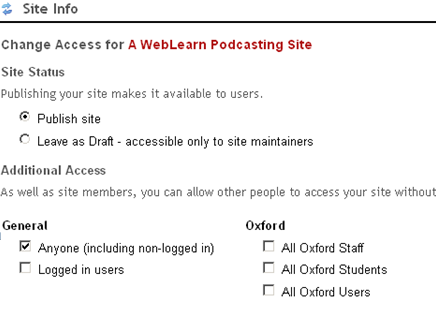
1. Create a public site. Use Site Info > Manage Access to grant access to ‘Anyone’.

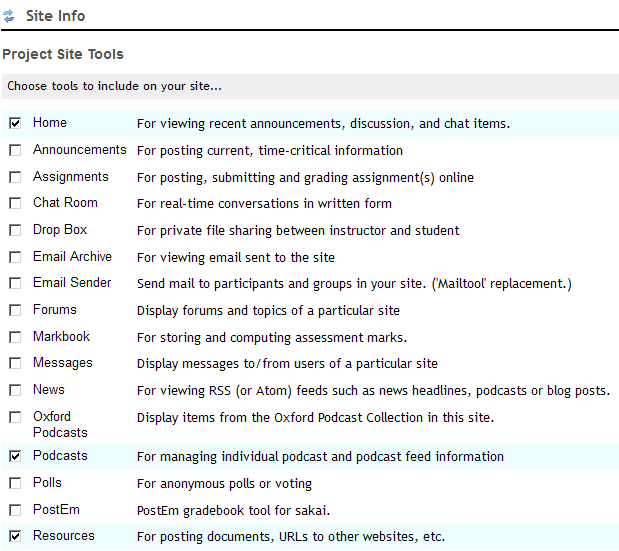
2. If they are not added in your site already, add the following WebLearn tools: Podcasts and Resources

  • Go to Site info > Edit Tools
  • Tick the check box next to “Podcasts” and “Resources”
  • Scroll down to the bottom of the page and click “Continue”
  • On the next page, click “Continue” and “Finish” to add the two tools in the site menu

2. Add your media file via the WebLearn Podcasts tool

  • Click Podcasts in the site menu
  • Click the “Add” link
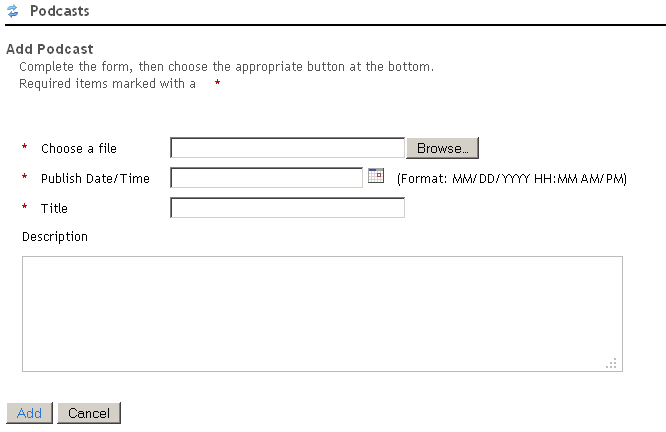
  • On the ‘Add Podcast’ page, browse your media file on your local computer, set the publish time, and provide a descriptive title.
  • Once you have complete the form, click the ‘Add’ button to add the media file to your podcast collection in WebLearn

4. Publish your podcasts

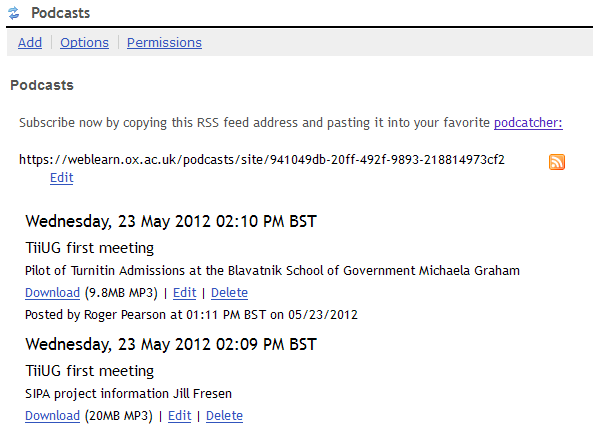
  • To see your podcast collection, click on the ‘Podcasts’ tool. Clicking the RSS button (bright yellow square shape) to generate the URL of the RSS feed

  • On the RSS feed page, copy the RSS feed URL in the browser’s address bar, which is similar to https://weblearn.ox.ac.uk/podcasts/site/early-adopters
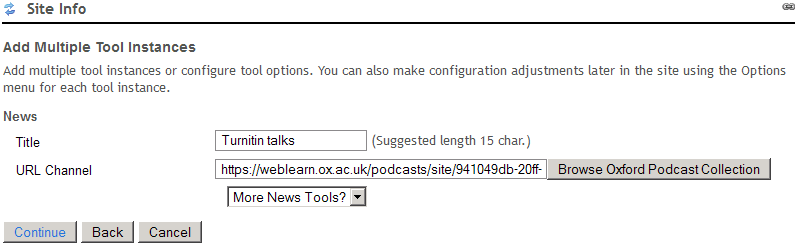
  • Add the ‘News’ tool via Site Info.   Replace the default Title with a descriptive one. In our case, we put ‘Turnitin talks”.  For the URL channel,  paste the URL copied early and click the ‘Continue’ and ‘Finish’.

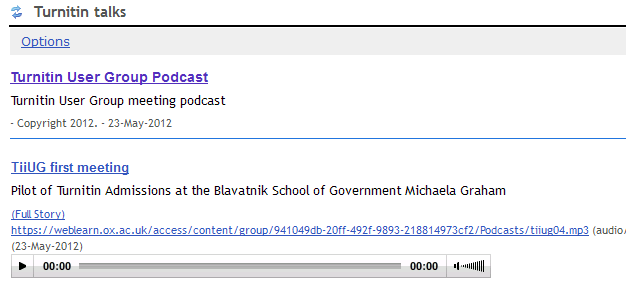
  • Now you have successfully created your own podcasting page with embedded media players


If you want to use the web page outside of this WebLearn site, e.g. departmental website, your own blog, then you need to make the whole site public. Note, this will make all other tools available to public.

  • Go to Site Info > Manage Access
  • Under “Additional Access”, tick the check box next to “Anyone (including non-logged in)”

Posted in e-learning, WebLearn | Tagged , | Leave a comment

WebLearn improvements after the upgrade from v2.6 to v2.8

There have been a number of new features and improvements in WebLearn as a result of the recent WebLearn upgrade. Three new features at site level:

Short URL

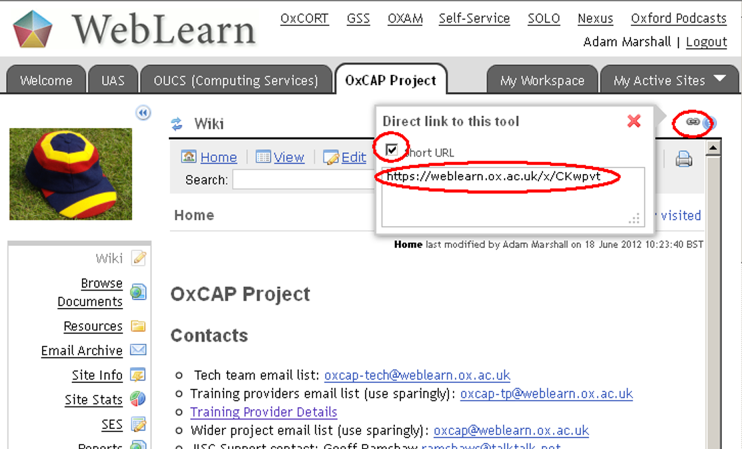
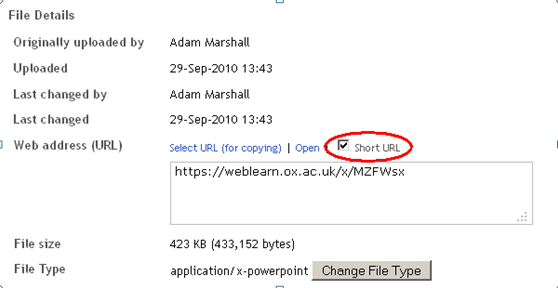
If you click on a link icon on a page, a pop-up window appears showing the URL of the page/tool.  In the pop-up window, click the check box next to ‘Short URL’, the URL is shortened.   Then you can link to the tool/page using the short URL.
Site templates

Instead of creating a site from scratch, you can create your site based on a number of templates.  The first three of six templates are ‘Template for tutor’, ‘Template for lecturer’ and ‘Template for content’.  It is hoped that the templates will help with commonality and consistency across sites.  More details of the templates.

Collapse site menu

By clicking on double arrow icon, the site menu will be collapsed to show tool’s icons only.  This will provide more space for the content.

Apart from the overall improvements, a number of tools are also enhanced.

Forums

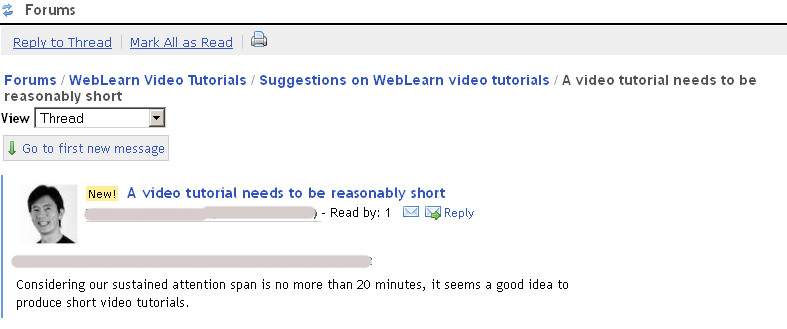
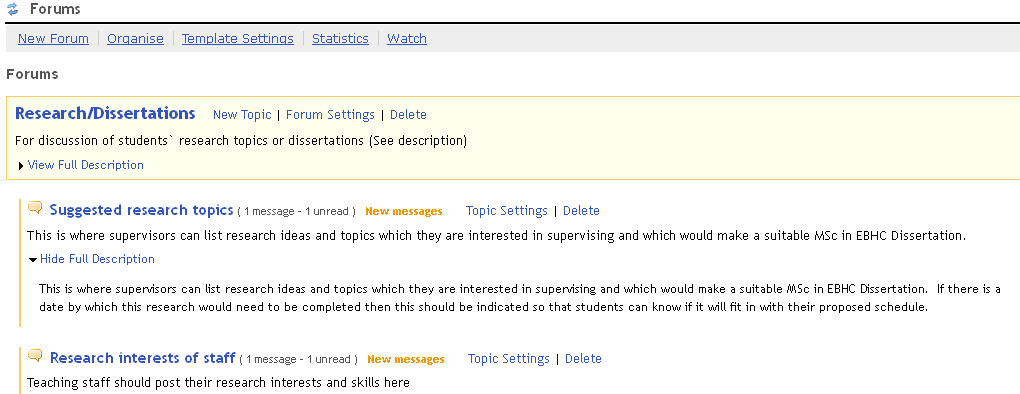
New features in Forums include an improved User Interface, sortable threads,  displaying author photos, setting availability for forums or topics, and linking to a message directly.

  • User interface: it is now much easier to distinguish Forums and Topics
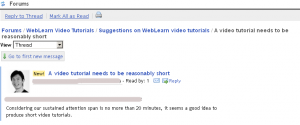
  • If you have already uploaded your photo into ‘Profile’ via ‘My Workspace’ your photo will be displayed alongside your posts.  People can click on your photo to see further information that you added in your profile: personal summary, contact information, etc.
  • In the Forums and topics setting, you can now set open and close dates for forums and topics respectively.
  • You can link directly to a message via a “Copy Link” button.
  • A count of how many people have read a message is now displayed

Resources

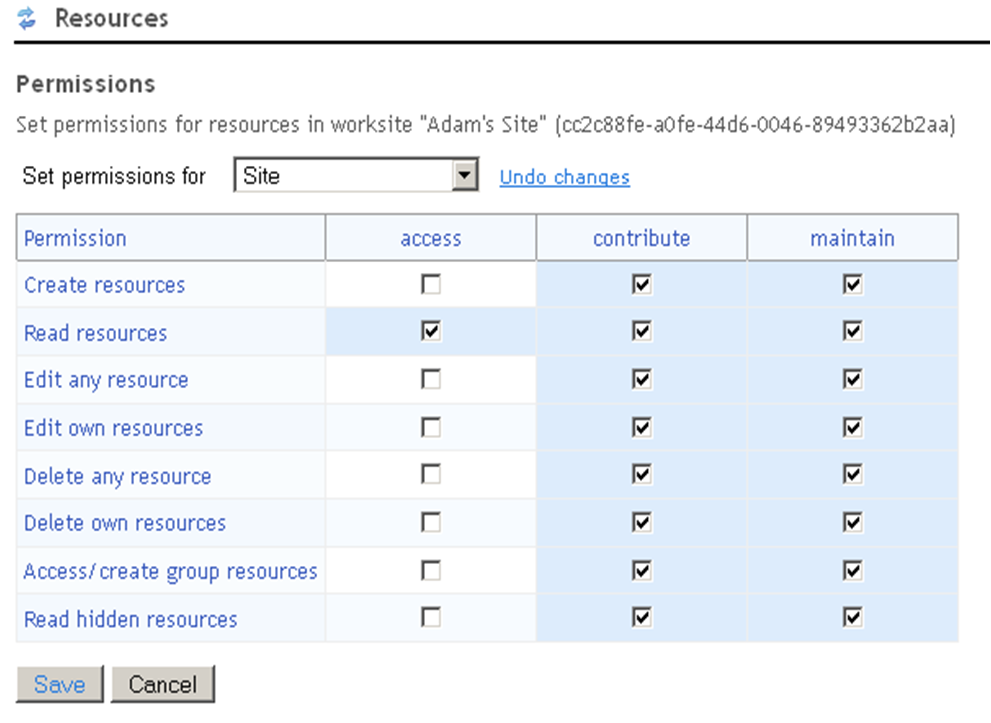
Two major changes to Resources are the short URL facility and a better explanation of permissions.

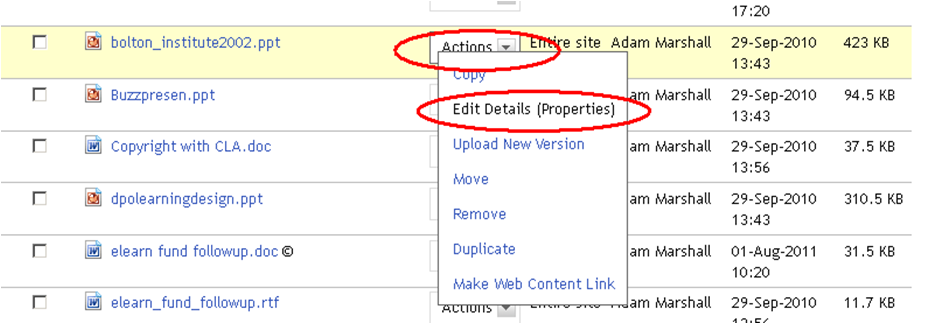
  • Short URL facility: you can find the short URL of a file or a folder via Actions -> Edit Details – > Web address
  • Permissions interface enhanced:  permissions in a number of tools including Resources are more descriptive and easier to understand.
    .

Sign-up

A large number of new features have been developed in the Sign-up tool.   For example, adding new ‘Categories’ field, enabling automatic creation of internal subgroups based on sessions, and manually emailing attendees.

  • New ‘Categories’ field: you can now tag your events, e.g. seminar, tutorial or meeting.  The categories appear in a column in a table where all meetings listed.  You can sort the categories by clicking the column heading: category.
  • Terms are translated from American to British English: e.g. ‘biweekly’, has been changed to ‘fortnightly’.
  • Internal subgroups can be created based on session attendees who choose the same time-slot.
  • Group synchronisation: If ‘Create groups for timeslots’ is ticked (see above), a group name appears under ‘Manage subgroups” in Site Info.  However, it initially shows zero member.  As participants sign up, cancel, or are moved into the participant list from the waiting list you need to manually click on the ‘Synchronise’ button to update the group members.

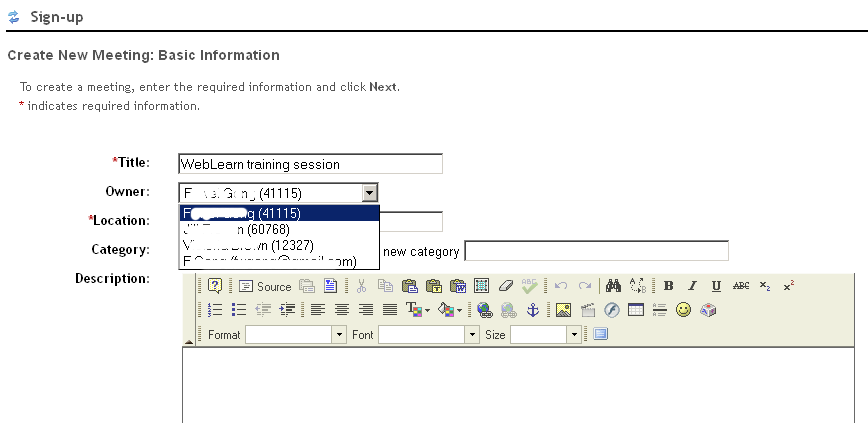
  • Change organiser: a sign-up session can be assigned to any maintainer or contributor in the site.
  • Attendees can choose more than one time slots in a multi-slot meeting.
  • Recurring meetings in a series can be deleted at once.
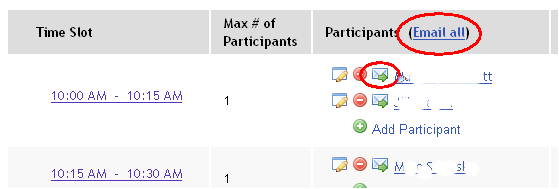
  • You can now manually email all or individual attendees.
  • You can prevent cancellation is disabled by attendee after closure.

.

Profile

The new profile tool comes with a number of new features.   It is much easier to add photos to your profile.  The improved privacy settings enable you to specify what information in your profile is shareable. In addition,   it has been integrated with a number of social networking tools including Facebook, Twitter, Linkedin, Skype and MySpace.

Schedule (Calendar)

Calendar is a rather powerful tool which allows you to bring certain external calenders into WebLearn as well as exporting WebLearn calendars to other calendar tools such as MS Outlook.

The improved Calendar tool enables you to generate a private URL of a WebLearn site calendar, and then use this URL to overlay view this WebLearn calendar events in another calendar tool, e.g. MS Outlook.   To better explain the functionality of the Calendar tool,  more descriptive terminologies have been used: e.g. Merge (internal calendars), Import, Export (public URL), Merge (external calendars), and Subscribe (generate private URL).

Email Sender (formerly Mailtool)

As a new tool, it has not only replicated the functionality of old tool, but also brought improvements. For example, Email Sender sits with the tool under the same category: Email Archive.  A quirk of old tool, sub-groups, has been removed.
Posted in WebLearn | Tagged , , | Leave a comment

Old WebLearn (Bodington) will be decommissioned on 18 Sept 2012

Old WebLearn (aka Bodington) will be decommissioned on the morning of 18 Sept 2012. The service will be unavailable after that date.

If you still have useful material stored therein then you should archive it as soon as possible. There are a multitude of guides to help you do this, see: http://www.oucs.ox.ac.uk/weblearn/index.xml?ID=name#oldwl

We are very happy to answer individual questions or give face to face help about archival or migration, simply contact us via weblearn@it.ox.ac.uk .

Unfortunately it has not yet been possible to offer equivalent Group Management functionality in New WebLearn. We are hoping that we will be able to start work on addressing this deficiency later on this year. We apologise for the delay in this area.

Posted in Migration, Old WebLearn, WebLearn | Tagged | Leave a comment

How to create a ‘Webliography’

A lecturer or tutor may wish to create a list of links to useful web sites for their students. To encourage active learning, students can contribute to building the list, which will grow dynamically and be a useful resource for future student groups. 

The lecturer could use the Web Content tool to create links to useful websites, but this can only be done by those with the maintain or contribute role, and it is not advisable to have a long list of Web Content links on the tools menu.

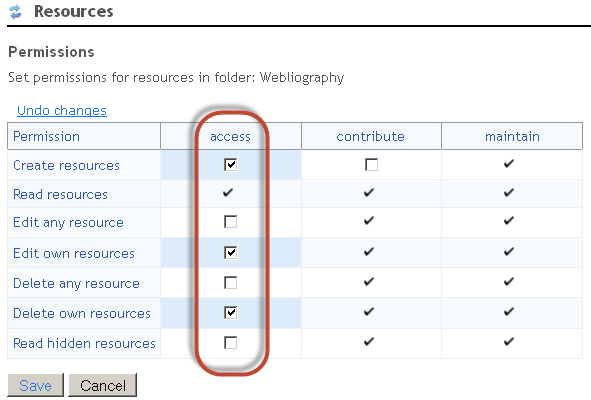
The links should have a title and a description, which is standard functionality in the Resources tool. In the Resources tool, there is the option to ‘Add a URL’. The idea is to create a folder called ‘Webliography’ in Resources, give the students the required permissions to create, edit their own links, delete their own links, and then make one Web Content link to the Webliography folder.

Here’s how to do it:

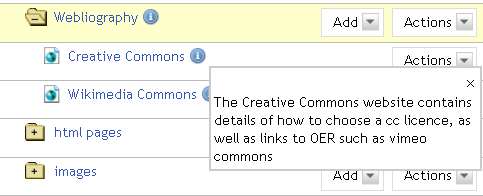
Create a folder called ‘Webliography’ in Resources. Use the ‘Add’ menu to add a few URLs, each with a title and description:


Grant the access role the required permissions on this folder only, using ‘Edit Folder Permissions’:

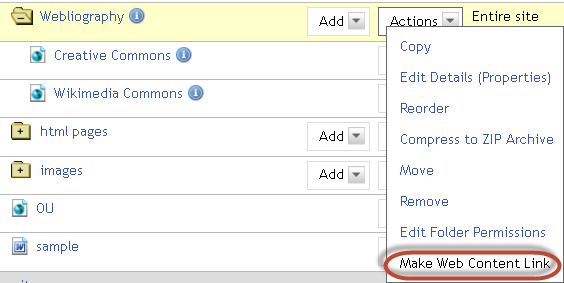
Alongside the folder, use ‘Make Web Content Link’ to create a link to this folder from the tools menu, and call it ‘Webliography’:


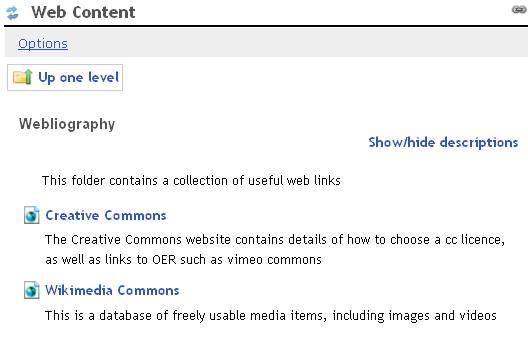
 This is what it will look like when a student clicks on the Webliography link on the tools menu:

The lecturer and students can add URLs in the Resources folder, with titles and descriptions, et voila, it’s a dynamic and growing list, with only one link on the tools menu.

Posted in WebLearn | Leave a comment

Copyright in a VLE

Mike Heaney from the Bodleian Libraries addressed the WebLearn User Group on the topic of copyright, with particular attention to making learning materials available in WebLearn.

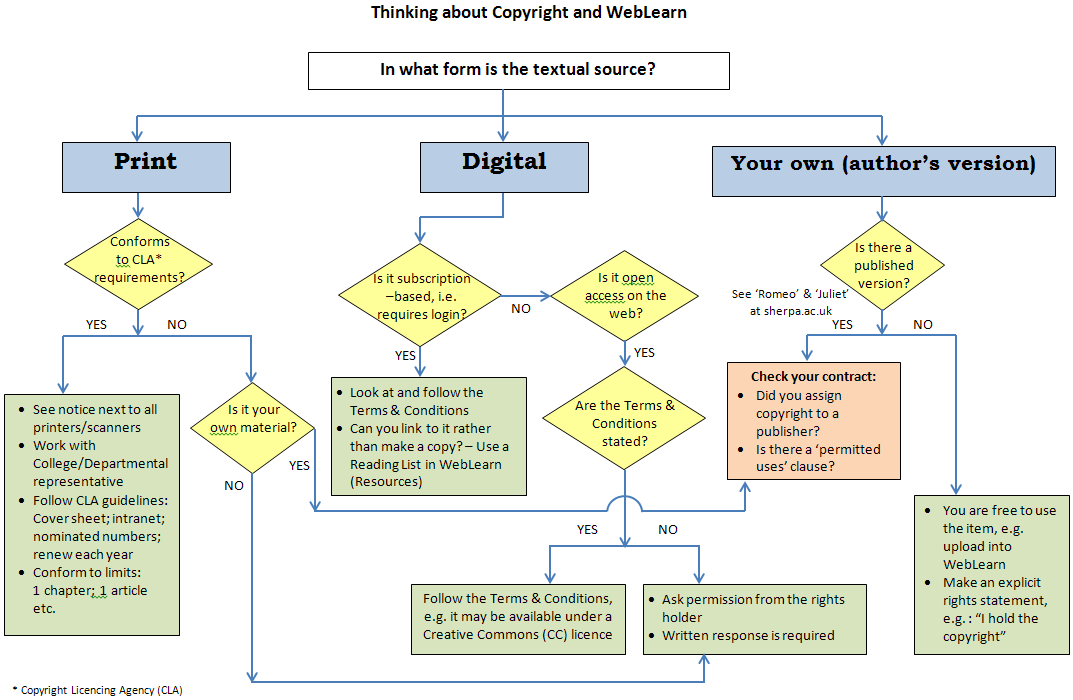
After the talk, Jill and Mike worked together to produce this flowchart summarising the issues to consider and possible routes to take:

flowchart of copyright process

The message is:

  • Even if an article is your own work, you may have signed away the copyright
  • Always check the terms and conditions, or failing that, request permission from the rights holder
  • Consider releasing your own material under a Creative Commons licence to make the usage conditions clear to others

Useful links:
Mike Heaney’s slides – WebLearn User Group presentation, July 2012
Mike Heaney’s audio commentary to accompany the slides
Copyright support site in WebLearn

Posted in WebLearn | Leave a comment

NDORMS case study: WebLearn with ‘green fingers’

An organic approach to building an intranet with WebLearn
Case study of the Nuffield Department of Orthopaedics, Rheumatology and Musculoskeletal Sciences (NDORMS)

Wulf Forrester-Barker, IT Manager at NDORMS has discovered that WebLearn can be stretched far beyond the expected applications of a Virtual Learning Environment. He has used various WebLearn tools to tackle a number of requirements in his department, including:

  • MSc in Musculoskeletal Sciences: creating a site that supports current students and shares some relevant information with prospective students
  • Athena SWAN Charter for Women in Science project: running an anonymous survey of more than 50 questions for all members of the department (Survey tool)
  • Sonographers at remote sites: testing their skills in interpreting subject-specific images and videos (Tests tool)
  • Room and resource booking: Providing a way for staff to book seminar, meeting and clinical appointment rooms, or equipment (Schedule tool)
  • Health and Safety: making information available in a read-only format and tracking usage (Resources and Site Stats tools)
  • Supporting a clinical trial: providing information including an online calculator for the ‘Oxford Shoulder Score’ for many non-Oxford participants, mainly in the NHS community (Web Content tool)

Wulf’s tops tips for success
1. Don’t abandon a site too quickly. Some aspects have taken a long time to germinate before establishing themselves as useful tools. It took over a year from the suggestion that WebLearn could provide certain solutions to the point where these became embedded across the department.
2. Seize the opportunity to try out new tools. They might not work exactly as expected in some of the places you deploy them, but they won’t work at all if you never try them out in your site. Wulf attended the Surveys course several months before he found opportunities to apply that knowledge.
3. From time to time, weed out areas or tools that are not being used. This brings more light to the areas that are healthy. You can move things around too, although do warn your users first!

 Useful links
PDF case study (https://weblearn.ox.ac.uk/x/pfIyNq) on WebLearn Guidance site
Slide presentation (https://weblearn.ox.ac.uk/x/MX0FCh) at WebLearn User Group
Audio commentary (https://weblearn.ox.ac.uk/x/RcSvYy) to accompany WebLearn User Group slide presentation

Posted in WebLearn | Tagged | 1 Comment

WebLearn unavailable on 21 August 2012 7-9am

It is planned to upgrade WebLearn to version 2.8-ox2 on Tuesday 21 August 2012 7-9am. There will be no service during this period.

Posted in WebLearn | Tagged | Leave a comment

WebLearn User Group 2pm, 10th July 2012

Please come along to the next meeting of the WebLearn User Group, to be held at OUCS on Tuesday 10 July from 2 to 4pm, followed by cream tea.

Booking is required: http://www.oucs.ox.ac.uk/itlp/courses/detail/TOVD

More details: https://weblearn.ox.ac.uk/info/eas

Adam Marshall will enlighten us on all the great improvements in Sakai 2.8, Ed Long will tell us about the Blavatnik School of Government’s iPad app and WebLearn customisation project, Wulf Forrester-Barker will undertake a bit of green-fingered WebLearn gardening, and Mike Heaney will share his knowledge about copyright do’s and don’ts in the electronic environment – a last chance to hear Mike speak and learn from his experience before he retires.

We were going to have only two guest speakers and finish earlier, but we have such great talks lined up that we will stick to the usual 2-hour format followed by tea and cream scones.

We hope to see you there.

Posted in e-learning, Sakai, WebLearn | Tagged , , | Leave a comment

WebLearn and Turnitin information sessions for staff

Are you planning staff induction or preparation sessions for the new academic year? You are? Then why not consider including a WebLearn or Turnitin information session in your schedule.

The central WebLearn team is able to offer free information or training sessions in your division, department or college for academic and/or administrative staff. Such sessions can be customised according to your needs and preferences. A session could take the form of a 15 minute overview during a scheduled staff meeting,  a short (30-60 min) presentation and demonstration, or a longer (hands-on) session for staff to start building their own sites in WebLearn, or try out the Turnitin plagiarism awareness software.

Turnitin includes two other products, GradeMark (online marking and commenting) and PeerMark (student peer review) which we are currently piloting – interested parties are invited to participate in these pilot projects.

Regular courses (free of charge) are offered by the IT Learning Programme.

Book a place or express an interest in a particular course at http://www.oucs.ox.ac.uk/itlp: look in the course catalogue under ‘W for WebLearn’ or ‘P for Plagiarism’.

There is one student-focused course called ‘Plagiarism: How to avoid it (for students)’; otherwise all regular WebLearn and Turnitin courses are aimed at staff members.

We plan to offer new ‘byte-sized’ tool-focused sessions during Michaelmas Term, which you will also find under the IT Learning Programme, closer to September.

Please contact weblearn@oucs.ox.a.uk or turnitin@oucs.ox.ac.uk to request a customised session for staff members, or with any questions you may have.

Keep up to date by joining the WebLearn and Turnitin User Group sites at https://weblearn.ox.ac.uk/info/eas and https://weblearn.ox.ac.uk/info/plag/tiiug respectively.

Posted in e-learning, Turnitin, WebLearn | Tagged , , , , | Leave a comment

WebLearn unavailable on 9 August 2012 7-11am

The COUS2 router in OUCS is nearing the end of its life and will be replaced between 7-11am on 9 August 2012. This means that WebLearn will be unavailable between these times.

Many apologies for the inconvenience.

Photo credit: http://www.flickr.com/photos/catzrule/4904720049

Posted in WebLearn | Tagged | Leave a comment