Subscribing to WebLearn calendars using Outlook

As a WebLearn user, you may wish to make your WebLearn calendar visible in other calendaring applications such as Outlook, Thunderbird (with the Lightning add-on), Google or iCal (Mac).

What is a calendar subscription?

Subscribing to your WebLearn calendar means that a dynamic ‘link’ is created between it and another calendaring application. All changes made to the WebLearn calendar will automatically be reflected in the ‘other’ application which has subscribed to it. You can subscribe to a WebLearn calendar that is located in any WebLearn site.

How secure is my WebLearn calendar URL?

The calendar URL that is generated by WebLearn is a private (secure) URL; there is little chance of anyone else being able to guess what the URL might be.  If you think the URL might have become compromised, you can go back into the WebLearn Schedule tool and delete and/or regenerate it.

Subscribing to a WebLearn calendar

There are three steps to the process of subscribing to a WebLearn calendar:

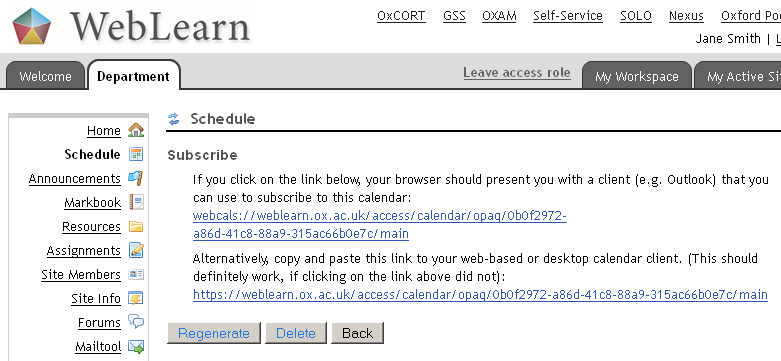
  1. Generate the calendar’s private URL from the WebLearn Schedule (Calendar) tool.
  2. Either:
    • Click on the webcal:// format of the URL, (recommended) or
    • Copy the http:// format of the URL, in order to paste it into the other calendaring application.

    The webcal:// format of the URL provides other calendaring applications with the hint that “this is a calendar”, so that they can handle it in the appropriate way.

    The http:// format of the URL should work for nearly all calendaring applications and for most computer configurations; however the route is slightly more complicated. Using this format means that you copy the URL with the intention of pasting it into the other calendaring application using an option there such as “Add calendar from the Internet” (or similar).

  3. Subscribe to the WebLearn calendar from the external calendaring application.

How to do it

Step 1:

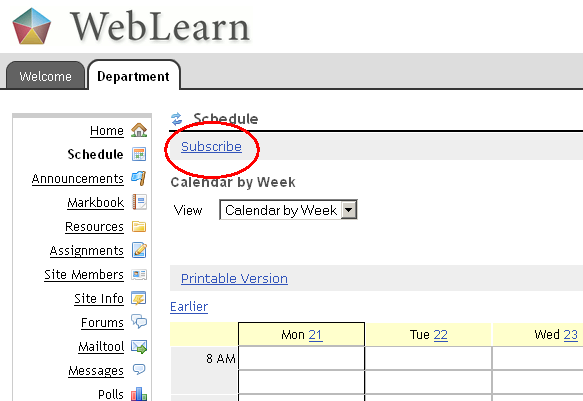
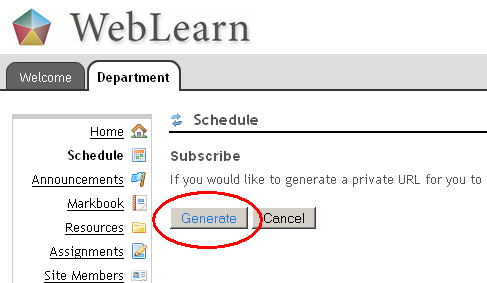
Login to WebLearn and access the site and Schedule (Calendar) that you wish to subscribe to, click on ‘Subscribe‘ and then ‘Generate‘ to generate the calendar URL.

Step 2:

Either click on the webcal:// format of the private URL, or copy the http:// format, depending on circumstance.

Step 3:

  • If you clicked on the webcal:// format of the URL, then follow the automated process, accepting all the options offered.
  • If you copied the http:// format of the URL, then open your other calendaring application in the usual way.
    • Find the option to “Add calendar from the Internet” or “Create a new calendar” or “Add calendar by URL” (or similar).
    • Paste the URL into the location window or URL box provided.

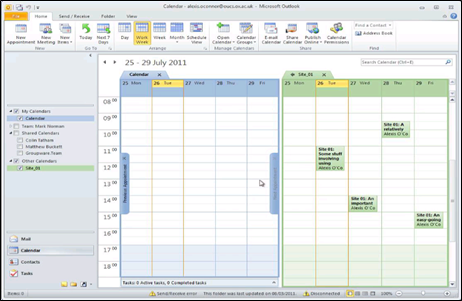
Your WebLearn calendar is now displayed alongside the events in the other application:

You can choose to show/hide or maximise/minimise your WebLearn calendar, depending on the functionality of the other application.

Further Information

Posted in Sakai, WebLearn | Tagged , , , | Leave a comment

Teaching with Sakai webinar 21/11/11 at 8pm

You are invited to register for the upcoming Teaching with Sakai webinar series: Wikifolios, Wikiflections, & Exams for Online Participation, Understanding & Achievement Monday, November 21, 2011 8pm (3 pm EST; noon PST)

Daniel Hickey (Indiana University – Bloomington) is teaching fully online graduate education courses.  He aligns three learning practices using IU’s OnCourse version of the Sakai course management system:

  • “Wikifolios” and wiki commenting foster participatory culture around disciplinary ideas
  • “Wikiflections” provide efficient formative and summative assessment of understanding
  • Timed online exams support external accountability and document course improvement

This webinar will illustrate how these practices are used in his Cognition & Learning in Education course.  It will also introduce the underlying “Designing for Participation” model and point to other faculty using this model in undergraduate Telecommunications and Freshman Composition courses.

Teaching with Sakai Webinar Series

The Teaching with Sakai webinar series highlights effective teaching practices using Sakai.  Each webinar in the series begins with a 20 minute presentation followed by facilitated discussion.

We hope to see you online!

Kim Eke, University of North Carolina-Chapel Hill

Jon Hays, University of California-Berkeley

Kate Ellis, Indiana University-Bloomingon

Posted in e-learning, Sakai, WebLearn | Tagged , | Leave a comment

Upload Problems with Safari on a Mac

We have applied a patch which we think addresses this problem

We think recent versions of Safari (and probably Chrome) on a Mac have a bug that is preventing files from being uploaded. This is affecting the Assignments tool (and Resources, etc.) and is stopping people from uploading essays.

Until we have had a chance to try out  a fix, it would be very sensible to recommend that Mac users try to use Firefox  with WebLearn.

For the more technically minded: https://jira.sakaiproject.org/browse/SAK-17255

Posted in Sakai, WebLearn | Tagged , , | Leave a comment

Accessing WebLearn via Mobile Oxford: Wed 16 Nov, 12:30-13:30 at OUCS

Did you know that you can have students complete a quick quiz during a lecture using their mobile phones and instantly see and discuss the results?

Did you know that students can use their mobile phones to receive course announcements, sign up to a tutorial or seminar, listen to a podcast on the train, or access library, weather and travel information?

Come and attend this one-hour session which demonstrates the award-winning Mobile Oxford platform (m.ox.ac.uk)  and a selection of WebLearn tools that can be accessed via a mobile device. Bring your internet-enabled mobile device and try it out for yourself.

Topics:

  • Overview of Mobile Oxford
  • Demonstration of WebLearn tools available via Mobile Oxford
  • Practise using some WebLearn tools via Mobile Oxford

Booking is required: http://www.oucs.ox.ac.uk/itlp/courses/detail/TOVJ

Venue: OUCS, 13 Banbury Rd, Oxford OX2 6NN

When: Wednesday 16 November, 12:30-13:30

Posted in e-learning, Sakai, Web, WebLearn | Tagged , | Leave a comment

Supporting Institutional Practice for feedback and Assessment (SIPA) Project

The WebLearn team is investigating, promoting and supporting the use of the external Turnitin plagiarism detection and prevention service and allied products GradeMark (online marking and annotations) and PeerMark (student peer marking and assessment). Turnitin is integrated into the WebLearn Assignments tool (version 1) and system improvements will be recommended for the new Assignments2 tool in response to user feedback.

We will investigate current institutional processes and policy in terms of academic writing and plagiarism prevention and make recommendations in collaboration with the Education Committee, the Proctors’ office, the Oxford Learning Institute and the Bodleian libraries.

New training courses for academic staff will be developed, focusing on assessment tools for formative testing, interpreting Turnitin originality reports, tackling plagiarism in the internet age, and student training in information skills and academic writing practice. We will work closely with academic colleagues to identify models of good practice in assessment and feedback (to and from students), and support staff and students in promoting academic writing and study skills.

Posted in e-learning, Sakai, Turnitin, WebLearn | Tagged , | Leave a comment

WebLearn report: May 2011- Oct 2011

Period: May 2011- Oct 2011

Software

New WebLearn was upgraded for times between May and Oct 2011 – it now stands at v2.6-0x9.1. For more detailed information please looked at the relevant blog posts:

Old WebLearn became read-only on 27th September: ‘Floor Managers’ still retain create permissions but all other users have had such privileges removed.

We had hoped to move to Sakai 2.8 in October but it was not possible to do this in time.

Improvements & Bug Fixes

  • When sites are copied, a simple search and replace of references to the old site are replaced with references to the new site.
  • Many surveys improvements, eg, MSIE bugs fixed, My Scales now appear, the participant count now accurate, PDF report has been tidied up
  • Reading lists: notes and edition always appear, MSIE bugs fixed, availability information for more books now appears and all known problems stemming from introduction of Aleph now fixed.
  • Many Student Enrolment System (SES) improvements.
  • WebLearn-Nexus integration: ability to subscribe to non-public calendars in MS outlook (& other email clients)
  • Two factor authentication is now available (see later)

Training and Guidance

The revamped Guidance Site is just about ready to go live. The “Using technology tools” course ran last term but had poor attendance.

Usage

Old WebLearn usage is declining rapidly; most departments and colleges have now moved to new WebLearn. Usage of new WebLearn is increasing.

Figure 1: Use of old WebLearn
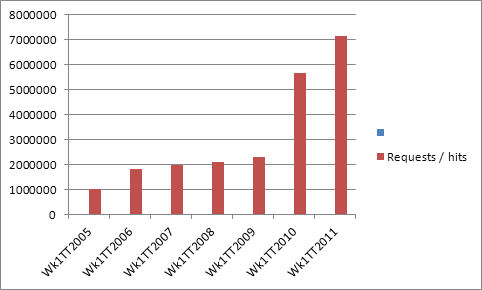
Figure 2: Pages Requests in Week 1 of Trinity Term (old + new WebLearn)

Projects

The Student Enrolment System II project started in February. This project builds upon the very successful initial phase and adds new features and for both students and administrators. It will finish at Christmas.

The OXAM Migration project runs from October to December, we will replicate and improve upon the incumbent OXAM service and deploy within WebLearn.

The Nexus-WebLearn integration project has made slow progress, next on the hit list is insertion of (Tutorial) sign-up events in personal calendars.

The WebLearn contribution to the Janus project has now finished: (two factor authentication in WebLearn) . It is now possible to use SAML to protect a WebLearn site with an extra “password” which is sent as an SMS. Work has been undertaken to ensure that there are no “back doors” into such a site, eg, webDAV access has been disabled.

The Blavatnik School of Government is expected to fund development work as part of their project to prove their students with an iPad App interface to their learning material.

The OxCAP Phase I project started in September and will run for 3 months – during this phase we will develop an implementation plan to be submitted for funding under phase II. This is a JISC funded initiative to expose data (as a public XML feed) about graduate training courses at Oxford. The implementation plan will also address local needs: we will bid to develop a new WebLearn tool  which will allow a search of all graduate skills training courses at Oxford to be performed; we will also develop a JavaScript library to allow basic searching on institutional websites. This project offers a solution to a problem that students (and staff) have been demanding for a while now; this project has the explicit backing of the PVC for Education and the Registrar.

No further work has been carried out on integrating with the forthcoming Oak Groups Store service.

Staff

A new member of staff, Roger Pearson, will start work in the WebLearn team on Nov 1st. he will be working on the “assessment and feedback” project known as SIPA, he will be reviewing and developing our support of Turnitin, investigating GradeMark and PeerMark (which will also be piloted), and recommending improvements to the WebLearn Assignments tool.

We should soon start advertising for a new WebLearn developer. This person will also work on the SIPA project but will also do general WebLearn development work.

Upcoming

  • Improvements to SES tool
  • Move to Sakai 2.8 (incl. collapsible LHS menus, academic network creation, improved WYSIWYG editor plus lots more)
  • Sign-up tool enhancements (categories, change organiser, auto create groups, prevent withdrawing when closed, better export)
  • The OXAM database of past exam papers will soon be housed within WebLearn.

Others

Adam Marshall attended and gave multiple presentations at the Sakai Conference in LA in June. Fawei Geng, Marc Savitsky and Adam Marshall attended and presented at the EuroSakai Conference in Amsterdam. Next year’s EuroSakai may be in Oxford and will be held in Feb 2012.

Jill Fresen attended and presented at the UAS conference.]Adam Marshall presented at the ICTF conference.
Posted in e-learning, Sakai, WebLearn | Tagged , | Leave a comment

WebLearn upgraded to version 2.6-ox9.1 on 18 October 2011

Detailed Release Notes – WebLearn – Version 2.6-ox9.1 – 18 October 2011

New WebLearn was upgraded on 18th October 2011 to version 2.6-ox9.1.

Improvements

  • Introduction of Private Calendar URLs so one can subscribe to non-public site calendars within MS Outlook and other email clients – click on the ‘subscribe‘ link
  • iCal files are no longer invalid if an event description contains a newline (and can there be exported / subscribed to)
  • Availability information for books is now displayed in the correct position within a reading list
  • Multiple notification emails are no longer sent when a site is duplicated
  • Sites can be configured to require two separate authentication factors – contact us for more details
  • SES tool: department hierarchy now displays correctly in Chrome and Safari
Posted in Sakai, WebLearn | Tagged , , , , , , | Leave a comment

What browsers & operating systems are used to access WebLearn?

I thought this pie chart of browser accesses to WebLearn may pique interest – for “Safari” read “Safari / Chrome”! This is from the period 1st August 2010 to 31 July 2011.

Summary of browser access to WebLearn for the academic year 2011-2011

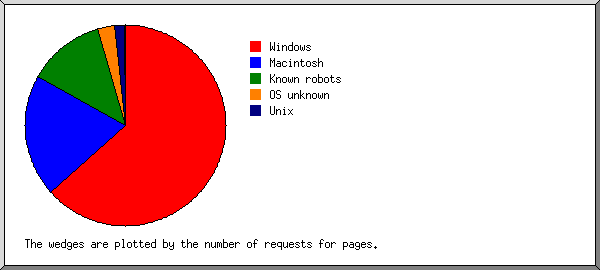
Here’s a similar chart for operating systems.

Summary of operating system access to WebLearn for the academic year 2011-2011

Posted in Sakai, WebLearn | Tagged | Leave a comment

Sakai Collaboration and Learning Environment (CLE) v2.8

The most recent version of the Sakai Collaboration and Learning Environment (CLE) is v2.8,  we hope to migrate WebLearn (currently based on Sakai 2.6) to this new version at the start of the new year.

Sakai 2.8 offers many improvements to key areas like accessibility, internationalization, performance, and security. Among the many enhancements included in the 2.8.0 release, noteworthy items include:

  • Configurable URL shortening service (cf tinyurl / bit.ly)
  • reCAPTCHA support for logins
  • Collapsible portal navigation menu
  • Experimental CKEditor implementation
  • Respondus question import handling
  • Customizable letter grades in assignments
  • Support for IMS BasicLTI outcomes and improved external integration capabilities
  • Enhanced user profile options
  • Persistent event logging for Quartz Scheduler jobs
  • Improved integration with external user providers (e.g., LDAP)
  • Inclusion of many new webservices
  • Updated language packs (Chinese, Dutch, French Canadian, Spanish, Portuguese, Turkish and Vietnamese.)
  • Feature to set open/close dates for discussion boards, forums and topics and sort the threads
  • Ability to preview message prior to sending in Messages tool
  • Ability for site authors to change display order of announcements

A full list of features can be found in the release documentation https://confluence.sakaiproject.org/x/0Al6B

Astute readers will note that we will be jumping from Sakai v2.6 to v2.8 missing out v2.7, this is entirely due to lack of resources but of course Sakai v2.8 contains all of the improvements found in Sakai v2.7. For the record, here are the key enhancements of v2.7:

  • Conditional release
  • Basic IMS LTI
  • Vastly superior Profile tool
  • Replacement of Mailtool with MailSender
  • Forums improvements (incl. ability to link directly to forum messages)
  • Plus others!

For more information, please see: https://confluence.sakaiproject.org/x/RAchB

Posted in Sakai, WebLearn | Tagged , | Leave a comment

WebLearn upgrade Tuesday 18th October

The WebLearn service will be unavailable sometime between 7am and 9am on Tuesday the 18th of October for an upgrade. It is advisable to avoid using the WebLearn service between these hours to avoid interruptions. Sorry for any inconvenience.

Posted in WebLearn | Tagged | Leave a comment