WebLearn’s Mobile Phone Interface

I thought it would be useful to explain the mechanics behind the WebLearn (Sakai) mobile phone interface (m.ox).

Mobile Oxford (or m.ox) is based on a piece of open source software called Molly which relays (or ‘proxys’) requests from a browser running on a smartphone to WebLearn via a special interface called ‘Entity Broker’. When queried, WebLearn sends information back to m.ox which then constructs a web page and forwards it to the user’s phone; different phones will receive slightly different pages in order to make the most of the phone’s screen. We have adopted an iPhone-like interface and do not intend to present a small version of a regular WebLearn page.

The very first time a user tries to access WebLearn via m.ox they are challenged to authenticate via the normal ‘Webauth’ Oxford Single Sign On (SSO) page. Successful authentication will direct WebLearn to trust any requests originating from m.ox until told otherwise. In other words, m.ox will become a trusted proxy for WebLearn albeit with a much reduced permission set (mainly read access but with some write access).

Authentication is based on an open protocol called oAuth which is also used by Flickr and Twitter. The advantage of oAuth is that one does not need to enter a username and password every time, once authenticated the username and password will not be required again for a very long time.

To allow m.ox to access WebLearn on your behalf,  follow the instructions on screen: an example is shown below for the “Sign-Up” tool.
mox-weblearn-1

m.ox requires authentication

mox-weblearn-2

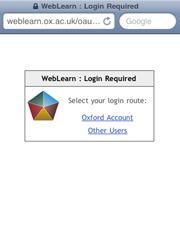
Select either Oxford Account or Other Users (cf WebLearn login)
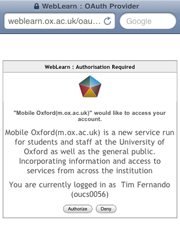
mox-weblearn-3

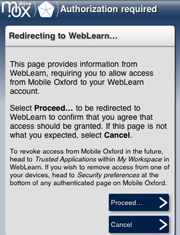
Confirm that you want webLearn to trust Mobile Oxford (m.ox)
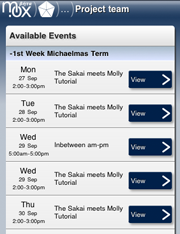
mox-weblearn-4

WebLearn will now trust m.ox and has dispatched a page to your phone

If at anytime you want to stop your phone having access to your WebLearn account you may stop it by using the instructions on m.ox. Alternatively, and this may be useful if your phone has been damaged, lost or stolen, login to WebLearn click on the  “My Workspace” tab and access the “Trusted Applications” tool in the left-hand side menu. Removing m.ox from the list of applications tells WebLearn to no longer trust m.ox, in other words, your phone will no longer be able to connect to WebLearn until you once again supply your Oxford SSO credentials.
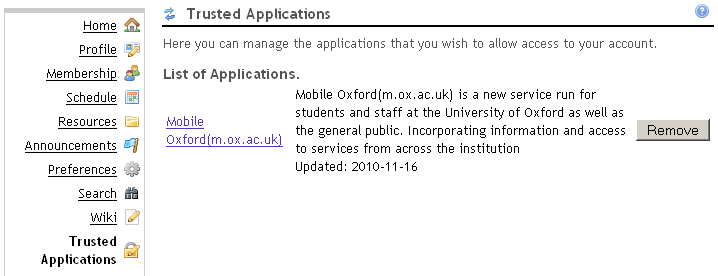
mox-wl-trusted-apps

The following tools are currently or will be available via m.ox:

  1. Polls
  2. Sign-up
  3. Resources
  4. Surveys (evaluations)
  5. Announcements

By ‘abvailable’ we mean that we have applied oAuth authentication and (with the exception of Resources) developed a smarthphone interface. Adding oAuth support to Resources was necessary as images or attachments may be used with most of the tools listed above, however, it is not currently possible to browse and download files from within the Resources tool.

We would like to add other tools in the future, examples include Schedule (Calendar) and Forums.

Links

Related blog posts:

  1. http://blogs.it.ox.ac.uk/adamweblearn/2010/09/weblearn-now-available-on-a-mobile-phone/
  2. http://blogs.it.ox.ac.uk/adamweblearn/2010/10/call-for-participation-weblearn-polls-via-m-ox-mobile-oxford/

References:
  1. m.ox
  2. Molly project
  3. oAuth
  4. Sakai Entity Broker

Continue reading

Posted in Sakai, WebLearn | Tagged , , | 1 Comment

New Module Enrolment Tool

Michaelmas term 2010 saw the introduction of a brand new locally written module registration tool known as SES (Student Enrolment System).

The tool works in conjunction with a course or module database known as DAISY which is being developed by the Social Sciences Division with help from MPLS. DAISY currently contains over 300 Graduate training courses hosted by MPLS departments (as part of their Graduate Academic Programme or GAP); Social Sciences will be adding a selection of their Graduate training courses before Christmas (2010).

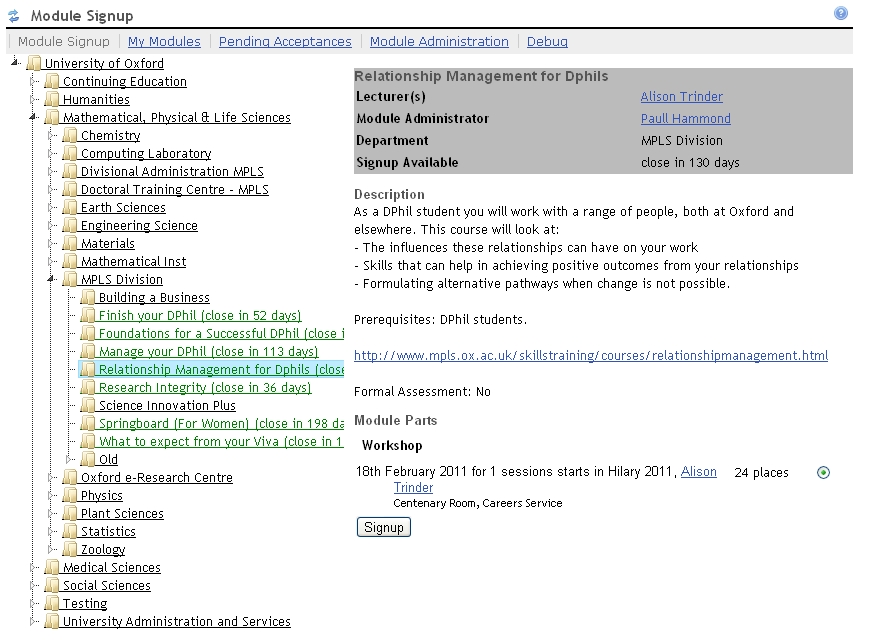
ses-tool

All available courses can be browsed via the SES tool within WebLearn and students are allowed to request a place on one or more courses. The request is passed along to the course administrator who can either reject the application or accept it in which case the student’s supervisor is contacted and asked to give their blessing. If a student is accepted then they will receive a confirmation email. DAISY will take care of inter-departmental billing but this facility is not operational this academic year.

The ‘student’ interface presents a hierarchy of divisions and departments and the courses that are offered (see screen-shot). This can be browsed or all courses can be searched; both course title and description are searched. Students can also see a list of current, upcoming and past courses but as WebLearn does not collect attendance data, this list has no official status.

There are interfaces for course administrators and supervisors, these show a list of course requests and the current status of the application. It is also possible to bulk register students, this facility is typically used by the host department to pre-register their own students before throwing the course open to others.

Social Sciences will require their students to register for specific courses in Hilary term 2011. The other divisions are well aware of the system and are carefully considering whether to use it in the future.

There is a small amount of overlap with HR Information System (HRIS), however, the focus of SES is on students whereas HRIS targets staff training.

Links

Posted in Sakai, WebLearn | Tagged , , | Leave a comment

Using Tableau to visualise ‘Site Stats’ reports

Thanks to Andy Cotgreave for writing most of this article.

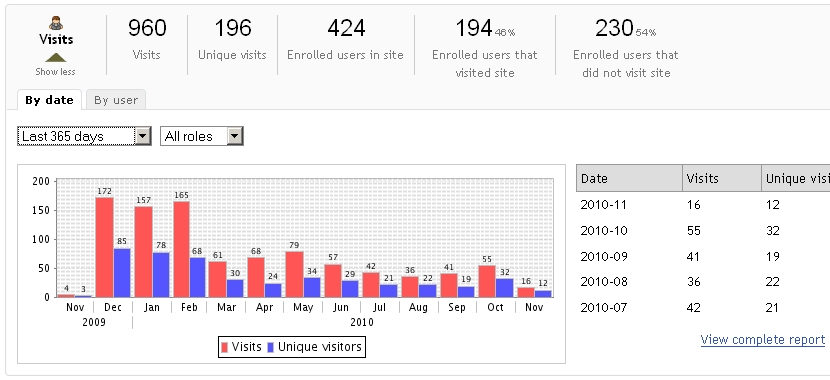
Site Stats is a fantastic WebLearn tool. Once added to a site, it will track all activity within that site and can produce colourful pie charts and histograms of predefined user activity. In addition, it is possible to set up customised reports focussing on particular areas of interest.  The raw data used to produce the reports can be downloaded in a format that can be used by a spreadsheet or equivalent package. A link is given below to the step-by-step guide which explains how to use the tool.

The tool does have limitations. Sometimes pie charts and histograms are not the most intuitive way of presenting the data and this is a situation when it is very useful to be able to download the data and manipulate it in a separate program such as Microsoft Excel.

wl-aps-site-stats

The visualisation facilities of Excel may be very useful in many situations, however, members of UAS have requirements that exceed the capabilities of Excel and, after surveying the landscape, have decided the use a piece of visualisation software called Tableau.

From the Tableau website: Taylor Hawes, Microsoft’s Controller for Global Platforms said it well, “At Microsoft, we use Excel spreadsheets and Pivot Tables to perform detailed analysis. However, Tableau has enabled us to bring analytics to a completely new level.”

Tableau allows complex reporting dashboards to be built complete with active buttons which instantaneously filter the charts giving a much better user experience. In addition, the charts complete with active buttons can be published onto the web with the minimum of fuss.

Now over to Andy ………

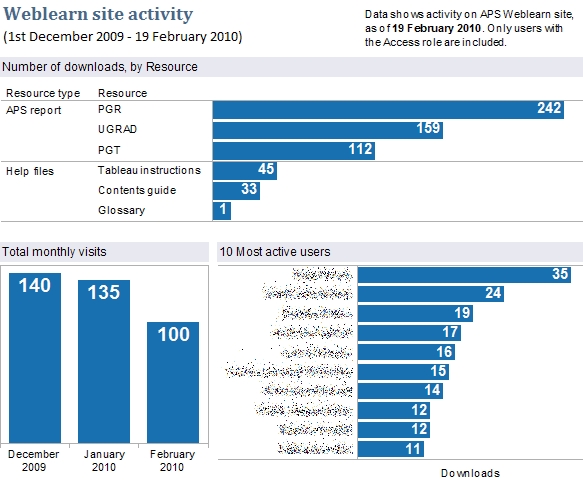
I’m doing a report for management about how often our Annual Programme Stats data is being looked at. To do this, I’ve created a few reports on the APS Weblearn site. I can export those as CSVs and then connect Tableau to them to create a dashboard as follows:

wl-tableau

It’s pretty easy to do this, and Tableau gives us more flexibility in the way we can display the data. I hadn’t really played with the custom reports features before, but there’s some good features in there.

Links

  1. Site Stats tool
  2. Site Stats Step-by-step guide
  3. Tableau website
  4. Tableau and Excel
  5. Tableau product tour video (this is worth it if only for the extreme Americanness of the presenter!)
Posted in Sakai, WebLearn | Tagged | Leave a comment

Turnitin Newsletter – November 2010

Student Access to Originality Reports

turnitinlogoMartin King of Royal Holloway University of London conducted an investigation into the use of Turnitin in Higher Education institutions in the UK related to student access to Turnitin. The survey indicated:

  1. Nearly 60% of respondents have a Turnitin usage policy either at the institution, faculty, departmental, or program level.
  2. 60% of respondents that have a Turnitin usage policy allow students to view their Originality Reports.
  3. 54% of respondents that did not have a Turnitin usage policy allow students to view their Originality Reports.
  4. 42% of respondents give students access to their originality reports for all of their assignments.

Turnitin (@turnitin) learned about this study by following Martin King (@elswedgio) and RHUL Elearning Team (@elearning_rhul) on Twitter.

Read more about this study at the Royal Holloway University of London – Learning Technology Blog: http://rhul-lt.blogspot.com/2010/11/turnitin-suvey-into-student-access-to.html

In The News

NYT Upfront: ‘Generation Plagiarism’?

“Copying and pasting from the Web is just like copying from a book. But too many students either don’t know that it’s cheating—or don’t care,” according to Trip Gabriel’s article, “‘Generation Plagiarism’?” in the New York Times UPFRONT – The Newsmagazine for Teens. He also recounts three anecdotes of students that use someone else’s words without attribution.

The article also references Sarah Wilensky, a senior at Indiana University who wrote a paper headlined, “Generation Plagiarism,” in which she says that relaxing plagiarism standards “does not foster creativity, it fosters laziness.”

  1. http://teacher.scholastic.com/scholasticnews/indepth/upfront/features/index.asp?article=f102510_plagiarism

CNET: Tools for Rooting out Web Plagiarism, Copyright Violations

Dennis O’Reilly explains in his article that certain “misguided souls” continuing to think that all online material is in the public domain. A very common misconception we hear from students.

“According to a study released last January by the National Bureau of Economic Research, fear of detection may not be the best approach to preventing plagiarism among students. The results of the study indicate that educating students about the importance of academic integrity and what constitutes plagiarism is the most effective deterrent.”

  1. http://news.cnet.com/8301-13880_3-20021945-68.html

The Chronicle of Higher Ed: Settlement Reached in Essay-Mill Lawsuit

“The operator of an essay-mill company has agreed to shut down all of his Web sites and to stay out of the term-paper business, according to the terms of a settlement agreement reached last month in a federal class-action lawsuit.”

http://chronicle.com/blogs/wiredcampus/settlement-reached-in-essay-mill-lawsuit

Upcoming Webinars and Training

PlagiarismAdvice.org Webinar Series

  1. Best practise for dealing with academic misconduct 24 November @ 3 PM GMT
  2. Institutional policies and procedures 1 December @ 3 PM GMT

Register here: http://spreadsheets.google.com/embeddedform?formkey=dGRqZDFHX2pzU1paRXdxNnRLU1pCY2c6MQ

Turnitin Academy Webinar: Best Practices for Teaching with Turnitin 1 December 2010 @ 9 PM GMT

Let’s discuss success strategies for using Turnitin on your campus or in your classroom.  We’ll share how schools have decreased instances of unoriginal content by nearly half. Register here: http://turnitinacademy5b.eventbrite.com/

Turnitin User Event – UK, 3 February 2011, Aston University, Birmingham, UK

This user event will bring together users of all experience levels and provide them with an opportunity to learn, connect, and share with each other. Click here to register and view the agenda:

http://turnitinusereventaston.eventbrite.com/

Scheduled Maintenance

All Turnitin services and related websites may be unavailable for use during scheduled maintenance times. Times for these scheduled maintenance windows are the first and third Saturdays of each month, 3 PM to 7 PM GMT.

Contact

Turnitin is a service of iParadigms, LLC

1111 Broadway, Oakland, CA 94607

+1 510.764.7600

www.turnitin.com

Posted in Turnitin | Tagged , | Leave a comment

Tool permissions explained

Ever wondered what a particular permission does? Well wonder no longer – here is a page explaining the most common ones: http://confluence.sakaiproject.org/display/DOC/Permission+Descriptions+%282.7%29

Posted in Sakai, WebLearn | Tagged , | Leave a comment

A Report Investigating the Effectiveness of the Turnitin Plagiarism Detection Service

A report has recently been released about the use of Turnitin in terms of its effectiveness.

The White Paper “The Effectiveness of Turnitin and WriteCycle” (White Paper from turnitin.com, 2009) reports on the use of Turnitin worldwide in helping to “reduce serious incidents of unoriginal content in student work and to produce better writers across the entire curriculum” (p.3). Continued use of the system can help to support students in developing responsible writing skills in a “cut-and-paste culture” (p.3).

The research results reveal that when secondary schools and institutions of higher education use Turnitin consistently and over a period of years, students become better writers and researchers who make more appropriate use of outside source materials.

A two page summary of the effectiveness of Turnitin is also available.

Posted in e-learning, Turnitin | Tagged , , , , | Leave a comment

Student access to Turnitin reports

An investigation into the use of Turnitin in UK HE institutions, focusing upon student access to the service has just been released. Martin King, Senior Learning & Technology Officer, Royal Holloway College, University of London, conducted a study on Turnitin practices in UK HE institutions (2010).

This study, entitled ‘Student access to Originality Reports‘, considered the following questions:

  1. are students permitted to interact with Turnitin?
  2. is access to the Originality Reports denied or allowed?
  3. what sort of access is supported?
  4. what are the reasons behind these decisions?
  5. what are the outcomes?

It was found that allowing students to view their Originality Reports is educational, formative, and can form the basis for discussing and learning about acceptable academic writing practices.

Posted in e-learning, Turnitin | Tagged , , , , | Leave a comment

Using Turnitin for plagiarism detection and prevention

turnitinlogoTurnitin is an online text-matching system that can be used to help identify potential plagiarism in electronically submitted student work. It can also be used formatively, for tutors to help students develop their academic writing and citation skills. Turntin highlights parts of a student’s submitted text which match existing sources in various repositories. Academic judgement is required to interpret this analysis.

OUCS manages Turnitin, and can provide free-of-charge user accounts to relevant staff in the collegiate University. Accounts can be requested by emailing, turnitin@oucs.ox.ac.uk. Alternatively, students can use Single Sign-On to submit work to the WebLearn Assignments tool, which can send files to Turnitin automatically. Lunch-time Turnitin training for staff can be booked on the OUCS website. Guidance on plagiarism avoidance and Turnitin is available on WebLearn. Work is currently underway to consolidate University guidance on Turnitin usage.

Posted in e-learning, Turnitin | Tagged | Leave a comment

WebLearn team member wins a competition!

Penut_posterAt the nLearning Plagiarism conference in Newcastle in June,  a competition was held for attendees to write for slogans warning students against plagiarism.

WebLearn team member Dr Jill Fresen submitted 3 slogans and the first one was chosen as a winner! Congratulations Jill.

Jill’s winning poster (‘Is your degree worth peanuts?’) is now available from the plagiarismadvice.org website. Why not download it and display it in your department or college?

Posted in e-learning, Turnitin | Tagged , | Leave a comment

New TurnItIn newsletter

There is a brand new TurnItIn newsletter. Topics covered:

  1. Reducing the Prevalence of Cheating
  2. In The News
  3. Upcoming Events
  4. Upcoming Webinars and Training
  5. Scheduled Maintenance

Links

Read the newsletter

Posted in e-learning, Turnitin | Tagged , | Leave a comment