TurnItIn2 – overview of changes

This is from the TurnItIn newsletter and refers to the submit.ac.uk service.

Turnitin now has a new interface and a number of new features. For many it has been a welcome change, and for others there may be a learning curve. For people who are not quite ready to make the switch, it is easy to go back to the older, more familiar versions of the Originality Report and GradeMark. At this point, over 80% of users are using the NEW version of the Turnitin2 Originality Report and GradeMark tools.

Here’s an overview of the changes:

Document Viewer Frame

The Turnitin tools are available in a unified view allowing you to see a paper in its original format PLUS multiple sources of feedback all at once. You can view the Originality Report matches and GradeMark comments in superimposed layers on an image of a paper in its original format; PeerMark feedback will be accessible from this unified view soon. Now, an instructor can see the highlighted matches from an Originality Report while simultaneously grading the paper with GradeMark.

Navigation

Tabs for user information, help, and feedback now appear along the top right section of your screen. Access to your libraries, calendars and discussion boards is provided by the tabs in the upper left of your screen along the top of the main activity area.

Assignment Inbox

Changes to the assignment inbox include:

  1. The GradeMark apple icon has been replaced by a “comment bubble” icon and a grade icon.
  2. The “submit” button has been relocated below the assignment title.
  3. Assignment settings are now easily accessible through a link labeled “assignment settings.”
  4. Arrows for navigating between pages of the inbox appear at the top and bottom of the inbox.
  5. Actions like “Delete”, “Move to…” and “Download” only appear if one or more papers are selected with the check boxes.

Libraries

The QuickMark Manager and Rubric Library for GradeMark are now available from the “Libraries” tab in the instructor’s view of the class. Now, instructors can create sets of commonly used marks and rubrics before the first paper is submitted to an assignment.

Getting to know Turnitin2

  1. Comprehensive web page about Turnitin 2 http://submit.ac.uk/static_jisc/ac_uk_what_is_new.html
  2. 4-minute Walk-through Video http://turnitin.com/static/support_video_gallery_walkthrough.html
  3. Live Walk-through Schedule (pdf) http://submit.ac.uk/resources/documentation/turnitin/training/Turnitin_Daily_Training.pdf
  4. Quickstart Guides http://submit.ac.uk/static_jisc/ac_uk_training.html
  5. Answers to Frequently Asked Questions about Turnitin2 (pdf) http://submit.ac.uk/resources/documentation/turnitin/sales/Turnitin2_FAQ_UK.pdf

Posted in e-learning, Turnitin | Tagged , , | Leave a comment

Call for Judges — Teaching With Sakai Innovation Award

The Teaching With Sakai Innovation Award (TWSIA) committee is seeking distinguished individuals to serve as judges for the fourth annual competition for this international award. We are looking for judges who have a passion for teaching, and whose life-long work includes championing effective learning opportunities first, and technology second but who are not currently involved in the Sakai community.

The purpose of the award is:

  1. To drive innovation on teaching and learning within the Sakai community
  2. To share best practices, understandings and experiences among faculty members and between faculty and other Sakai community members
  3. To communicate the goals and issues of the teaching and learning community to contributors in Sakai including developers, user interface, system administrators, documentation, support, and quality assessment

Judges will select the finalists using the award evaluation rubric and through interviews with the finalists, which are conducted through web-conferencing technology during the Spring 2011 semester. If you know anyone who might be interested or whom you would like to nominate, we would be delighted to hear from you to discuss this further and answer any questions.

Past entries, finalists and the rubric can be found at http://openedpractices.org/twsia.

Please email any nominations or questions to Sue Roig (Susan.Roig@cgu.edu) no later than Friday September 24, 2010.

Read the FULL CALL FOR JUDGES Announcement at: http://openedpractices.org/twsia-2011-call-for-judges

Posted in e-learning, Sakai, WebLearn | Tagged , | Leave a comment

A video explaining the Sir Louie project

This video of me at JISC’s Flexible Service Delivery seminar in Nottingham on 9th September will probably become a cult internet hit one day.

In the meantime it should help to clarify what we are planning to do within the Sir Louie project.  The video:

  1. http://www.youtube.com/watch?v=u59otbRSsqE
Posted in e-learning, Sakai, WebLearn | Tagged , , , , , | Leave a comment

A much better way of migrating content from Old WebLearn

We have recently introduced a much improved method of moving content out of Old WebLearn and in to New WebLearn. This method employs IMS Content Packages (IMS CP) as a transport medium. This has the advantage of preserving HTML descriptions from the old system.

All previous methods of migration still work as before, however, we would recommend this new way especially if the material is not to be reorganised before being added to new WebLearn.

We advise you move your material in chunks; login to old WebLearn and navigate to a suitable point in your tree and begin the migration process:

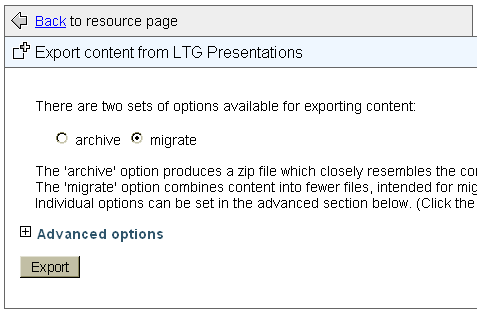
  1. Click ‘Export content’ in the ‘Resource Options menu
  2. Accept the default settings and click the  ‘Export’ button on the next page – save the file on your desktop

export1

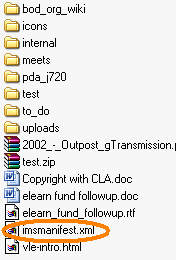
The resultant Content Package contains a special file called a ‘manifest’ – this contains metadata about the rest of the ZIP file.

export2

Your material has now been moved out of old WebLearn, to move into new WebLearn, create, or navigate to, a site and add the ‘Resources’ tool:

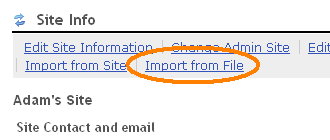
  1. Click on ‘Site Info’
  2. Click the ‘Import from file’ link
  3. Click the ‘Browse’ button and locate the file you just exported, then click ‘Import’

export3

On the resultant page:

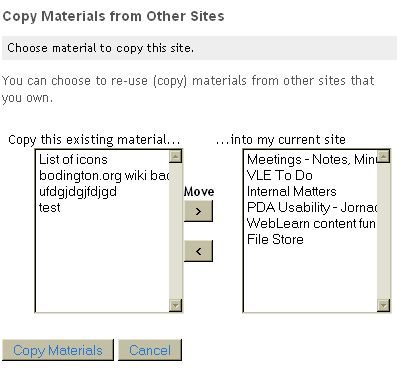
  1. Select all items in the left-hand list and click ‘>’ to move them to the right-hand window
  2. Click ‘Copy Materials’ – this may take a while to complete
  3. When all is complete, visit Resources and check that all is as expected.

export4

You still have to move quizzes separately.

There are a lot more possibilities to consider when migrating you materials, we would strongly recommend that you attend our (free) course to find out more.

Links

  1. Book on the ITLP Migration course
  2. ITLP Migration course notes
  3. IMS CP
Posted in Migration, Sakai, WebLearn | Tagged , , , , | Leave a comment

WebLearn has been upgraded

Two new versions of WebLearn have recently been released: 2.6-ox4.1 on Tuesday August 17th 2010 and 2.6-ox5.0 on Tuesday September 7th 2010

Improvements

  • Introduction of an option to send an email to the student when quiz is complete (Tests tool)
  • New improved email messages for Survey tool
  • Introduction of a new tool which will allow graduate students within the MPLS and Social Sciences Division to register for courses via WebLearn. This tool will be made available for general use at the end of September.

Bug Fixes

  • Fixed inconsistent handling of HTML in Access View of Resource descriptions
  • IMS CP: importer now gets correct descriptions from manifest
  • IMS CP: nested zip files no longer expanded by default
  • HTML is no longer filtered when editing Site Description (Home Page) via Site Info > Edit Site Information. This ‘bug’ caused the home page to be rewritten upon saving, one of the side effects was to force all hyperlinks to open new windows
Posted in Sakai, WebLearn | Tagged , , , , , , , | Leave a comment

Job Advert – Sakai Developer

OXFORD UNIVERSITY COMPUTING SERVICES (OUCS)

Title:  Senior Programmer – Sakai Developer (Java)

Salary:  £36,715 -£43,840 (If no suitable applicant is forthcoming, an appointment on the scale £28,983 – £35646 (with an appropriate adjustment of duties) may be considered.)

Note that this could be arranged as a year-long secondment if desired.

Do you have:

  1. Extensive knowledge of Java, Tomcat, Spring, SQL, Hibernate, XML and version control systems?
  2. Enthusiasm for designing and building new software for learning.
  3. Proven ability to work well with senior academics and IT specialists
  4. Excellent communication, presentation, planning and organisational skills?
  5. Experience of developing the Sakai collaborative learning environment?

If so, you may be the person we are looking for to join our VLE (WebLearn) team.

You will work alongside other VLE developers and learning technology support officers in the Learning Technologies Group (LTG) within OUCS to develop the service and support the requirements of our growing user community.

As an experienced developer you will be responsible for planning, managing, designing, testing and documenting major software developments.

If you have a track record of successful Open Source code development and the enthusiasm to keep abreast of new developments please submit your application.

The LTG forms an important section within Oxford University Computing Services (http://www.oucs.ox.ac.uk), and is home to many interesting initiatives to support teaching and research.  Benefits include flexible working, a good pension, excellent career prospects and holiday provision.

This post is offered for one year in the first instance – it should be possible to offer this as a “year-long secondment”.   Please obtain further details and an application form from http://www.oucs.ox.ac.uk/jobs/ (http://www.oucs.ox.ac.uk/jobs/sakai-developer.xml)

Completed applications must be received by 12 noon on Monday 27th September 2010.  Interviews will be held on Monday 11th October 2010.

Posted in Sakai, WebLearn | Leave a comment

Converting MS Word to HTML

Pasting text into WebLearn’s WYSIWYG HTML editor which has been copied from either Microsoft Word or Outlook is a hit and miss affair.

Pasting directly (via the ‘Paste’ button) is not recommended. Pasting using the ‘Paste from Word’ button does a better job but still leaves a large amount of unnecessary information interspersed within the text (use the ‘Source’ button to see this in action).

Pasting via the ‘Paste as plain text’ button is a good approach but nearly all the formatting is lost.

The best method I have seen is to use this website: http://word2cleanhtml.com/ simply paste your text into the box and click the ‘Convert …’ button then click on the ‘Source’ button in the HTML editor and paste the resulting HTML into WebLearn.

Posted in Sakai, Web, WebLearn | Tagged , , , | Leave a comment

WebLearn courses next term

From Michaelmas term, we will be offering a new course ‘WebLearn: Surveys‘ which enables Oxford users to design and deliver online surveys at no charge.

If you have materials in the old WebLearn system (Bodington), come and attend the course ‘WebLearn: Migrating your content‘ so that you can move your material to the new WebLearn before the old system is de-activated.

If you have been using new WebLearn for a while and would like to make more effective use of the VLE, you might like to attend ‘WebLearn: Making your site work‘ to pick up some tips and tricks.

If you are a new user then ‘WebLearn: Fundamentals‘ is a great way to get to grips with the system.

Once a term we also run the course ‘Learning and teaching: using technology tools‘, which focuses on your teaching philosophy and some low-threshold technologies you might like to explore.

Turnitin is a plagiarism detection service that can be used to scan formative essays and summative assessments for text that matches other electronic sources. Come along to the lunch time session on ‘Plagiarism: WebLearn and Turnitin‘ to learn how to use the system directly or via the WebLearn integration.

Do come and attend the termly meeting of the WebLearn User Group where we hear from WebLearn enthusiasts and share ideas and best practice.

Links

  1. Search for and book a course
  2. WebLearn website
Posted in e-learning, Sakai, Turnitin, WebLearn | Tagged , , , , , | Leave a comment

Sakai Teaching and Learning Initiatives

This is taken from the latest Sakai newsletter:

Following work at the 2010 Sakai Conference in Denver, the Sakai Teaching and Learning (T&L) group has identified priority initiatives for the upcoming year. During the year leading up to the 2011 Sakai Conference in Berlin, the T&L group will focus on the following four
areas:

  1. Continuing leadership of the Teaching with Sakai Innovation Award
  2. Continuing advancement of the learning capabilities design lenses
  3. Sharing best practices and resources for the use of Sakai for distance learning
  4. Increasing student engagement in the Sakai community
  5. Structurally, the T&L group has formed an initiative group for each of these categories that will meet on a regular basis. The full T&L group will hold a call together each month to share progress across the initiatives. (Please see minutes from the August 2010 call.)

Each quarter, the T&L group will also host a virtual community gathering to share the work that has been accomplished on these initiatives and to create opportunities for discussion, feedback and additional input.

Please mark Thursday, September 9 at 5:00pm EST on your calendar for the first T&L community gathering.

The T&L group page in Confluence has been updated with information about the initiatives. The T&L group has also created a calendar in Confluence that includes all group meeting dates.

All initiative groups are seeking broader engagement from across the Sakai community.

If you would like to participate in or monitor the work of an initiative group, there is a Confluence page, a mail list, and a regular tele-conference for each group. The Confluence page for the T&L group includes links to all of the initiatives, and is a great place start in gaining information about all T&L group activities.

Please consider identifying at least one individual on your campus to participate in the T&L group. It is a very welcoming group that is doing important work not only sharing best practices in teaching and learning, but also in helping to define the future direction of Sakai.

Kim Thanos
kthanos@sakaifoundation.org

Posted in e-learning, Sakai | Tagged | Leave a comment