It is planned to upgrade WebLearn to version 2.10-ox1.3 on Tuesday 18th November 2014 7-9am. There will be no service during this period.
We apologise for any inconvenience that this essential work may cause.
It is planned to upgrade WebLearn to version 2.10-ox1.3 on Tuesday 18th November 2014 7-9am. There will be no service during this period.
We apologise for any inconvenience that this essential work may cause.
You can now customise the appearance of all your WebLearn sites, for example, your department, faculty or college can have a its own top banner on pages. (This is an enhancement of a previous post.)
One or more of the following aspects can be configured:
This customisation must be done by the central WebLearn team. If you require this service then please send an email listing the various values for the above attributes; ensure that you have stored any images in a public folder in your administration site and state the URLs in the email.
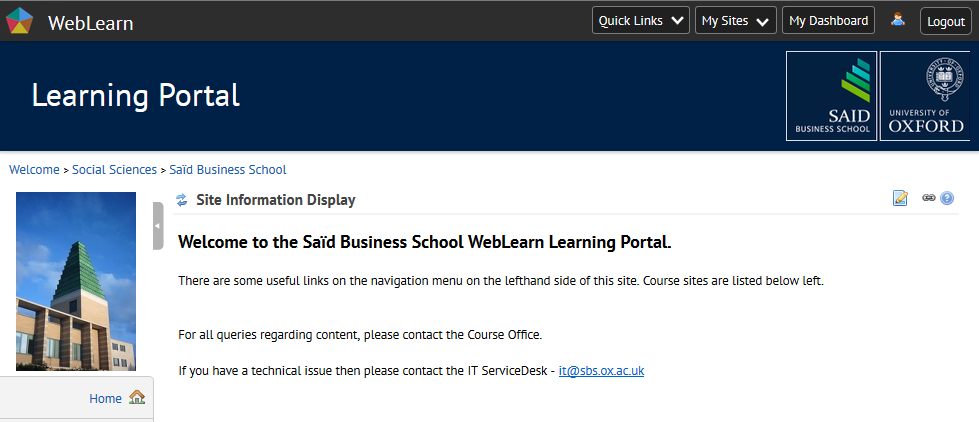
The Said Business School: this has the ‘message and ‘imageSource’ attributes set
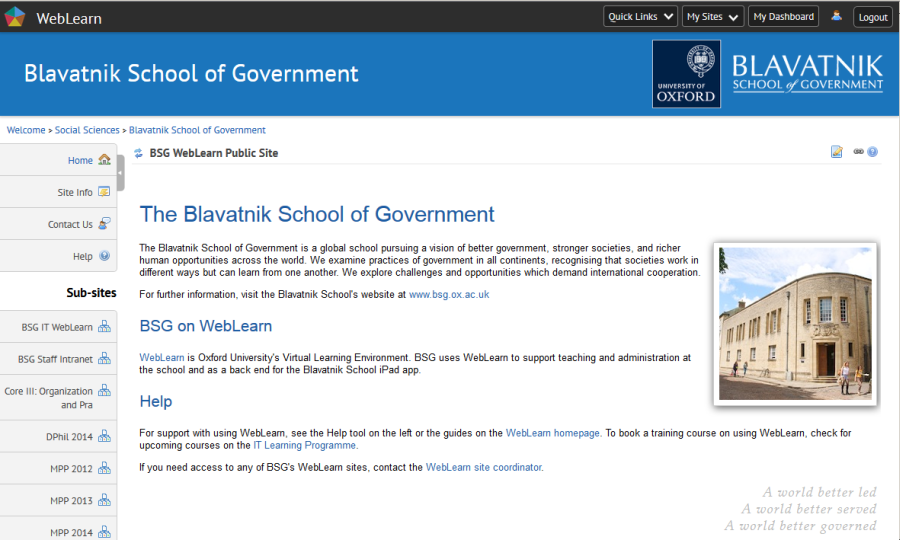
The Blavatnik School of Government who have set the ‘backgroundColour’ and have a composite image with their own branding coupled with the University’s square crest.
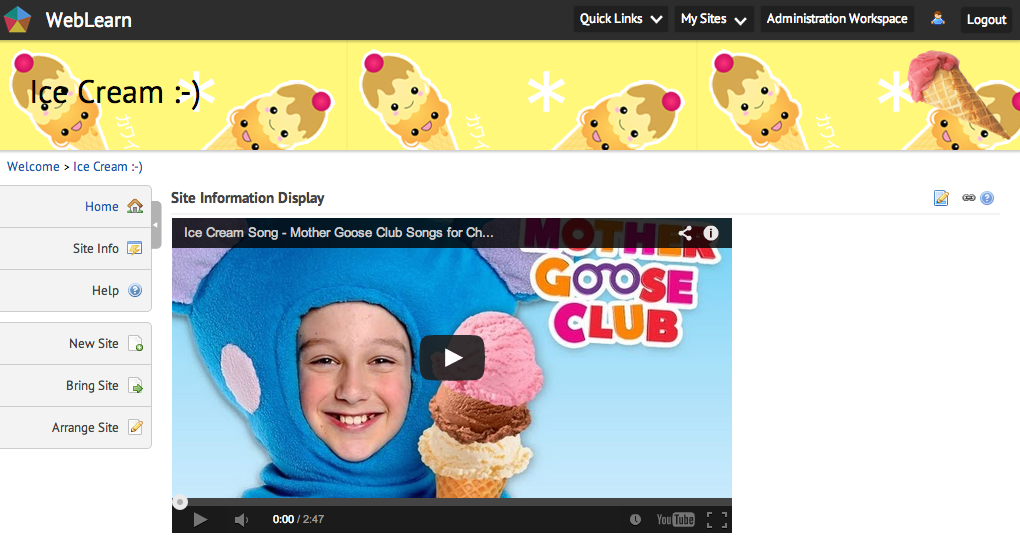
A site for ice cream lovers: this has the ‘message’, ‘backgroundImage’ and ‘fontColour’ attributes set; the ‘imageSource’ attribute has been blanked out.
The following lunchtime seminars may be of interest to WebLearn users:
(In cooperation with the Stanford Learning Analytics Summer Institute)
Pretoria, South Africa, 15 September 2014
Learning analytics (LA) is becoming an increasingly important area of investigation – to recognise students who are ‘at risk’, to address the risks, and ultimately to improve student retention. Institutions are moving towards interoperability and most VLEs now build in LA capability. At Oxford we are investigating the Sakai Open Academic Analytics Initiative (OAAI) and participating in online webinars with other Sakai institutions.
Educause provides a collection of useful documentation – the Analytic Research Centre (academic analytics in higher education); a questionnaire to assess an institution’s Analytics Maturity Index; and a presentation at the forthcoming Educause conference (30 Sept 2014) about building institutional capacity to implement LA.
Questions to consider are: ‘What data is flowing in an institution?’ and ‘How can we harness it to improve student success?’ Similar questions can be asked about an institution’s VLE in terms of data about teaching and learning.
Among others, the following two case studies were presented at the workshop:
International activities
WebLearn was upgraded between 30th September and 3rd October 2014 to version 2.10-ox1.2. For more detailed information and other minor changes, please looked at the detailed release notes.
If you would like to suggest further improvements then please do so by contributing to the WebLearn User Voice feedback service.
WebLearn will be unavailable for a short period between 22:00 and 22:30 on Thursday 25th September 2014 whilst repairs are made to the faulty TurnItIn configuration: this should fix the problems that users are experiencing relating to the TurnItIn integration within the Assignments tool. We sincerely apologise as there will be no service to users during this period.
Note: TurnItIn-enabled assignments created before the move to WebLearn 10 will now have their backlog of Originality Reports processed, unfortunately TurnItIn-enabled assignments created after the move to WebLearn 10 will need to be recreated from scratch.
Please contact the WebLearn team if you have any questions or need help with this. Please accept our apologies for the inconvenience that this mistake may have caused.
WebLearn 10 has brought with it the brand new Lessons Tool. This tool allows one to set up a step-by-step learning exercise which students can be asked to work through in a structured manner.
Consider this example: without leaving the page, you can ask your students to read instructions, take part in a discussion, watch a video clip and finally answer a few questions to assess how well they understand what they have just learnt.
In the past it was not easy to link a number of WebLearn tools on one page to create a smooth web experience. The Lessons Tool has now solved this problem!
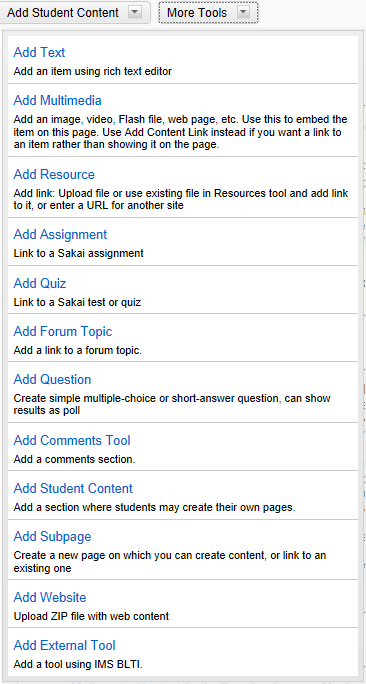 Lessons is a new tool that allows you (as a maintainer/contributor) to organise resources, activities, and media on a single page. Each Lessons page can be customised to suit your needs, including links to other WebLearn tools, conditional release of items and content, etc.
Content from a number of WebLearn tools can be added to a Lessons page including Assignments, Polls, Forums, etc. We will be adding support for Tests in the next few weeks.
The “Add content to the Lessons page” section (see blow) shows the full list of what you can have on a Lessons page.
If the Lessons tool is not in your site, you can easily add it via Site Info. Go to Site Info, click Edit Tools, select the Lessons tool and follow the screen instructions. As you can have more than one Lessons tool in a site, you are allowed to customise the name of the Lessons page.
Once Lessons is added to a site, it appears in the menu on the left hand side.
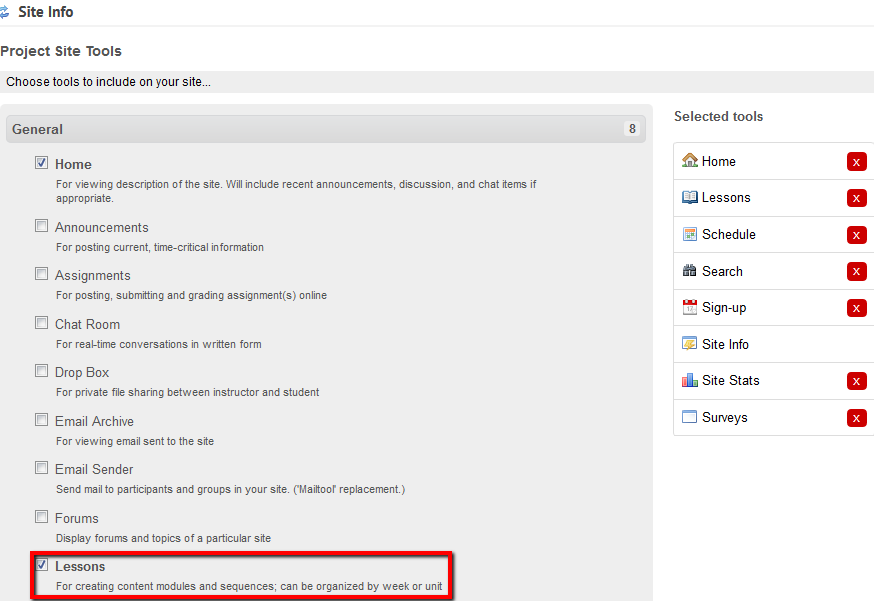
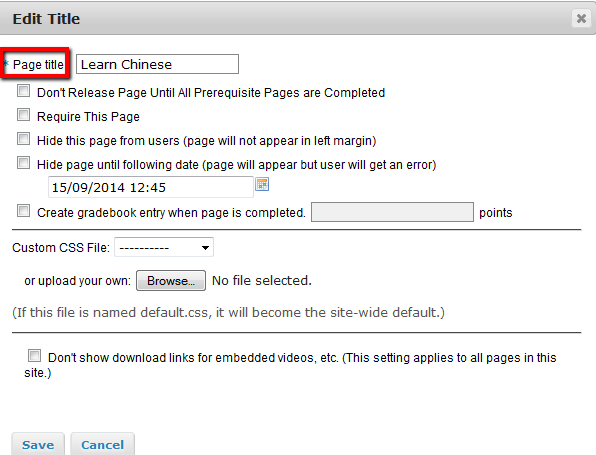
Click on the Lessons page link on the left hand side. You can rename the lesson or add content to the lesson.

To rename a lesson you should click the ‘Settings’ icon. Note that you can also configure other things here, for example, the time when the page is available.
Add content to the Lessons page
Go to a lessons page, clicking on “Add Content” allows you to add the flowing content.
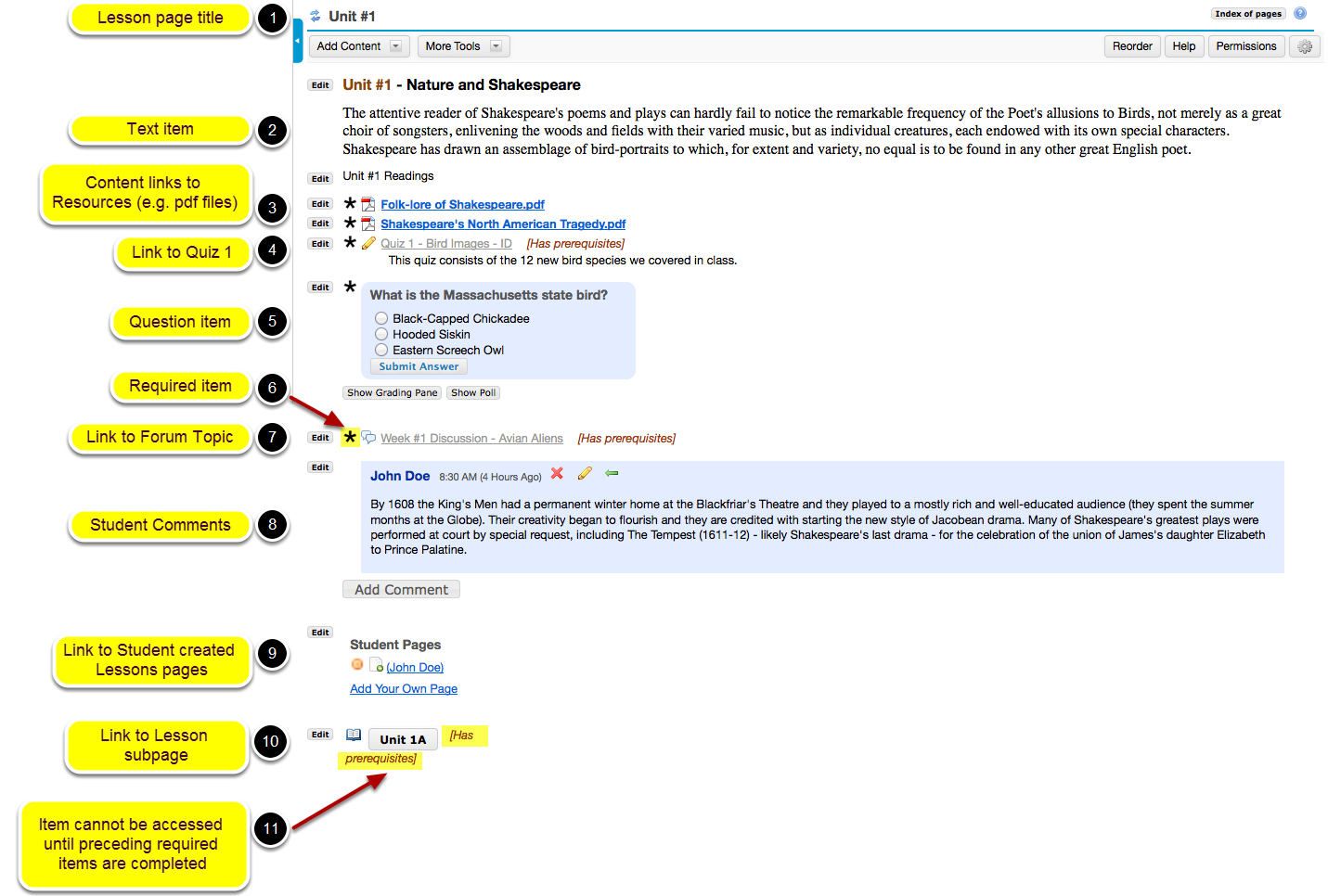

Photos credit: the two Creative Commons licensed images are produced by Longsight company (http://longsight.screenstepslive.com/s/sakai_help/m/26029/l/252627-what-is-the-lessons-tool#!prettyPhoto).
If you want to move the text of your home page into the Resources tool then you can follow this ‘recipe’. (You may wish to do this if your home page contains JavaScript code or other page elements that are only available in Resources HTML pages.)
1 Go to your site and click on the ‘Edit’ icon (pencil and paper)
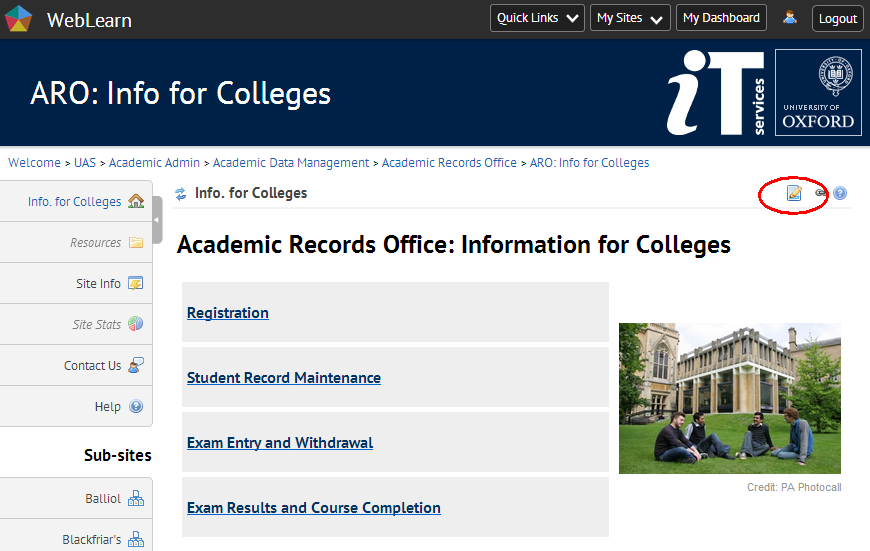
2 Within the editor panel, select all text with your mouse and press CTRL-C (or equivalent) to copy the text. Make sure you scroll to the bottom of the page to get all text. (You may find it easier to switch to “Source” view to do this.)
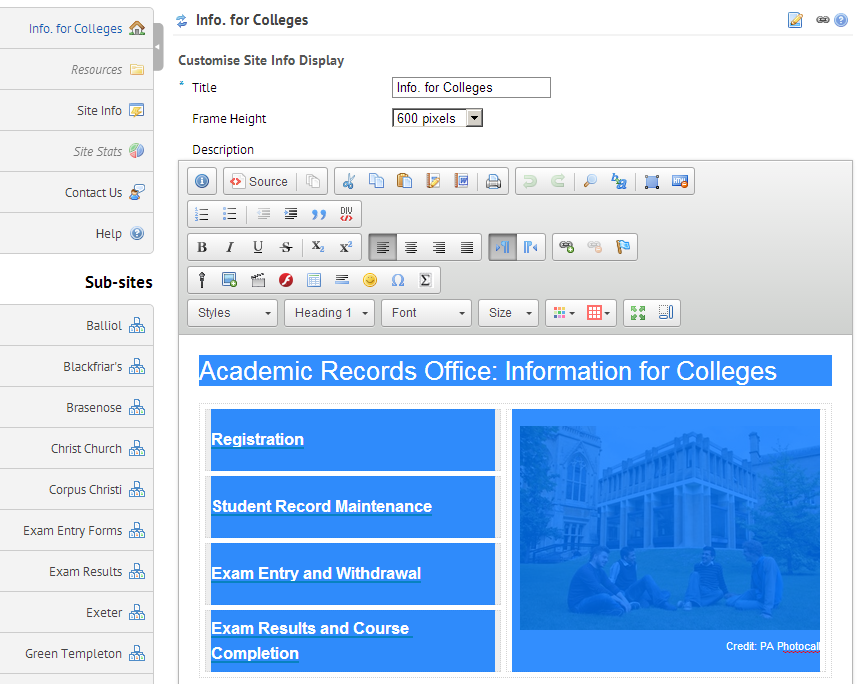
3 Click ‘Cancel’ then navigate to the Resources Tool.
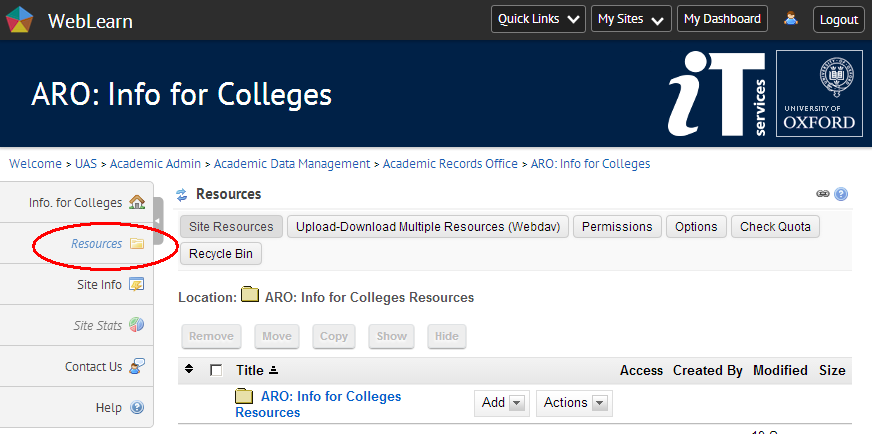
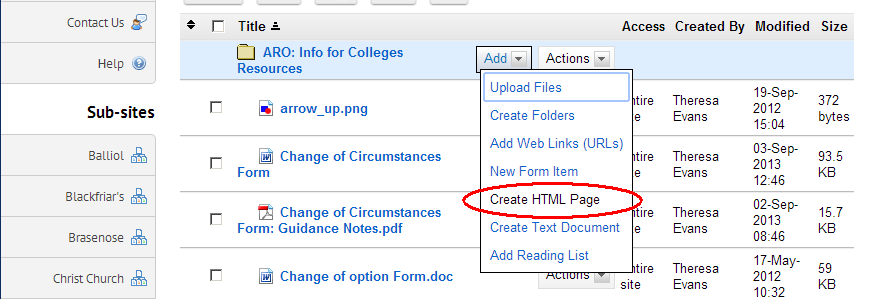
4 Create a new HTML page. You may want to create a special folder for this.
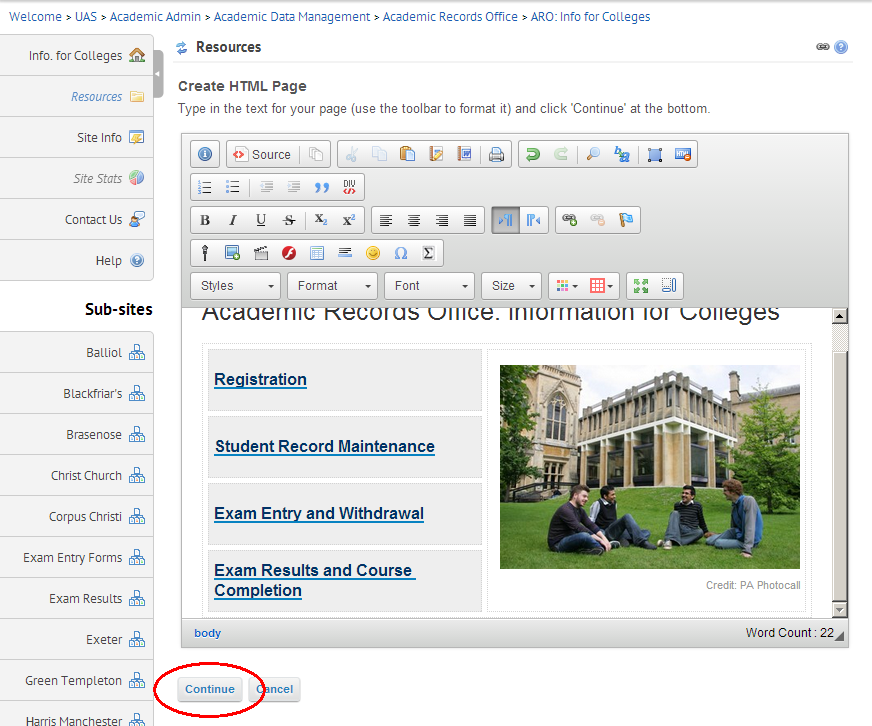
5 Paste the copied text into a new HTML page in Resources by clicking in the editor panel and pressing CTRL-V (or equivalent) then save the page (click ‘Continue’).
6 Give the page a sensible name. It is good practice to keep the “.html” extension
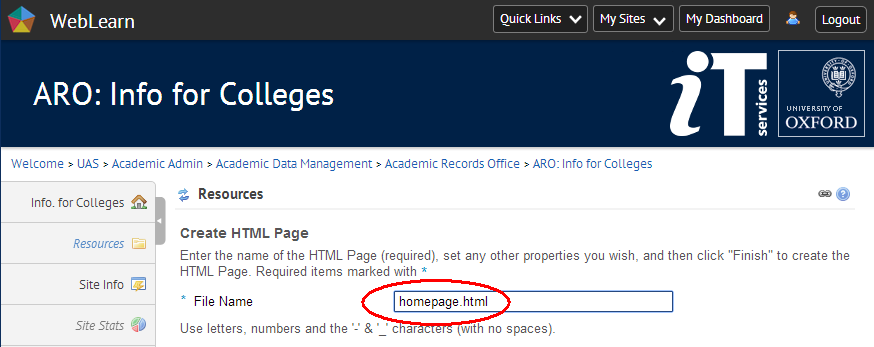
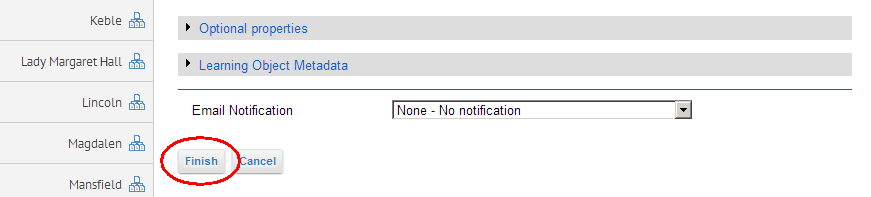
7 Complete the Save process
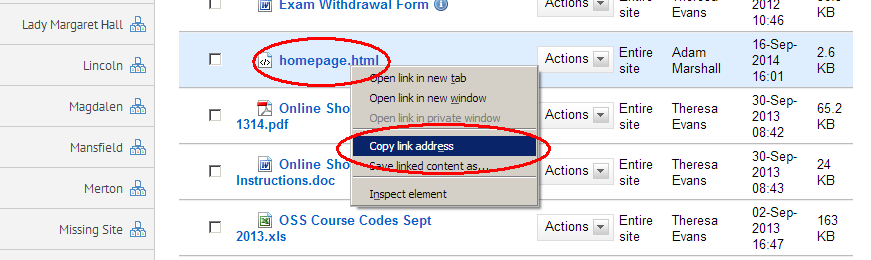
8 copy the URL of this page
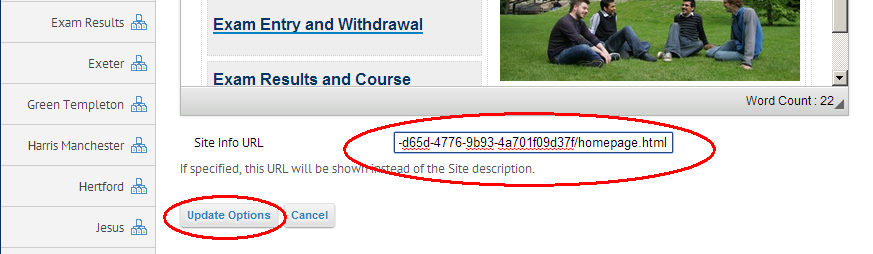
9 Edit the Home Tool again, paste the URL into the box marked “Site Info URL” (underneath the editor panel) then save by clicking “Update Options”
10 Your page should look the same as before but will behave better. Check that there is nothing missing and check that the links work. If anything is wrong then repeat the process.
11 If you are happy you may like to remove the original text from your Home page but this is purely optional.
We are pleased to announce that WebLearn has undergone significant face-lift with a move to WebLearn 10 (2.10-ox1). The upgrade was affected on Tuesday 16th September 2014, we apologise for the disruption that the extended downtime must have caused.
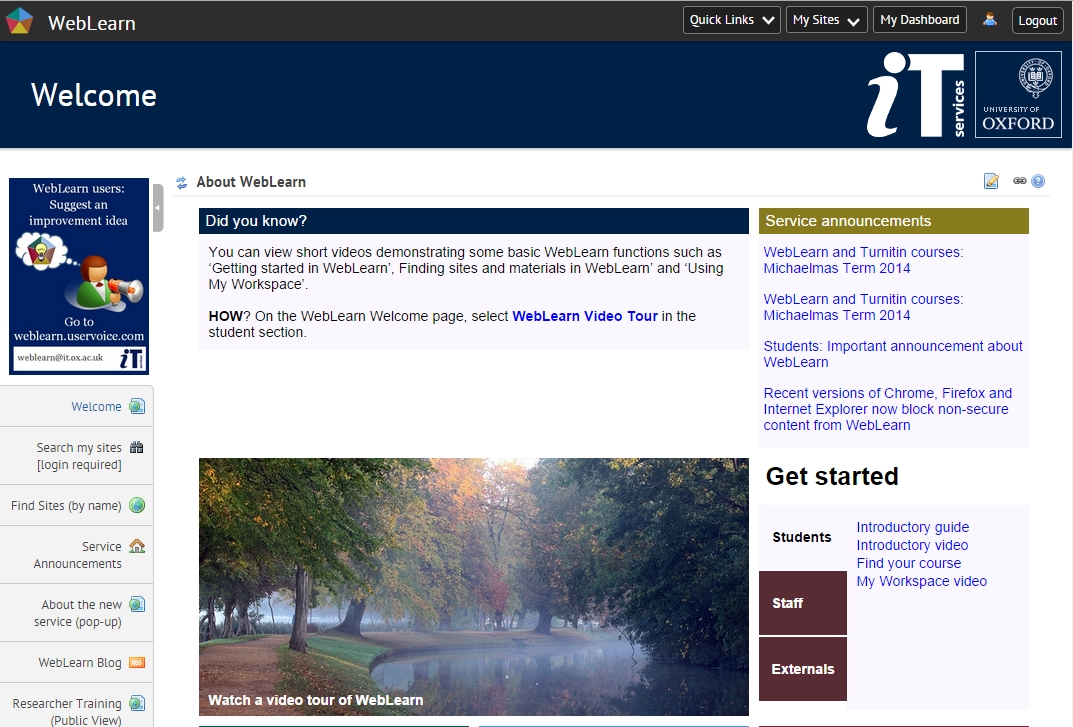
As well as a new look, this release brings a wealth of new features including:
This new version has been subjected to months of testing but, as with other similarly complex systems, there are bound to be some teething problems – some issues that our testing did not reveal. Should you encounter any oddities then we would be very grateful if you could report them to the central team (using the new ‘Contact Us’ tool), ideally with screen-shots. We will attempt to address any outstanding issues over the next few weeks.
The next few sections outline some of the new features and present a handful of known issues that we simply didnt have time to address.
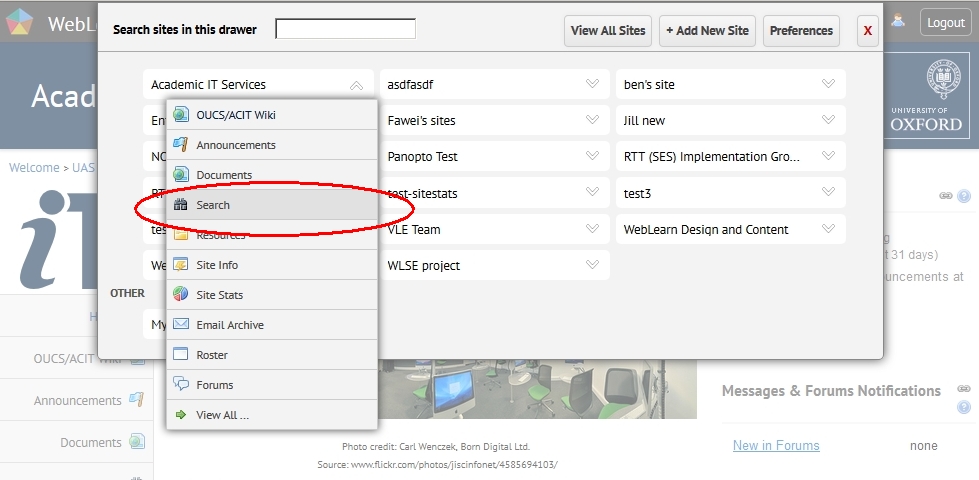
There is a new ‘breadcrumb trail’ and navigation to sites is now performed via the “Sites Drawer”.
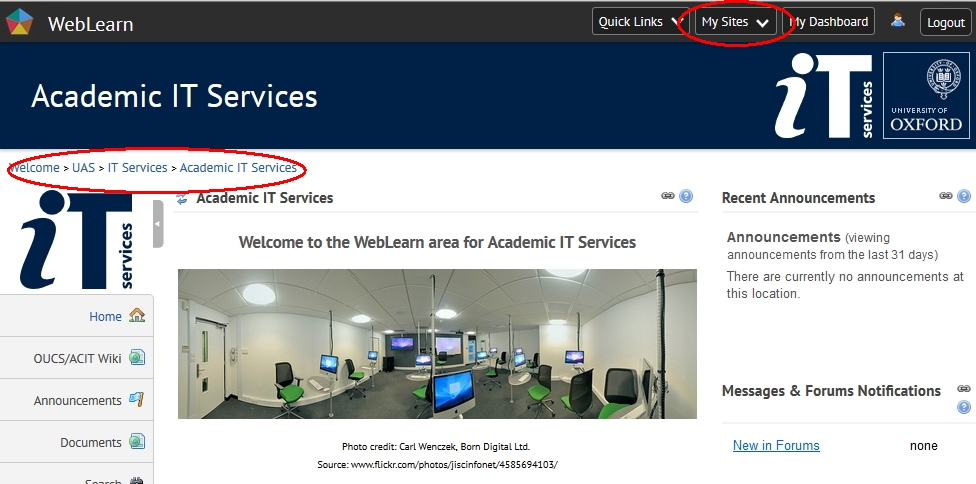
To access the “Sites Drawer”, click on My Sites and then click on the symbol to the right of the target site to reveal and jump to individual tools present on the site.
The Home and Web Content tools no longer use “iFrames”, this has resulted in a change in behaviour (see below) and have new icon for configuring the ‘properties’ of the tool, this used to be a button labelled ‘Options’. (This is the first step towards removing iFrames from the system.)

On the Home page, you may also see a red warning rectangle appearing at the top right of the screen explaining that some HTML tags have been removed from the page. This warning comes from AntiSamy which is a new library filtering out potentially dangerous HTML tags. AntiSamy filtering is not applied to files in Resources so the procedure detailed below will fix that issue as well.

It is now possible for departments to have their own top banner on all their pages.The following aspects can be configured:
This customisation must be done by the central WebLearn team. If you require this service then please send an email listing the various values for the above attributes; ensure that you have stored any images in a public folder in your administration site and place the URLs in the email.
The Said Business School: this has the ‘message and ‘imageSource’ attributes set
A site for ice cream lovers: this has the ‘message’, ‘backgroundImage’ and ‘fontColour’ attributes set; the ‘imageSource’ attribute has been blanked out.
Unfortunately, as with any major release, there are a handful of known issues that we simply didn’t have time to address. We will attempt to address these issues over the next few weeks.
It is planned to upgrade WebLearn to version 2.10-ox1 on Tuesday 16 September 2014 from Midnight – Noon (note the extended outage). There will be no service during this period.
This release will bring major changes in both WebLearn and the supporting infrastructure:
We apologise for any inconvenience that this essential work may cause.
Here’s a sneak-preview of the new front page.
 WebLearn User Group talks Technology-enhanced learning and teaching Turnitin at Oxford Sakai in UK HE LTG Case Studies LTG Likes OxTALENT