WebLearn and Turnitin Report: Apr 2013 – Oct 2013

WebLearn and Turnitin:  Apr 2013 – Oct 2013

The big news in this period has been the changes in behaviour of Firefox and Chrome in how they handle pages containing ‘mixed content’.

Web browsers classify content as either ‘secure’ (the URL begins with https:), or ‘non-secure’ (the URL begins with http:). Web pages which contain both secure and non-secure content are said to contain mixed content. In situations such as this, Firefox and Chrome now choose to block, ie, not display non-secure content. This means some pages in WebLearn are either blank or have missing elements such as videos.

We have modified WebLearn to address some of the problems with insecure content and staff have been informed of the implications and asked to update WebLearn pages, however, there may still be some items on sites that do not display, e.g. videos, social media widgets and others.

It is expected that the other major browsers, eg, Opera and Safari, will adopt the same approach as Firefox and Chrome in the near future – the problem is not going to go away and site owners need to take action.

WebLearn currently stands at v2.8-ox7.3, the highlights are since April (v2.8-ox5) are

  • URL redirection – you can now change a site URL but ensure the old URL still works.
  • CK edit used throughout (except within Surveys tool). This is a rewrite of the previous FCK edit and handles MS Word text much better.
  • Graduate Training (SES) tool improvements
  • Above-mentioned enhancements that post process a WebLearn page to rewrite embedded URLs and HTML Anchor tags in order to get around the blocking of mixed content. So far the Web Content, Resources and Home tools have been addressed. (The Oxitems team have also made changes to support sites that embed Oxitems feeds.)
  • Measures have been put in place so that we should now be informed when the “Import into WebLearn” facility disappears from the Libraries’  SOLO  search engine: we no longer have to rely on our users informing us of problems.
  • New student-centric front page – the content is based on feedback from students that were interviewed.
  • The front page contains a link to  ‘WebLearn User Voice’ which is a new transparent mechanism for gathering enhancement requests from our users.

The next release of WebLearn is due on 5th November and will herald large improvements to the sign-up tool, updates to the Oxford Podcasts tool to use the new Podcasting service,  small enhancements to Resources, WYSIWYG HTML editor, Announcements, Site Redirects and the Graduate Training (SES) tool.

Training and Guidance

This term’s program of training has been announced, there are no new courses.

Projects

Work on the Student Enrolment System (SES) III project is on going with one work package left to complete. This project is led by the academic divisions and is funded by SSPB. So far numerous improvements have been made to the Graduate Training (SES) tool within WebLearn in the areas of user interface, searching, reporting and  course administration.

The PICT-funded SIPA project which worked with academic and administrative staff members across the university to investigate assessment and feedback practices and to invite user input has now finished. The main outputs are

  • A report on the pilot of Assignments 2 tool. In short, Assignments 2 is unsuitable for production use and
  • Reports on the pilot of PeerMark and GradeMark. In short, there is a small group of tutors at Oxford who are using GradeMark enthusiastically, but there is little interest in PeerMark. Hence our current limited licence for these two products will suffice for the foreseeable future.
  • The authoring of training materials. There are now three plagiarism-related courses and a wealth of on-line support materials.
  • The development of education policy support. The document “Policy and Guidance for Examiners and others involved in University Examinations” was updated and includes input from IT Services. Education Committee has agreed a proposed programme of work to address areas where the University’s strategy for the prevention and handling of plagiarism should be further strengthened.
  • New Sakai-Turnitin integration code. Close to the end of the project,  iParadigms rewrote the Turnitin web services interface (API) which meant that the Sakai – Turnitin integration code needed to be rewritten. The new code is 70% complete and we are liaising with iParadigms regarding the sharing of the remaining work with the rest of the Sakai community.

Other

Developers Marc Savitsky and Colin Hebert have left to graze upon pastures anew, however,  Ben Holmes has joined the WebLearn team as a developer. Ben has previously worked in the area of computer-aided assessment and is very enthusiastic and full of good ideas. He has already been of great benefit to the team and will continue to be so.

Links

Posted in Turnitin, WebLearn | Leave a comment

WebLearn and Plagiarism Awareness Courses Michaelmas Term 2013

A variety of taught courses are offered by IT Services to support the use of WebLearn and the plagiarism awareness software Turnitin. Course books for the formal courses (3-hour sessions) can be downloaded for self study. Places are limited and bookings are required. Click on the links provided to book a place, or for further information. Bookings open 30 days in advance, but you can express an interest in a course and receive a reminder to book when booking opens.

WebLearn courses

WebLearn: Fundamentals Mon 14 Oct 9:15 – 12:15

or

Thurs 7 Nov 2:00 – 5:00

or

Thurs 12 Dec 9:15 – 12:15
WebLearn: Design and content (formerly called ‘Making your site work’) Thurs 14 Nov 9:15 – 12:15
WebLearn: Tools to support teaching and learning Thurs 21 Nov 2:00 – 5:00

Plagiarism awareness courses (Turnitin)

Plagiarism: WebLearn and Turnitin Mon 4 Nov 12:30 – 13:30
Plagiarism: Turnitin Fundamentals Thurs 17 Oct 9:15 – 12:15
Plagiarism: Interpreting Originality Reports using Turnitin Mon 18 Nov 12:30 – 13:30
Plagiarism: How to avoid it (for students) Thurs 31 Oct 9:15 – 12:15
Plagiarism: How to avoid it (for students) – SIAS Tues 15 Oct 2:00 – 5:00

Byte-sized lunch time sessions

These focus on particular tools with plenty of time for questions and discussion

WebLearn Bytes: Site Management and Resources Tues 22 Oct 12:30 – 13:30
WebLearn Bytes: Surveys Tues 29 Oct 12:30 – 13:30
WebLearn Bytes: Assignments Tues 12 Nov 12:30 – 13:30
WebLearn Bytes: Tests and Quizzes Tues 26 Nov 12:30 – 13:30

User Group meetings

WebLearn User Group Wed 2 Oct 2:00 – 4:00
Turnitin User Group Fri 11 Oct 2:00 – 4:00

Express an interest!

The following courses can be arranged if there is sufficient demand for them. Visit the link to express your interest in a particular course:

Multimedia: Tools for creating interactive online resources This one-hour session gives an overview of three free, open-source, e-learning authoring tools: eXe, Xerte and GLO Maker. It will emphasize the strengths of each tool and suggest where each might be applicable. A short demonstration of an aspect of each tool will be given.
WebLearn: Using Mobile Oxford This one-hour course demonstrates the award-winning Mobile Oxford platform (m.Ox) and a selection of WebLearn tools that can be accessed via a mobile device. Participants will have the opportunity to use their mobile devices to try out various WebLearn tools via the mobile platform.
WebLearn: Surveys(3-hour course) WebLearn Surveys (beta) can be used to design and manage electronic questionnaires to be delivered online. Surveys can be created for general data gathering purposes, or for course, lecturer or tutor evaluation. They can be delivered to WebLearn site members, ad-hoc groups or the general public.
WebLearn: Assessment and feedback There are several ways to assess student work in WebLearn. This course looks at the e-assessment options available to lecturers and tutors: how to configure the tools, use them to mark student’s work and deliver feedback.
Posted in WebLearn, WebLearn courses | Tagged , , | Leave a comment

How to compress large video files without losing quality using Handbrake

Large video files are slow to upload and download.  One of the most popular tools that can significantly shrink the file size without losing quality is Handbrake.  It is popular due to three reasons:

  • It can convert video from nearly any format, e.g. .wmv – Windows Media Video File, .avi – Audio Video Interleave File, .m4v, .mov, etc.
  • It is free and Open Source
  • It works on Windows, Mac and Linux

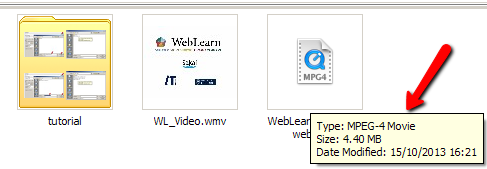
This tutorial illustrates how to compress a video file for the web on a Windows machine. The sample file I used to compress was called WL-Video.wmv and its original size was 39.0 MB.  After compression the file size was down to 4.40 MB.  The compressed video format is MP4 as it is the most supported video format on the web. Depending on your original video file, following the instructions in the tutorial, the file size may still be reduced if your video file is already MP4 format.

Download and install Handbrake if you do not have it

  1. Download Handbrake at http://www.handbrake.fr
  2. Double click the downloaded file to install Handbrake by following the instructions on screen.

Compress videos

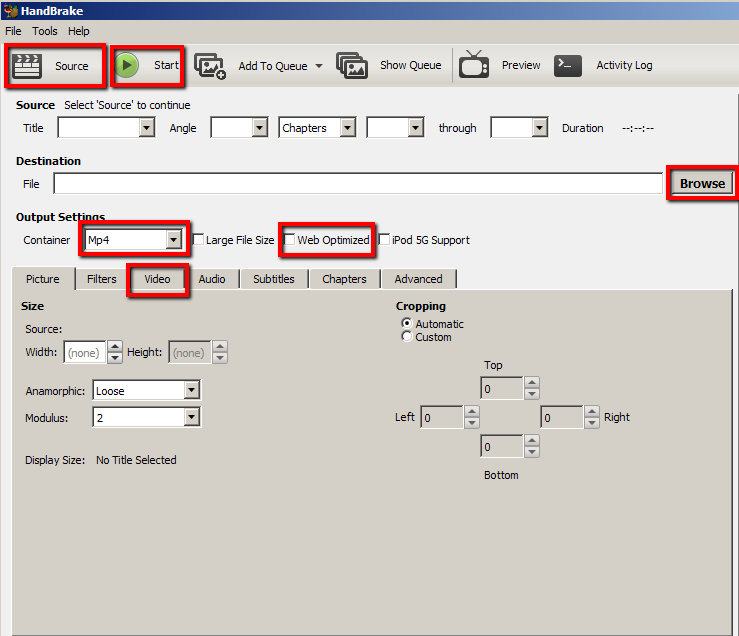
3. Launch Handbrake.  Do not be put off by all the buttons and options available – you usually only need to use a few of them.

handbrake-0

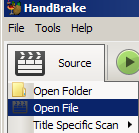
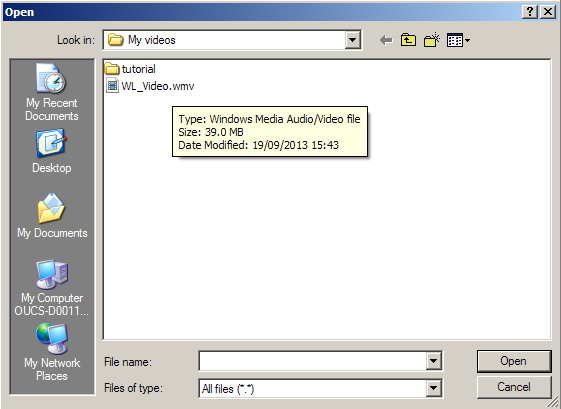
4. Click Source > Open File to select the video you want to compress.  In this tutorial, I select WL_Video.wmv and then click Open.  You can see the original size was 39MB.

handbrake-1

handbrake-10

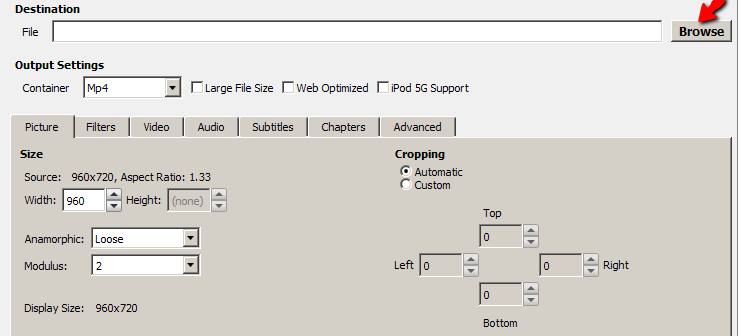
5. In Handbrake, under Destination you can decide where the compressed file is saved by clicking Browse.  By default, it is saved in the same folder where the original file is.  You can change to other location if necessary.   You are required to provide a name for the compressed file.

handbrake-18

6. For Output Settings, choose Mp4 if it is not selected and select Web Optimized.

handbrake-4

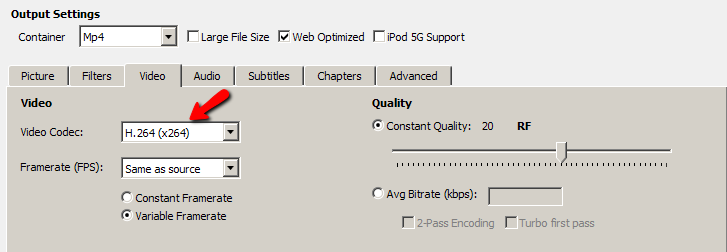
7. Click on Video and make sure that H.264(X264) is selected.

handbrake-5

8. Click Start to compress the video.  The green Start button will become red Stop button until the compression is complete.   When it is back to green.  You are ready to view the compressed video.  The original video file was reduced from 39.0MB to 4.40MB.  The compressing process for this small file took around 20 seconds.  If it is a very large file, it can take much longer to compress.

handbrake-12Note: 

This tutorial aims to introduce the basic features in Handbrake.

Handbrake has many more features which allow you to change the level of compression (e.g. setting average bit rate (kbps).  In addition, you can easily optimise a video for different devices including ipod, TV or Android tablet.  If you would like to  learn more about videos and advanced features in Handbrake, here is a complete Handbrake guide: https://trac.handbrake.fr/wiki/HandBrakeGuide.

Posted in WebLearn | Tagged , , | 10 Comments

Missed the last WebLearn User Group meeting? Recordings (audio and slides) available online

The presentations from the last meeting ( 2nd October) are available in the User Group site- https://weblearn.ox.ac.uk/info/eas/ (Log into the site and click “WLUG Presentations” from the course menu on the left).    A big thank you to all the presenters.

  • Tim Jones, Student Welfare and Support Services: Alternative approaches to learning
  • Thomas Jellis, School of Geography: The Copenhagen Fieldclass (OxTALENT prize winner)
  • Jeremy Howick, Dept of Primary Care Health Sciences: Peer assessment in essay writing and research (OxTALENT prize winner)
  • Adam Marshall, WebLearn team: WebLearn updates
Posted in e-learning | Leave a comment

How to display public tweets in a WebLearn page

If you used Twitter’s feed to display public tweets in WebLearn, you may notice that it has stopped working.  This is not caused by WebLearn but by a change in Twitter which no longer supports RSS feeds.

This blog post demonstrates how you can display public tweets from any user by using the Twitter Timeline.

Generate HTML code in Twitter

1. Log into your Twitter account, (if you haven’t already done so, you will need to create one).

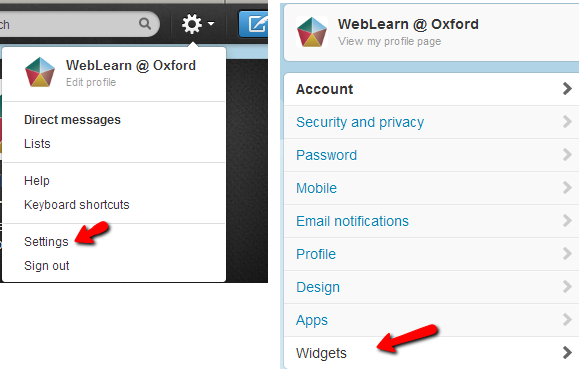
2. Go to Settings and select Widgets

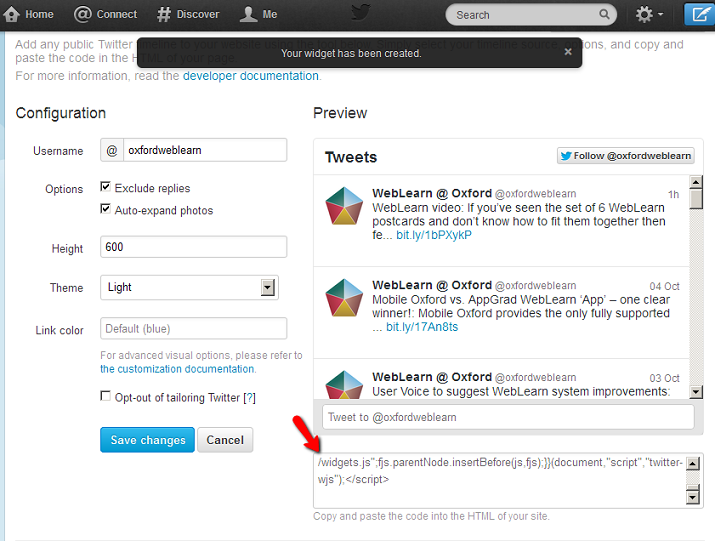
wl-63. On the Widgets page click the button Create new

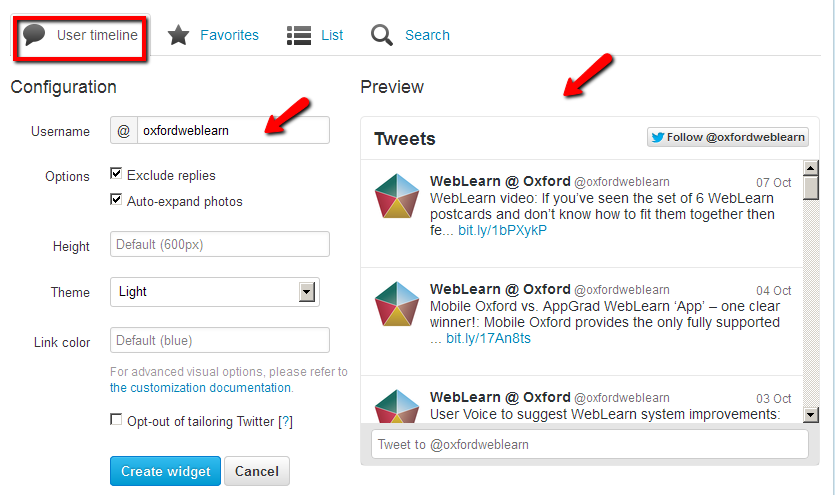
4. By default, the User timeline widget is created for you.  You can see  the look and feel of the tweets under Preview.

4.1  You can configure the page to change the look and feel of how the tweets are displayed in the WebLearn page.  Once you are happy with the configuration, click Create widget

4.2  If you want to display tweets from a different Twitter account, simply change the username under Configuration and click on Save Changes.

wl-9

5. Once the widget is created, select the HTML code in the bottom right box and copy the code (right click the mouse and select copy)

timeline-4

Create a WebLearn page

6. Log into WebLearn

7. Go to Resources to create a HTML page

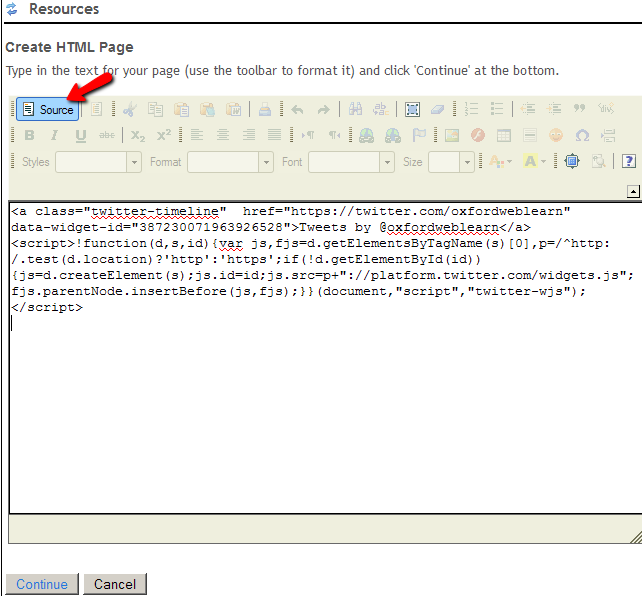
8. Click Source to switch to source view, and then paste the HTML code that you copied from the Twitter widget.  Click Continue.  Note: you can also insert other content including text and images here to provide the context of the tweets. To put it another way, you can use the techniques presented here to embed tweets on any WebLearn page.

wl-7

9. Provide a suitable page title and click Finish.

Link the page from the course menu on the left

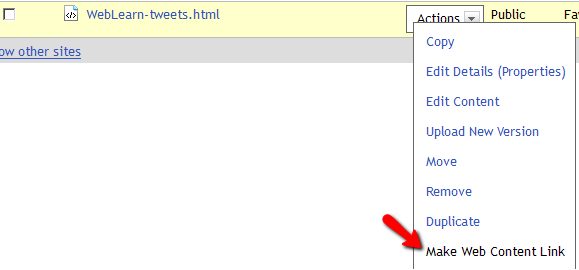
10. In Resources, click Actions and select Make Web Content Link

wl-4

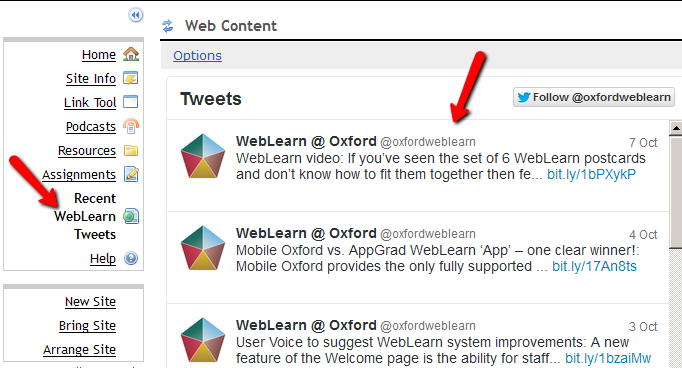
11. Provide a descriptive page title, e.g. Recent WebLearn Tweets, and click Add.

Now you have successfully created a web link that displays the recent public tweets from a Twitter account.

wl-8

Posted in WebLearn, WebLearn Bytes | Tagged , , | Leave a comment

WebLearn video

If you’ve seen the set of 6 WebLearn postcards and don’t know how to fit them together then fear not, we have made a video to show how it is done.

(If the video doesn’t display then visit: https://www.youtube.com/watch?v=Ig1_1vhcheg )

Shameless plug 1: Visit the Academic IT You Tube Channel: http://www.youtube.com/user/ltgoxford
Shameless plug 2: If you like the music then visit this You Tube Channel: http://www.youtube.com/channel/UCHQ9SD8qeB-oiXeQkv2Og6A/videos

Posted in WebLearn | Tagged | Leave a comment

Mobile Oxford vs. AppGrad WebLearn ‘App’ – one clear winner!

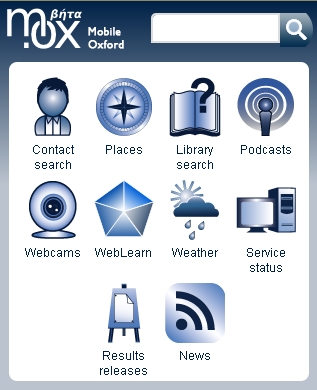
mox-appsMobile Oxford provides the only fully supported WebLearn mobile application. This provides easy-access to a handful of the most popular areas of WebLearn, it also restricts the ability to remove material which is invaluable should the mobile device be lost or stolen.

Other ‘third party’ providers of apps (e.g. AppGrad) sometimes list WebLearn (and other University services such as Nexus) as one of their built in ‘features’. However, Oxford University IT Services has not tested or endorsed any such apps for use with Oxford Nexus, WebLearn…. and cannot vouch for their security in handling your username and password.  Remember that, if your password is compromised, someone could read and/or delete your emails and you could temporarily lose access to your account.

Be aware that apps such as AppGrad may also access other information on your phone or tablet such as all of your contact details.  What they are able to access will depend on the platform you are using.

Perhaps most importantly it doesn’t appear that AppGrad actually let Oxford SSO account holders to access WebLearn at all!  Our investigations show that the app simply takes you to the ‘Other Users’ login page – there is no way to leave this page and access the ‘Oxford Users’ login page.

In other words you would be better off just using a standard web-browser on your device!

Just because apps claim to integrate with University of Oxford Services doesn’t make it so and this can be misleading for users.

Links

Posted in Web, WebLearn | Tagged , , , | Leave a comment

User Voice to suggest WebLearn system improvements

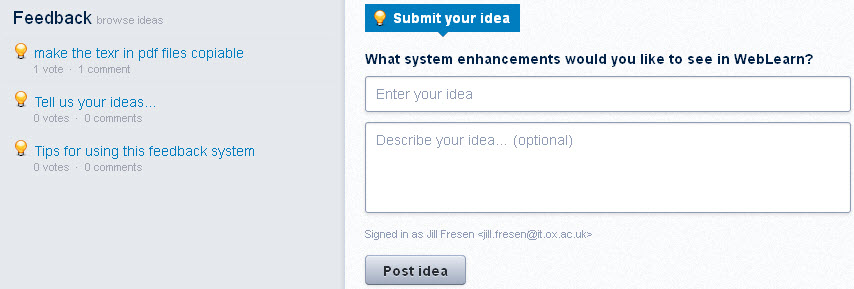
A new feature of the Welcome page is the ability for staff and students to submit a suggestion for WebLearn system improvements (under ‘Contact and feedback’). To use this feature, go to the WebLearn Welcome page https://weblearn.ox.ac.uk and click on ‘Suggest a system improvement’. A pop up window appears which allows you to record your idea and give it a description. Other users can vote on ideas submitted.

All suggestions will be considered by the central WebLearn team in the light of feasibility, user demand, and available development resources.

uservoice


Posted in WebLearn | 1 Comment

New WebLearn Welcome page goes live

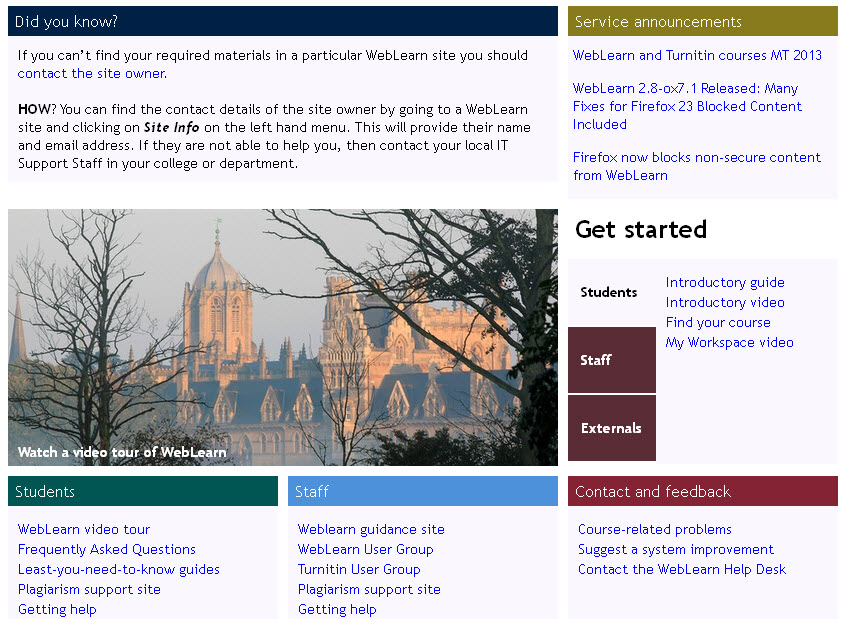
Go to https://weblearn.ox.ac.uk to view the new WebLearn Welcome page. The WebLearn team has responded to recommendations from last year’s WebLearn Student Experience Project and incorporated features that students asked for. These include a clear section on ‘Getting started’; separation of support materials designed for students and for staff; and more information about WebLearn features such as My Workspace, that they didn’t know about (see the collection of 30 ‘Did you know?’ items which are randomly displayed).

The page randomly displays a new Oxford photograph each time it is loaded. We cleared permission to use the photos from the photographer, whose website is www.oxfordlight.co.uk. Refresh the WebLearn Welcome page to see a new photo selected from a sample of those showing classic views of Oxford in a variety of seasons and at different times of the day.

welcome

Posted in WebLearn | Leave a comment

WebLearn 2.8-ox7.1 Released: Many Fixes for Firefox 23 Blocked Content Included

WebLearn was upgraded on 12th September 2013 to version 2.8-ox7.1. This was an emergency release which added functionality to WebLearn so that it rewrites pages in order to display content and links that would otherwise be blocked by Firefox 23 enhanced security measures. This means that the enhanced security of Firefox and future releases of Chrome will, in the main, not prevent students from accessing their course material. it had the side effect of making WebLearn a more secure environment.

You will see below that there is a small change in behaviour to the Web Content tool.

Please note that it is still necessary for pages with mixed content to be revised. The reason for this is that students will still get warnings about content being blocked even though WebLearn is able to post-process these pages so that much of the content becomes accessible; these warnings are generated before WebLearn has chance to correct the problems. Nothing can be done about this.

We would strongly suggest that Local WebLearn Coordinators and anybody who has the maintain or contribute role on one or more sites read the WebLearn blog post on the implications of the tightening up of security within the most popular web browsers.

Please note: If you have a link to an external site that attempts to re-use the current WebLearn window such as:

    <a href="http://www.bbc.co.uk/news" target="_top">BBC News</a>

this will not work in Firefox 23 due to bug. It should be fixed in the Firefox 24 release  (due for release on 17 September) but until then the only option is to change the link it to change it to have a  target="_blank" instead.

Security Improvements (pertaining to Firefox 23)

Web Content Tool

  • When a Web Content link is set up from the Edit Tools page within Site Info, it will now always open in a pop up window.
  • It is now impossible to specify that an http: site should not open in a pop up window on the Options page of the Web Content tool
  • The database has been modified to make all Web Content links with an http: target open in a popup window.
  • Inform maintain and contribute roles that they wont see target http: web sites in pop-up Web Content windows. Present link to target site in the window instead. (Users with the access role will always see the target site in the pop-up window.)

Resources tool

  • YouTube URLs are rewritten on-the-fly to use the https: protocol (instead of http:)
  • target="_blank is added to all links that appear in WYSIWYG HTML editor’s “About CK edit” pop-up window
  • rewrite weblearn http: URLs which begin http://weblearn.ox.ac.uk/ and http://beta.weblearn.ox.ac.uk/ are dynamically rewritten to start with https://weblearn.ox.ac.uk/
  • Hyperlinks within documents stored in Resources which use http:// protocol are rewritten on-the-fly to open up in a new browser tab

Home tool

  • URLs are rewritten within the “Description” field of the Home tool. This description can be used as the Home page text, however, we would strongly recommend that rather than doing this, one constructs a file in Resources and supplies the address as the Site Info URL .

Oxitems

  • Oxitems now accepts a callback function as 11th parameter in the output_newsfeed() function. Calls to Oxtems’s output_newsfeed() function should be rewritten to include "oxitemsCallback" as the 11th parameter in the call. This will force target links to open in a new browser tab. Consider this example:
    
    <script type="text/javascript">
    output_newsfeed("offices/confcoll-vacancies","3","","x","s",
                    "","iso-8859-1","","","", "oxitemsCallback")
    
    </script>
    

    Clearly you should preserve all your other parameters and add blank parameters

Other Improvements

  • Reading list dynamic availability service is now working again
  • Graduate Training (SES) tool:
    • All facet values are returned instead of just the most popular
    • Search results page has been improved
    • Ability for administrators to register non-Oxford course attendees has been added
    • Online courses and courses without teaching (or signup) dates now appear on search results page
Posted in Sakai, Student Experience, Web, WebLearn | Tagged , , , , , | Leave a comment