WebLearn unavailable on THURSDAY 12 September 2013 from 7-9am

It is planned to upgrade WebLearn to version 2.8-ox7.1 on Thursday 12th September 2013 from 7-9am. There will be no service during this period.

This emergency upgrade will add functionality to WebLearn so that it rewrites pages in order to display content and links that would otherwise be blocked by Firefox 23 enhanced security measures. This will mean that the enhanced security of Firefox and future releases of Chrome will, in the main, not prevent students from accessing their course material.

We would strongly suggest that Local WebLearn Coordinators and anybody who has the maintain or contribute role on one or more sites read the WebLearn blog post on the implications of the tightening up of security within the most popular web browsers.

We apologise for any inconvenience that this essential work may cause

Posted in Downtime, Sakai, WebLearn | Leave a comment

New WebLearn welcome page

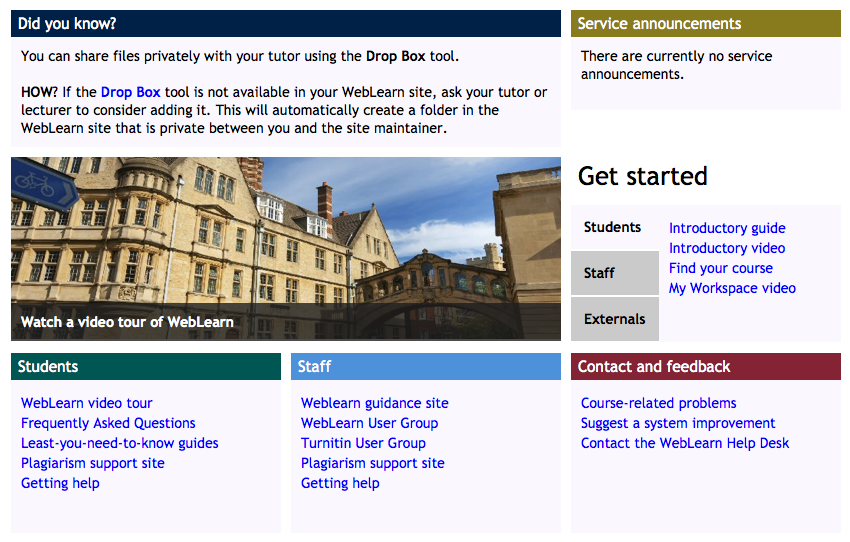
We are building a new Welcome page which will appear at https://weblearn.ox.ac.uk in time for the new academic year. Feedback from students last year in the WebLearn Student Experience project indicated that students ignore the current front page, since it links to the WebLearn Guidance site which is designed primarily as help and guidance for staff members building WebLearn sites.

The WebLearn Guidance site will still be available via a link on the new Welcome page, as well as from the sub-sites link in the left hand hierarchy of sub-sites.

The new Welcome page is designed with clear areas for Students and Staff, as well as a ‘Get Started’ area for new WebLearn users. A brand new feature is the “Suggest a system improvement” option, which links to “User Voice” – a forum of suggestions for enhancements that will be monitored by the central WebLearn team and considered, depending on feasibility and the weight of user votes. Another new feature is the “Did you know” panel, which highlights useful things about WebLearn, that users may not be aware of, with links to further information. We are confident that the new page design will not only make existing help materials more prominent and easier to find, but will also meet needs expressed by students to enhance their WebLearn experience.

Here is a preview of the new Welcome page which will shortly be launched:

portal-frame-screenshot

Posted in Student Experience, WebLearn, WLSE | Leave a comment

Firefox now blocks non-secure content from WebLearn: WebLearn pages may need to be edited

A recent change to Firefox v23  browser behaviour may have a significant impact on WebLearn users.

Firefox v23 will now block Mixed Active Content by default.  This makes it more secure. It will  not display non-secure (http) content within the WebLearn frameset.

It is possible that users will report WebLearn pages as being ”broken’ and unfortunately, if those pages do contain non-secure content,  it may be necessary for WebLearn pages to be updated by their owners. This could be a fairly sizable task and ideally needs to be done before the start of term.

The benefit to carrying out this work will be in making your WebLearn  areas more secure because they will be much less susceptible to ‘man-in-the-browser’ attacks. (Such attacks can occur when an non-secure piece of content (eg, web page, embedded video or iframe) becomes compromised and is used to launch JavaScript which can steal session cookies or other sensitive data from the surrounding web page.)

Internet Explorer has been warning users about Mixed Content for a number of years now, you may have seen a message along the lines of “This site contains both secure and non-secure content …” ; Firefox v23 goes one stage further, it doesn’t actually display a warning and the resultant page is simply displayed without the non-secure items. There is however a way of telling that this has happened, you should be able to see a small security warning shield to the left of the site address in the browsers address bar.
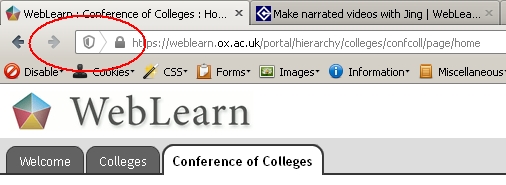
grey-shield

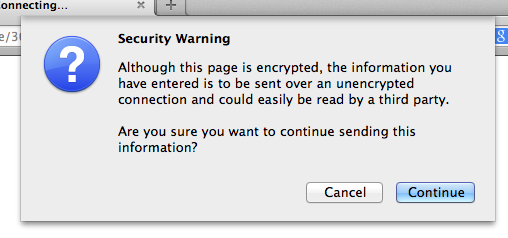
Clicking on the shield will display the following dialogue
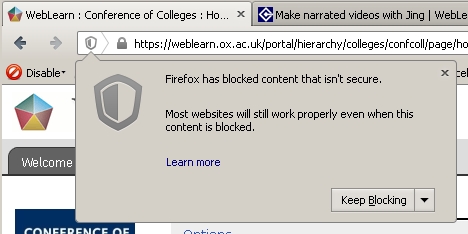
grey-shield-dialogue

The WebLearn team are looking at making changes behind the scenes which will address some of these issues but the scope of these fixes will be limited and intervention by site owners and maintainers will still be necessary.

Where may non-secure active content be located?

Non-secure content is likely to be blocked in a number of scenarios. We will enumerate them here and explain how to combat these insecurities later.

  • embedded YouTube videos that do not use a secure (https) URL
  • links to non-secure (http) external web sites that open inside the WebLearn frameset, ie, in the main content area
  • links to http://beta.weblearn.ox.ac.uk/ (or http://weblearn.ox.ac.uk/) that open inside the WebLearn frameset, ie, in the main content area
  • site Home pages that display a non-secure external web page, for example, a departmental home page
  • Oxitems RSS feed displays that use output_newsfeed.js
  • Other RSS feeds that either use non-secure JavaScript URLs or do not force links to open in new windows or tabs
  • Web Content links to external websites that do not open in a pop-up window
  • Web Content links that do open in a pop-up window but only for site participants with the maintain and contribute roles. Students (ie, access users) will be unaffected.
  • Syllabus tool items which employ a redirect to a non-secure web page
  • Non-secure Facebook plugins
  • Non-secure 3rd-prty Twitter display widgets
  • WYSIWYG HTML pop up help

You can get a report on insecure content by using Firefox’s Web Developer functionality, press Ctrl-Shift-K then reload your page. The console will show the URL of any blocked content.
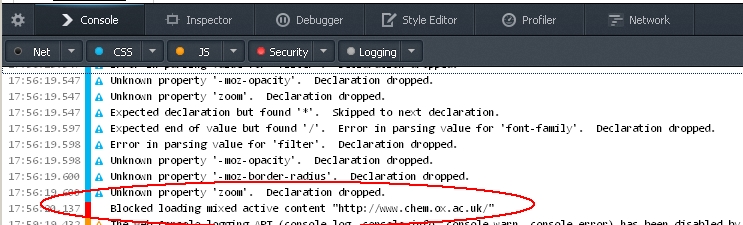
webdev

Non-secure passive content

Firefox classifies some content as ‘passive’. At the moment, passive content is not blocked but it will be soon so it makes sense to address such page elements now.

  • display of images that are not stored on a secure domain
  • embedded HTML5 audio and video elements that are not stored on a secure domain

What is the WebLearn Team doing to help?

The central WebLearn team will make modifications to the WebLearn code-base so that it will dynamically alter certain pages as they are loaded in the browser – this will only work for pages stored in Resources (as long as they have been authored from within WebLearn) or text placed in the Home tool ‘Description’ box, however, this is not an ideal solution. We would strongly recommend that pages are modified as per the guidelines given below.

Any changes that will be made are outlined in the appropriate section below in red. Version 2.8-ox7.1 of WebLearn release on 12 September 2013 will include these changes.

We will also be making changes to the Web Content tool to force links to non-secure sites to open in a pop-up window for site participants with the ‘Access’ role (but not for other roles).

All other tools such as Assignments, Announcements, Forums, Polls, Schedule, Sign-up, Surveys, Syllabus and Tests will not be post-processed and must have their content modified by hand.

Please note that it is still necessary for pages with mixed content to be revised. The reason for this is that students will still get warnings about content being blocked even though WebLearn is able to post-process these pages so that much of the content becomes accessible; these warnings are generated before WebLearn has chance to correct the problems. Nothing can be done about this.

Changes you must make to ensure content is not blocked

Embedded YouTube videos

Embed code needs to be changed to use the https protocol (instead of http). For example,

<embed height="344" 
       src="https://www.youtube.com/v/r8isc3Gulvg&amp;hl=en&amp;fs=1" 
       type="application/x-shockwave-flash" 
       width="425"></embed>

Or you may want to replace your old embed snippet with code in the new protocol agnostic format

<iframe width="420" height="315" 
        src="//www.youtube.com/embed/r8isc3Gulvg" 
        frameborder="0" 
        allowfullscreen></iframe>

WebLearn will be modified to dynamically re-write insecure You Tube URLs for pages stored in Resources or in the Home Tool. This will mean that there should not be a problem displaying You Tube videos in these 2 cases.

Links to non-secure external web sites that open inside the WebLearn frameset

Such links should be forced to open in a new tab or window. For example

<a href="http://www.bbc.co.uk/" target="_blank">

WebLearn will be modified to dynamically re-write hyperlinks where the target is an insecure URLs so that, when click, the resultant page will open in a new tab or window. This will only be done for pages authored in WebLearn (using the WYSIWYG editor) and stored in Resources or in the Home Tool. This will mean that there should not be a problem with such links in these 2 cases.

Links to non-secure external web sites that open in the current WebLearn window

If you have a link to an external site that attempts to re-use the current WebLearn window such as:

<a href="http://www.bbc.co.uk/news" target="_top">BBC News</a>

this will not work in Firefox due to bug in the current release. It should be fixed in the next Firefox release (due for release on 17 September) but until then the only option is to change the link it to change it to have a  target="_blank" instead.

Links to http://beta.weblearn.ox.ac.uk/ that open inside the WebLearn frameset

Such links should be rewritten. Consider this original link

<a href="http://beta.weblearn.ox.ac.uk/portal/hierarchy/a/b"> ...

This should be changed to

<a href="https://weblearn.ox.ac.uk/portal/hierarchy/a/b" 
   target="_blank"> ...

i.e. the target=”_blank” attribute should be added.

WebLearn will be modified to dynamically re-write URLs in the above format for pages stored in Resources or in the Home Tool. This will mean that there should not be a problem in these 2 cases.

Site Home pages that display a non-secure external web page

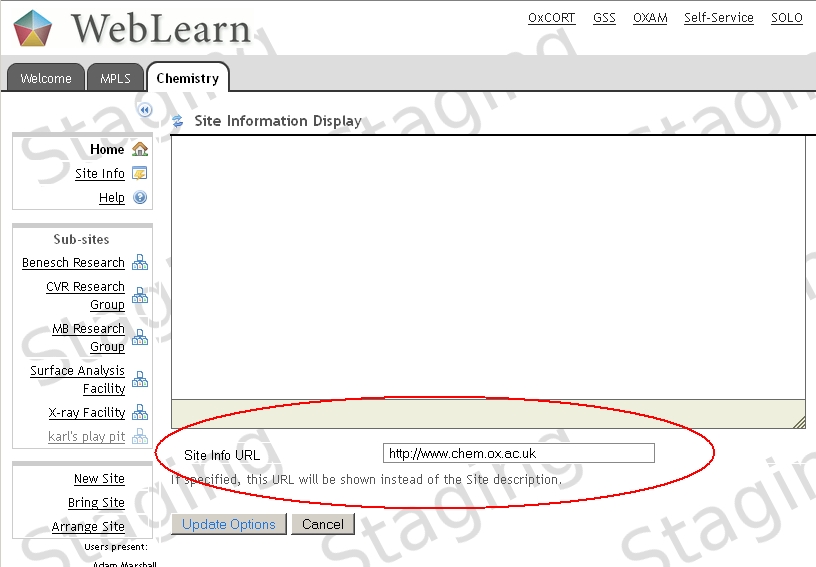
The simple solution is to not display the non-secure page. To do this, visit the Home tool click on Options
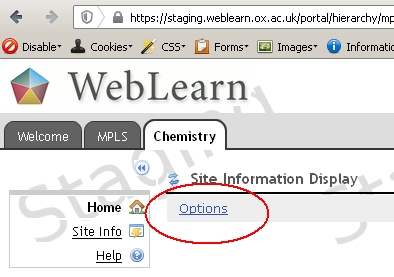
dept-home-page

then scroll down and remove the address in the Site Info URL box or link to a different ‘Welcome’ page that is stored in Resources.
dept-home-page-url

Oxitems RSS feed displays that use output_newsfeed.js

We currently do not have a fix for this and are liaising with the Oxitems team on this matter, in the meantime we suggest adding text to say “Please use the right mouse button to click on links below and opt to open them in a new tab”.

Other RSS feeds that either use non-secure JavaScript URLs or do not force links to open in new windows or tabs

Please read an earlier (now updated) blog post about displaying RSS feeds.

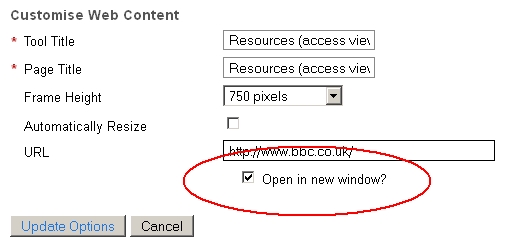
Web Content links to external websites that do not open in a pop-up window

You should always opt to open links to non-secure (http) sites in a pop-up window.
wc
Please note that Web Content links that do open in a pop-up window will not be blocked for site participants with the access role, however, they will still be blocked for those with the maintain and contribute roles. This means that students should be be unaffected.

WebLearn will be modified to ensure that non-secure (http) Web Content links always open in a pop-up. The database will be modified to reconfigure all existing Web Content links to non-secure sites so that they open in a pop-up.

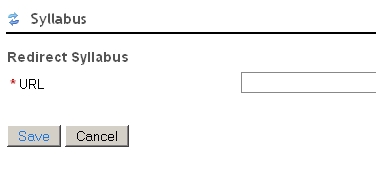
Syllabus tool items which employ a redirect to a non-secure web page

Either remove the redirect and replace with a page stored in the Resources area of your WebLearn site
syl

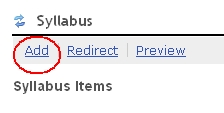
or or add the text of the target page as a Syllabus item
sly-add

Non-secure Facebook plugins

Please regenerate any Facebook plugins and replace the incumbent with the new code.

Non-secure 3rd-party Twitter display widgets

Please switch to using the Timeline widget supplied by Twitter.

WYSIWYG HTML pop up help

We do not have a fix for this yet other than searching the Internet for “CKEdit help”.

Display of images that are not stored on a secure domain

Save a copy of the images in the Resources tool in the site and use this copy of the image instead. Please respect the copyright of all images!

Embedded HTML5 audio and video elements that are not stored on a secure domain

Store audio and small files in WebLearn, store large video files on a server that uses https protocol.

LTI Tools should use secure launch URLs

If you have asked the WebLearn team to add Basic LTI tools to your site, you must ensure that the launch URL is set to a secure URL (https). If you don’t, then even if the launch is set to open in a popup window, Firefox will block the content.
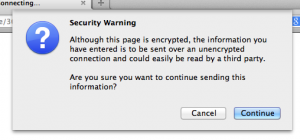
Firefox warning

Updated 29th August

Posted in Sakai, WebLearn | Tagged , | 3 Comments

Make narrated videos with Jing

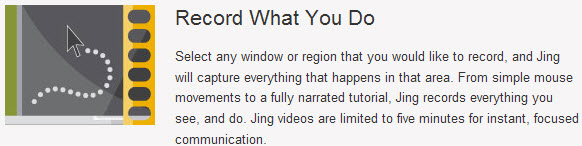
Audio and video support to enhance the essay feedback experience for international students (an approach pioneered by Russell Stannard of the University of Warwick) will shortly be provided for students on the Department for Continuing Education’s Pre-Master’s courses. To support in-essay and terminal comments, additional tutor guidance will be recorded using the free software, Jing.

From the Jing website:

jing

Useful links:

Posted in WebLearn | Leave a comment

WebLearn courses and course books

In the early days of ‘New WebLearn’, we were in the fortunate position to be able to sponsor the cost of all WebLearn courses, including the course books. Now that the service is no longer new, we are unable to continue this arrangement.

In keeping with the model employed by the IT Learning Programme for all their courses, the WebLearn Fundamentals course will still be offered free of charge, although course books will no longer be provided at no cost. Instead, the booklets will be available for reference during the face-to-face course, and will be available for sale at cost price (£5). Of course, the booklets are available online and can always be downloaded from the ITLP Portfolio (http://portfolio.it.ox.ac.uk/).

All other three-hour WebLearn courses will be charged at £9 per person, to cover some costs involved in the delivery of face-to-face sessions, including a copy of the printed course book.

All lunch-time sessions, including the popular WebLearn Bytes sessions, will continue to be free. Where relevant, handouts of the slideshow may be provided, free of charge.

WL Fundamentals

The same arrangements apply to Turnitin courses: See the blog post: Turnitin courses and course books.

Posted in WebLearn, WebLearn courses | Leave a comment

WebLearn upgraded to Version 2.8-ox7 on 13 August 2013

New WebLearn was upgraded on 13th August 2013 to version 2.8-ox7. For more detailed information and other minor changes, please looked at the detailed release notes.

Improvements / Bug Fixes

  • 2 new columns have been added to Assignments Marking CSV download: submission date and whether the submission was late
  • The ‘Select Login Route’ page now displays correctly on an iPad
  • Blank paragraphs no longer inserted above <link> elements (references to CSS) in the WYSIWYG editor

Graduate Training Tool (SES)

  • The ‘departments tree’ of courses has been replaced by an Accordion view of the same courses
  • Join waiting list button no longer appears for DAISY courses that cannot be booked through WebLearn
  • A number of old unused courses have been removed
  • Search results page now displays the correct courses and has more useful information, it also displays correctly in Internet Explorer
Posted in Sakai, WebLearn | Tagged , | Leave a comment

WebLearn unavailable on Tuesday 13 August 2013 7-9am

It is planned to upgrade WebLearn to version 2.8-ox7 on Tuesday 13 August 2013 7-9am. There will be no service during this period. We apologise for any inconvenience that this essential work may cause.

Posted in Downtime, Sakai, WebLearn | Tagged | Leave a comment

WebLearn upgraded to version 2.8-ox6

New WebLearn was upgraded on 16th July 2013 to version 2.8-ox6. For more detailed information and other minor changes, please looked at the detailed release notes.

Improvements

  • All sites now use CK Edit (except Surveys Beta tool) – this is a much improved rewrite of the previous WYSIWYG HTML editor and handles text pasted from Word in a much better way. The editor now works on an iPad but there may be issues with MSIE 10
  • The reading List availability service has been fixed (by the Bodleian libraries)
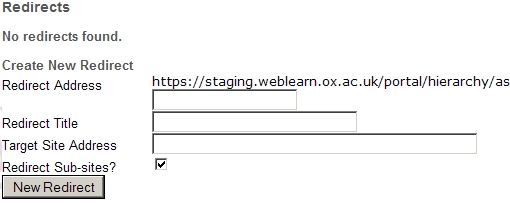
  • The Arrange Site > Redirects facility has an improved user interface.
  • Improved “Moving site” page
  • Drop box now available on additional verification (AV) sites
  • The CLA copyright notice text (in Resources) has been improved

Graduate Training Tool (SES)

  • Brand new search facility (searching now performed on the server which should address problems with Internet Explorer)
  • A new search facet “Delivery Method” has been added
  • Non logged in users asked to login in order to see sign-up button
  • On Browse by Department’ page, the ‘Previous’ folder now only displays courses that are less than a year old and will not contain currently running courses
  • A new ‘Lecturers View’ page has been added, lecturers can now see all students enrolled on their courses
  • Courses with multiple presentations now only appear once in the ‘Browse by Department’ tree

Bug Fixes

  • In signup tool, the username of an attendee now exported rather than the internal Sakai ID
  • The bug in the hierarchy service which caused one to jump to a different instance of a sub-site in a separate location in the hierarchy has now been fixed
Posted in Sakai, WebLearn | Tagged , , | Leave a comment

Four Indispensable Tips

Photo: http://www.flickr.com/photos/24661759@N05/8477029116

I thought I would post these Four Top Tips which were presented to the recent WebLearn User Group.

Site redirects

It is now possible to redirect users to a new site should they use an old URL.

As an example, if Department X moves from Humanities to Social Sciences, the department’s sites can be moved and then a redirect can be put in place so that the old URL still works. The redirect would be from https://weblearn.ox.ac.uk/portal/ hierarchy/humdiv/deptX  to https://weblearn.ox.ac.uk/portal/hierarchy/socsci/deptX. You would almost certainly want all sub-sites to be redirected as well.

This should be done by using the Hierarchy Manager. Click on Arrange Site and use the new ‘Redirect’ functionality. We intend to improve the user interface to clarify what inputs are required.

For details see this blog post: Do you want to change a site URL?’  http://blogs.it.ox.ac.uk/adamweblearn/2013/04/do-you-want-to-change-a-site-url/

(As a side note, if a whole tree of sites needs moving to a new location, for example, all sites and sub-sites belonging to Department X, then this can only be done by the central WebLearn team. Please contact us via the usual channels if this is needed.)

Calendar

The Calendar (Schedule) tool has some advanced functionality, such as merging, exporting and subscribing to calendars.

Merge (internal calendars): allows you to select calendars from all the WebLearn sites of which you are a member and display them in the current site

Merge (external calendars): allows you to input the URL of external calendars (in iCal format), or tick a box for the university term dates calendar, which are then displayed in the calendar of the current site. External calendars must obey a number of quite restrictive rules so this facility may not be as useful as it initially seems. It:

  • doesn’t support full event days;
  • doesn’t support events not defined with <VEVENT>;
  • doesn’t support re-occurring events;
  • doesn’t support events without end time.
  • Export (public URL): allows you to export a URL of the current site’s calendar in order to subscribe to it from other calendaring applications
  • Subscribe (generate private URL): generates a private URL in order to subscribe to it from other calendaring applications. See this ‘How to’ guide for more details.

Short URLs

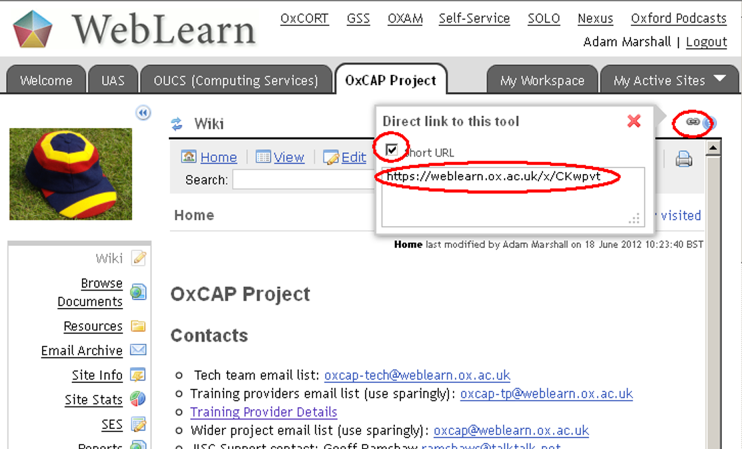
URLS in WebLearn are notoriously long and clumsy. It is now possible to generate a short URL to provide to people in email messages or on websites.

A short URL can be generated from the ‘link’ icon on any tool/page (top right).

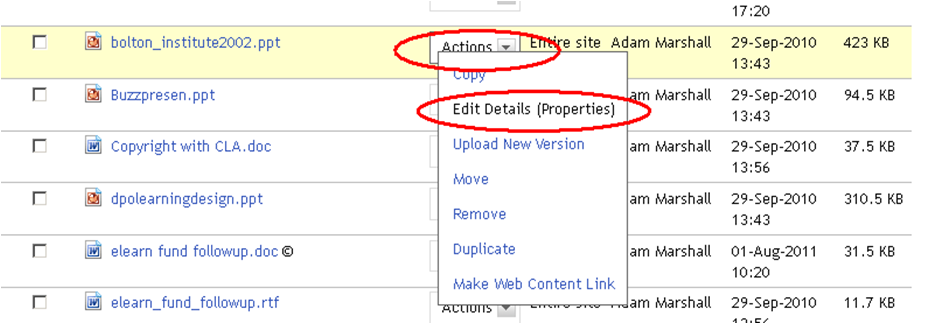
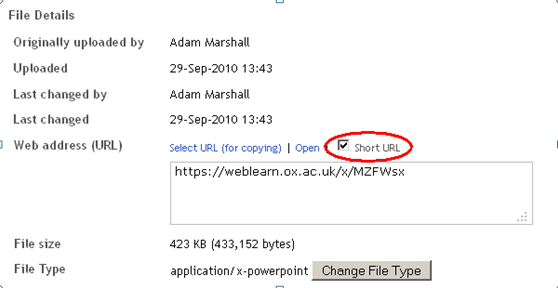
A short URL can also be generated for any item in Resources, via the ‘Edit Details (Properties)’ option – tick the ‘Short URL’ checkbox.


For more information, please see this blog post: http://blogs.it.ox.ac.uk/adamweblearn/2012/08/weblearn-improvements-after-the-upgrade-from-v2-6-to-v2-8/

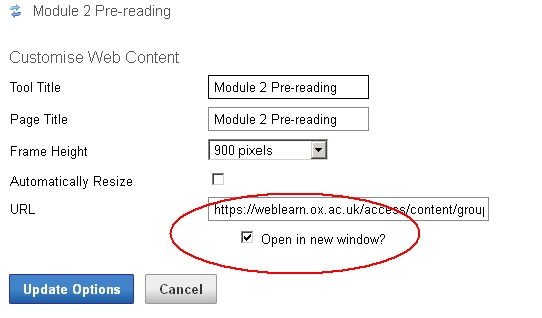
We recommend always opening Web Content links in a new window

The mechanism for opening Web Content links in a new window has been improved.

In the past the link would indeed be opened in a new window but the target web page would still be embedded within the WebLearn frame set. When linking to external non-https websites (such as http://bbc.co.uk) browsers, especially Internet Explorer, would complain of mixed (secure and non-secure) content and display alarming messages to the end user.

This has now been changed so that users with the ‘access’ role do not see the target web page within the WebLearn frame set and therefore do not see the scary warning messages. Users with the ‘contribute’ and ‘maintain’ role still see the old version (and warnings); this is necessary so that the ‘Options’ link is available for them to edit the page.

If a Web Content link to a PDF document is NOT opened in a new window, then people using an iPad are unable to scroll past the first page.

We would str

Posted in Sakai, WebLearn | Tagged , , , , , | Leave a comment

Apereo OAE Phoenix (nee Sakai 3) is now available!

http://blogs.it.ox.ac.uk/adamweblearn/files/2013/06/apereo-logo.png

The Apereo Open Academic Environment (OAE) project team is pleased and excited to announce the first release of the Apereo Open Academic Environment; OAE Phoenix. This release consists of the first production ready release of Apereo OAE and focusses on providing support for various forms of academic collaboration.

Apereo OAE is designed as a multi-tenant platform that can be run at large scale, allowing for a single installation to support multiple institutions at the same time. OAE Phoenix is a first and important step and attempts to provide a basic, but solid foundation that can be used as the basis for many more collaborative scenarios.

We’d like to invite everyone interested in Apereo OAE to get involved during these early and exciting times and help drive contributions, adoption and direction.

Try it out

It is a project goal to make a community instance of Apereo OAE available for everyone to sign up to and play with or even use for real collaborations. We are currently targeting for this instance to be available by the fall, informed by the gathered production experiences.

In the meantime, OAE Phoenix can be seen and tested at http://oae.oae-qa0.oaeproject.org/, where anyone can sign on. Note: this environment is also used for QA purposes, and will be wiped and re-deployed every night, so no data retention and some downtime is expected.

The source code has been tagged with version number 0.2.0 can be downloaded from the following repositories:

Back-end: https://github.com/oaeproject/Hilary/tree/0.2.0

Front-end: https://github.com/oaeproject/3akai-ux/tree/0.2.0

Documentation on how to install the system can be found at https://github.com/oaeproject/Hilary/blob/master/README.md.

The repository containing all deployment scripts can be found at https://github.com/oaeproject/puppet-hilary.

Get in touch

The project website can be found at http://www.oaeproject.org. The project blog will be updated with the latest project news from time to time, and can be found at http://www.oaeproject.org/blog.

The mailing list used for Apereo OAE is oae-dev@collab.sakaiproject.org. You can subscribe to the mailing list at http://collab.sakaiproject.org/mailman/listinfo/oae-dev.

Bugs and other issues can be reported in our issue tracker at https://github.com/oaeproject/3akai-ux/issues.

Posted in Apereo OAE (formerly Sakai OAE / 3), e-learning | Leave a comment